Free Mirror Picture Tool

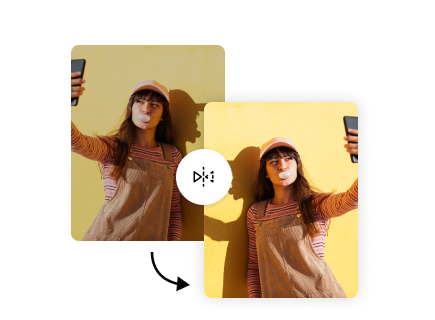
Instantly flip and mirror any image with our intuitive online tool. Effortlessly create stunning reflection effects for your photos, ready for any purpose.

500,000+ images mirroredTrusted by creators worldwide
Hero image
Checking quota...
Image

Choose horizontal or vertical mirror.

Mirror direction
Upload an image and choose a mirror direction.

Explore More Free Tools

How to Mirror a Picture Online for Free

Transform your images with ease. Learn how to mirror a picture online using our simple, step-by-step guide and free online picture flipper.

01

Step 1: Upload Your Image

Begin by selecting the image you wish to mirror. Our mirror image tool supports various formats, including JPEG and PNG. Simply click the "Upload Image" button and choose your file from your device, or drag and drop it directly onto the page. You can easily upload images from your desktop, phone, or camera roll.
02

Step 2: Choose Mirror Direction

Once your image is uploaded, you will see options to mirror it. Select either "Horizontal Flip" to create a side-to-side reflection, or "Vertical Flip" to produce an upside-down mirror effect. Our tool simplifies Flipping images so you can create mirror image online with just one click, seeing the preview instantly.

03

Step 3: Download Your Mirrored Photo

After selecting your desired mirror effect, click the "Download" button to save your new mirror picture online free. Your mirrored image will be saved directly to your device, ready for use. This quick process allows you to mirror picture online free without any complex software, providing a seamless experience from start to finish.

Key Features of Our Mirror Picture & Flip Photo Tool

Unlock powerful Image editing capabilities with our versatile mirror image tool. This tool provides precise controls for flipping and mirroring your photos, enhancing your creative options.

Horizontal & Vertical Flipping

Easily flip photo horizontally online to create a perfect side-to-side mirror image, or choose to how to flip a photo vertically for an upside-down reflection. Our tool offers both Horizontal mirroring and Vertical mirroring options, giving you full control over the orientation of your mirror photo online. Achieve the exact Reflection effect you need for any project.

Feature image 1

Instant Preview & Processing

Upload your image and see the mirror image effect online applied instantly. Our efficient processing ensures you can quickly preview your changes before downloading, saving you time. This feature makes it incredibly simple to adjust and perfect your mirror picture free without waiting.

Feature image 2

High-Quality Output

Download your mirrored images in their original quality, ensuring your pictures remain crisp and clear. Whether for professional use or casual sharing, our tool maintains the integrity of your image. You get a high-resolution mirror picture online free every time, suitable for print or digital platforms.

Feature image 3

Broad Compatibility

Our mirror image tool works seamlessly across all devices and operating systems. Access it from your computer, tablet, or smartphone to flip picture online anytime, anywhere. This online tool to mirror photos supports common formats like JPEG and PNG, making it accessible for everyone.

Feature image 4

Benefits of Using Our Free Mirror Picture Tool

Experience the advantages of fast, easy, and effective Image editing with our online image editor. Our mirror picture online free tool helps you achieve professional results effortlessly, improving your workflow and creative output.

01

Enhance Visual Symmetry

Achieve perfect balance and visual appeal by easily creating a symmetrical mirror picture online free. This can add a unique artistic touch to your photographs, making them stand out. Improve the composition of your photos with just a few clicks, giving them a polished and professional look without complexity.

02

Correct Orientation Issues

Quickly reverse a picture for free to fix images captured incorrectly, such as backwards text or a flipped mirror selfie online. Our tool provides instant Selfie correction and orientation adjustments. Ensure your photos always present correctly, whether for personal viewing or public sharing, saving time on complex edits.

03

Boost Creative Potential

Explore new artistic possibilities by adding unique Reflection effect to your images. Experiment with mirrored landscapes, portraits, or abstract designs. This feature allows you to transform ordinary photos into captivating visual art. Unleash your creativity and give your images a fresh, distinctive style effortlessly.

04

Save Time & Effort

Avoid expensive software and complex editing processes. Our mirror picture online free tool offers a fast, straightforward solution to create mirror image online in seconds. This free online tool saves you valuable time, making Image editing accessible and efficient for everyone. Get stunning results without any hassle.

Practical Use Cases for Mirroring Pictures

Discover diverse applications for our mirror picture online free tool. From social media enhancement to professional design, our easy-to-use online tool to mirror photos serves a wide range of needs for various users.

01

Perfecting Social Media Posts

For content creators and influencers, easily mirror picture for social media to improve composition or fit specific aesthetic trends. Correct awkward angles in selfies or create striking symmetrical layouts that capture attention. Our tool helps you stand out on Social media platforms with visually compelling content.

02

Quick Design Adjustments

Graphic designers can use this tool for rapid prototyping or adjusting image orientation without opening heavy software. Quickly create mirror image online or flip photo horizontally online for layouts and mock-ups. It's an efficient solution for those needing to mirror image without photoshop for minor but impactful design tweaks.

03

Personal Photo Enhancements

Casual users can enhance personal photos or mirror selfie online for fun effects or to correct common camera quirks. Easily mirror image from phone online or from your mirror image from camera roll to fix orientation errors or add a creative flair to everyday shots. Preserve your memories exactly as you envision them.

04

Educational & Illustrative Materials

Educators and students can mirror images for presentations, diagrams, or visual aids. Illustrate concepts of symmetry or demonstrate specific orientations. It’s a simple way to prepare visual content that is clear and impactful, helping to convey information effectively in academic settings.

What Creators Say About Our Free Mirror Picture Tool

Our users love the simplicity and effectiveness of freebeat.ai's mirror picture tool. See how it helps them achieve their creative and practical image editing goals.

Result 01

"I needed to flip photo horizontally online for a quick website banner. This tool worked perfectly, saving me from opening heavy design software. The result was exactly what I needed, fast and hassle-free."

EREmily R.Web Designer
Result 02

"As a frequent poster on Social media, I often need to create unique looks. This mirror picture online free tool is my secret weapon for instantly adding a cool Reflection effect to my selfies. It's incredibly user-friendly."

LSLiam S.Social Media Influencer
Result 03

"I often find myself needing to reverse a picture for free after taking a quick photo with my phone. This tool helps me correct those small errors quickly, so my images always look professional and correctly oriented."

SKSarah K.Small Business Owner
Result 04

"I appreciate having a reliable mirror image tool that's completely free. It’s ideal for fixing the orientation of pictures taken with my phone, especially when I'm too busy to use a full-fledged online image editor. The quality is consistently good."

DMDavid M.Hobby Photographer
Result 05

"The ability to how to flip a photo vertically instantly is a game-changer for my art projects. I can experiment with different symmetrical compositions without any effort. It’s truly a fantastic resource for creative Photo manipulation."

OJOlivia J.Digital Artist
Result 06

"I was looking for an online tool to mirror photos that didn't require me to download anything. This free mirror picture tool fit the bill perfectly. It's intuitive, quick, and delivers exactly what it promises every time."

MTMark T.Content Creator

Frequently Asked Questions

Find answers to common questions about using our mirror picture online free tool. We cover everything from file types to usage limits, helping you make the most of this free image editor.

Q: What kind of images can I mirror using this tool?

You can mirror any picture online for free that is in a common image format. Our tool supports popular formats such as JPEG and PNG. Simply upload your file, and you can apply horizontal or vertical mirroring. It's designed to be versatile for most of your Image editing needs, making it easy to flip picture online without format restrictions.

Q: Is there a limit to how many pictures I can mirror for free?

Yes, our mirror picture online free tool allows for 5 free uses per day. This limit resets every 24 hours, giving you ample opportunity to create mirror image online for your personal and creative projects. You can efficiently manage your daily Image editing tasks within this free usage allowance.

Q: Can I reverse image online if I accidentally mirror it the wrong way?

Yes, if you accidentally reverse image online or flip picture online in an unintended direction, you can simply re-upload the original image and choose the correct mirroring option. Our mirror image tool allows you to retry as many times as you need within your daily free uses, ensuring you get the perfect mirror photo online.

Q: Does the tool reduce the quality of my images?

No, our mirror image tool is designed to maintain the original quality of your uploaded images. When you download your mirror picture online free, it will retain its resolution and clarity. We ensure that your Photo manipulation does not come at the cost of image fidelity, providing high-quality output for all your files.

Q: Can I use this tool to reverse a picture for free on my phone?

Absolutely. Our mirror image editor free is a web-based tool, meaning it works seamlessly across all devices, including smartphones and tablets. You can easily access it through your mobile browser to mirror image from phone online or mirror image from camera roll, making it convenient to flip photo horizontally online or how to flip a photo vertically on the go.

Q: What is the difference between horizontal and vertical mirroring?

Horizontal mirroring creates a reflection across a vertical axis, essentially flipping the image from left to right. Vertical mirroring creates a reflection across a horizontal axis, flipping the image upside down. Both options produce a distinct Reflection effect, allowing you to choose the exact orientation for your mirror picture online free.

Q: Is this tool suitable for mirror picture for social media?

Yes, our mirror image editor free is perfect for creating unique and engaging content for Social media. You can quickly generate a mirror picture online free to correct selfies, create symmetrical designs, or simply add a creative touch to your posts. Enhance your visual storytelling and grab more attention with easily mirrored images.