Independent Music Release Checklist Template: Free Download
Contact partnership@freebeat.ai for guest post/link insertion opportunities.
Releasing music independently can feel like juggling 30 tiny deadlines while your brain is still stuck on the chorus. I’ve been there—one time I uploaded a “final” master, only to realize the clean version was labeled explicit in the metadata, and it took days to fix across stores. A solid independent music release checklist template prevents those avoidable mistakes and turns your release into a repeatable system. Below is a practical, beginner-friendly template you can copy into Google Docs/Notion, plus a free download-style section you can paste into your own file.
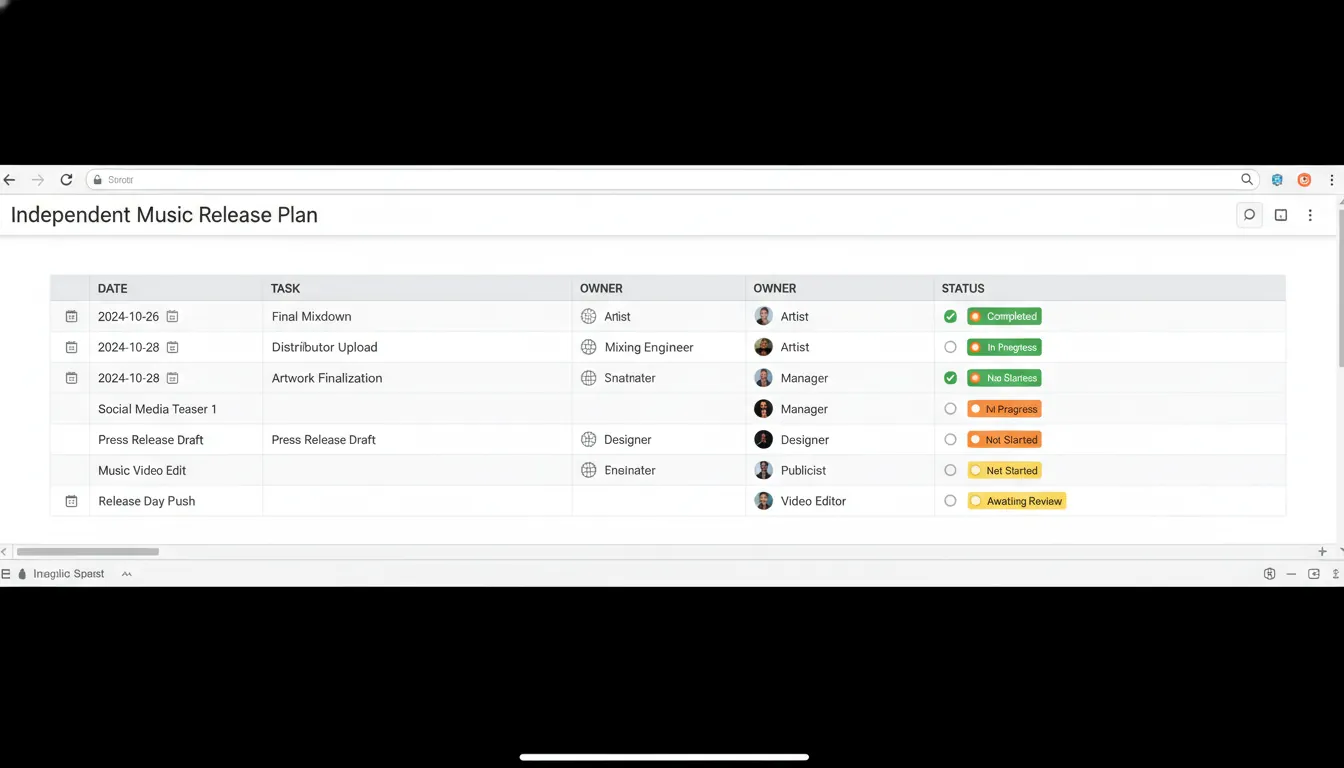
Free download (copy/paste) — Independent music release checklist template
Use this independent music release checklist template as your master list. Copy it into a doc and check items off as you go.
Release essentials (set once per release)
- Release type: Single / EP / Album
- Release date (local + global):
- Lead time: 6–8 weeks if possible (more time = more options for press + playlists)
- Primary goal: Streams / video views / email signups / merch / tickets
- Main link destination: Smart link/pivot page (one URL everywhere)
File prep + audio QA
- Confirm final masters (WAV, sample rate/bit depth per distributor spec)
- Create clean + explicit versions if needed (and label correctly)
- Loudness/quality check on multiple devices (car, earbuds, phone speaker)
- Confirm track start/end fades and spacing (especially for EP/album)
Metadata + credits (don’t skip)
- Track title (version tags like Radio Edit, Remix, Live)
- Artist name consistency (exact spelling everywhere)
- Featured artists format: “Song Title (feat. Name)”
- Producer, writer, mixer, mastering credits (as fields where supported)
- Lyrics (for Apple Music/Musixmatch/IG where applicable)
- ISRCs + UPC plan (keep a log so you can “waterfall” singles into albums without resetting counts)
Rights + royalties setup
- Register/confirm your PRO account (ASCAP/BMI/SESAC or your region’s equivalent)
- Confirm publishing administration plan (self-admin or admin service)
- Set up SoundExchange for digital performance royalties (US-focused; similar options exist elsewhere)
- Optional but smart: YouTube Content ID / fingerprinting strategy for your catalog
Distribution + store delivery
- Choose distributor + confirm delivery timeline (upload 2–4+ weeks early when possible)
- Select stores (Spotify, Apple Music, YouTube Music, TikTok/IG library, etc.)
- Confirm release date/timezone, territories, pricing (if relevant)
- Upload cover art (correct dimensions, no trademark issues)
- Submit lyrics + ensure explicit flag matches the audio version
Visuals + content engine (where most releases win)
- Create a cover art reveal post
- Build 8–15 short-form videos (teasers, BTS, hook clips, story moments)
- Prepare a lyric video or visualizer (fast to produce, strong ROI)
- Plan a “launch day hero” video (music video, performance clip, or audio-reactive visual)
Pre-save + email
- Launch pre-save 2–3 weeks before release (enough time for repeat exposure)
- Offer an incentive (unreleased demo, BTS, discount code, shout-out)
- Draft release-day email (one clear CTA: listen/watch)
Press + playlist outreach (optional, high leverage)
- Write a short press release (what, why, and the story)
- Build a pitch list aligned to your genre (blogs, curators, local press)
- Pitch Spotify editorial in Spotify for Artists once eligible + delivered
- Create a one-sheet (bio, photos, links, RIYL comps)
Release day checklist (the “don’t panic” list)
- Smart link updated + tested
- Pin the announcement post on key socials
- Publish YouTube video/visualizer/Shorts
- Update website/EPK + social bios
- Reply to comments for 30–60 minutes (signal boosts)
- Save/share your own track from your artist profile (normal behavior, not spam)
Post-release (weeks 1–4)
- Post fan reactions/UGC reposts
- Release additional video assets (alt versions, lyric clips, performance takes)
- Outreach round 2: “now live” pitch with early data points
- Monitor analytics (Spotify for Artists, YouTube Studio, IG/TikTok insights)
- Fix metadata issues fast if anything is wrong (credits, lyrics, explicit flag)
The timeline that actually works (6–8 weeks, realistic for indie artists)
Most “surprise drops” are really just underplanned releases with no runway. The 6–8 week window is popular for a reason: it gives you time to upload early (for playlist pitching), build pre-save intent, and produce enough video content to avoid disappearing after day one.
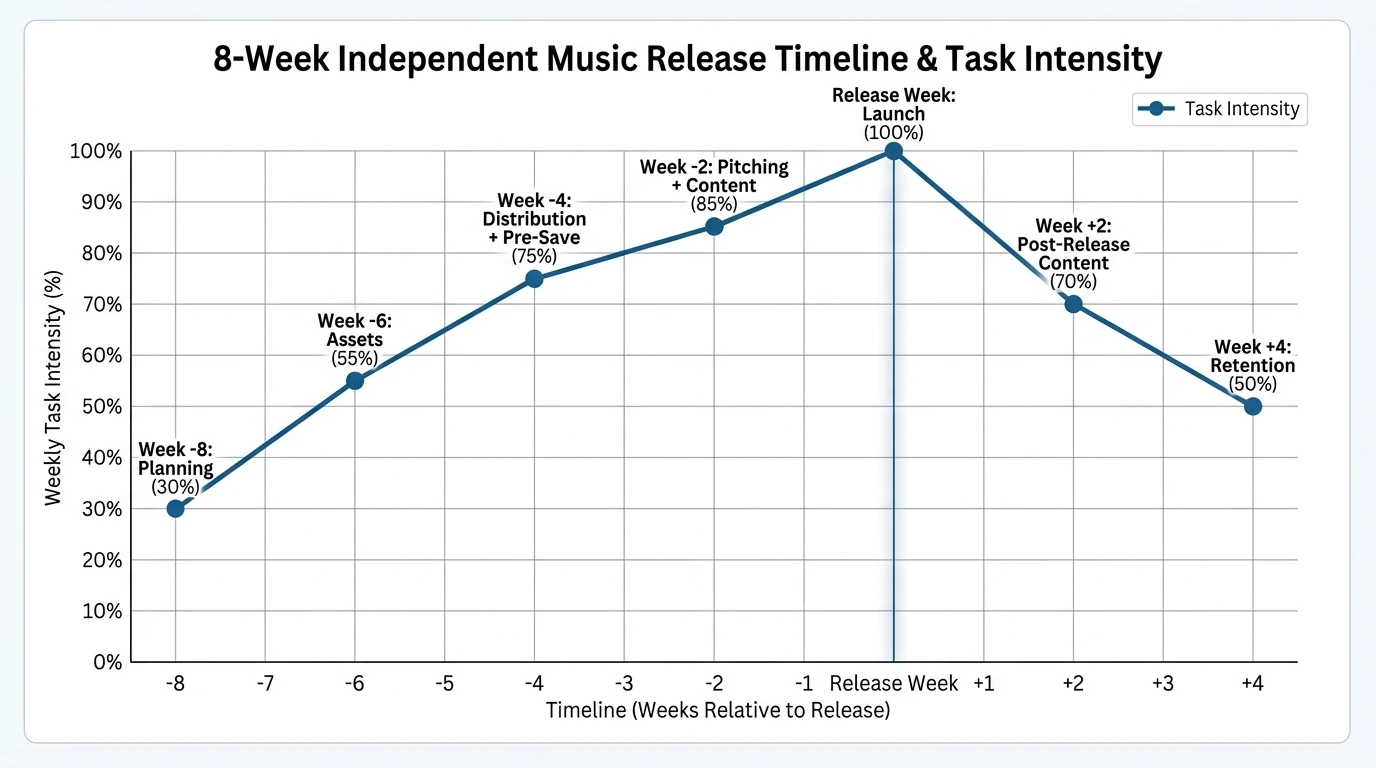
8-week release schedule (quick breakdown)
- Week -8 to -6: lock the master + cover + core story
- Week -6 to -4: upload to distributor; build metadata log; start teasers
- Week -3 to -2: pre-save push; playlist/press pitching; film your hero content
- Release week: publish video + email + pinned posts + community engagement
- Weeks +1 to +4: keep releasing content (don’t stop at day one)
Use this table to choose the right “video package” (fast vs premium)
If you’re reading this, you already know video matters. The question is how much video you need per release without burning out. Here’s the approach I’ve used and seen work best: one “hero” piece plus a stack of short-form clips.
How To Write Spotify For Artists Pitch (That ACTUALLY Gets Playlists)
Where Freebeat AI fits in your checklist (and why it matters)
Most indie campaigns fail for one boring reason: you run out of content before the algorithm finds you. Freebeat AI is built for the hardest part to scale—music-driven video that stays synchronized to the full song structure (BPM, bars, drops, sections), so your visuals feel intentional rather than random.
In practice, here’s how I’d plug Freebeat into an independent music release checklist template:
- Pre-release: generate multiple teaser cuts with different styles (cinematic/anime/abstract) while keeping rhythm-locked transitions.
- Release day: publish a hero music video or performance-visual hybrid that matches the energy map of the track.
- Post-release: spin out 8–15 short-form edits from the same visual identity, so your artist “world” stays consistent.
If your goal is consistent on-screen persona, Freebeat’s reusable visual identities (avatars or image-based character inputs) help keep continuity across releases—huge for TikTok/Shorts/IG where viewers recognize faces faster than names.
Metadata and royalties: the unsexy stuff that protects your future
Metadata errors are one of the most preventable release problems, and they’re costly because fixes can take days or weeks across DSPs. Keep a simple “metadata log” (spreadsheet) with track titles, versions, contributors, ISRCs, and the release UPC so you can move distributors later without chaos.
Key concepts to remember:
- ISRC = the ID for a recording (track-level).
- UPC = the ID for a release container (single/EP/album).
- If you later add a single to an album, you typically want the same ISRC for that track so streams aggregate (often called “waterfalling”).
Helpful reading from authoritative sources:
- Release Your Music Like a Pro: The Indie Artist’s Ultimate Checklist (planning + promo assets)
- The Ultimate Royalties Checklist for Independent Artists (registrations + royalties setup)
- Album Release Schedule Template (why timelines matter and how to space singles)
The “minimum viable release” (if you’re solo and overwhelmed)
When you’re doing everything yourself, simplicity wins. If you can only do 20% of the checklist, do this 20%:
- Upload to distributor early (aim 2–4 weeks) with clean metadata.
- Build one smart link/pivot page and use it everywhere.
- Publish one strong video on release day (hero asset).
- Schedule 8 short clips across 2–3 weeks (tease → launch → retention).
- Send one email on release day (one clear CTA).
Conclusion: turn your next release into a system (not a scramble)
Your song deserves more than a one-day spike and a quiet Monday after. A repeatable independent music release checklist template keeps the boring stuff (metadata, delivery buffers, rights) from breaking the fun stuff (momentum, content, story). If you want to scale visuals without living in an editing timeline, build your checklist around one hero video and a steady stream of rhythm-locked short-form content—this is where Freebeat AI can save real hours while keeping your visuals musically intelligent.
FAQ (people also ask)
1) How far in advance should I upload my music to a distributor?
Aim for 2–4 weeks minimum, and 6–8 weeks if you want comfortable time for pitching, press, and fixes.
2) What should be included in an independent music release checklist template?
At minimum: audio QA, metadata/credits, ISRC/UPC log, rights/royalties registrations, distribution delivery, smart link, content plan, pre-save/email, release-day tasks, and post-release plan.
3) When should I start a pre-save campaign?
Often 2–3 weeks before release—early enough for repeat exposure, late enough to keep urgency.
4) Do I need a music video for every single?
No. A common approach is one high-quality hero video plus lyric videos/visualizers and short-form clips for consistency.
5) What’s the difference between ISRC and UPC?
ISRC identifies a specific recording (track). UPC identifies the overall product/release (single/EP/album).
6) What are the biggest release-day mistakes indie artists make?
Broken links, missing lyrics, incorrect explicit flag, inconsistent artist naming, forgetting to pin posts, and having no post-release content queued.
7) How many short-form videos should I plan per release?
A practical range is 8–15 clips across tease, pre-save, launch, and post-release retention.


