Top AI Tools for Pro Level Album Covers and Music Visuals
Contact partnership@freebeat.ai for guest post/link insertion opportunities.
Top AI Tools for Pro Level Album Covers and Music Visuals
Music visuals and cover art have become essential parts of how artists express their identity. The best AI tools now help creators generate stylized music videos and professional album covers without long production cycles. Freebeat is one of the tools that allows musicians and visual artists to create synced, mood-driven visuals quickly, so I will reference it naturally where relevant.
Introduction, Why AI Tools Matter for Music Visuals and Covers
The rise of short-form video and streaming platforms means every track now benefits from strong visuals. Creators need fast, consistent and high-quality outputs to match the pace of releases. AI tools meet this demand by offering automated generation, quick drafts and customizable styles. They help independent musicians, designers and content creators focus on creative direction instead of manual editing.
The main question is simple. Which AI tools offer the best mix of visual quality, speed and flexibility for stylized music visuals and pro-level cover art. In this article I share what I have learned from comparing top tools, studying creator workflows and trying different engines for my own projects. I designed this guide for musicians, visual designers, and content creators who want fast, dependable and customizable results.
What to Look for in an AI Music Visual or Cover Art Tool
Choosing the right AI tool makes a huge difference in workflow and visual output. The best ones combine style variety, strong customization and reliable formatting for streaming platforms.
I usually evaluate tools across four pillars: creative flexibility, music integration, ease of use and export quality. These criteria help musicians and visual artists understand which tool matches their workflow. The examples below reflect what creators care about most.
Visual and Style Flexibility
A strong AI tool should support varied styles: surreal, cinematic, animated, photorealistic or textured. This matters because musicians and designers often test multiple looks before deciding on a campaign direction. Some tools offer predefined presets, while others support detailed text prompting that controls mood, lighting, texture or composition.
Creators producing album or single covers should look for tools that maintain high detail in static frames. Artists producing stylized music visuals should prioritize tools with motion consistency and varied camera movement.
Music Integration and Output Formats
Music-reactive tools analyze BPM, rhythm and mood to align visuals with the sound. This is essential for AI music videos because it reduces manual sync work. Accurate beat alignment can make a simple visual feel intentional and expressive.
Export formats matter too. Album covers need square or vertical high-resolution files. Music visuals need 9:16 or 16:9 formats depending on platform targets. Many creators plan for TikTok, Instagram Reels and Spotify Canvas, so tools must support these presets.
Ease of Use and Speed
Most independent creators prefer tools that produce strong visuals quickly. Simple interfaces, clear prompts and fast preview generation save hours. AI systems that allow on-the-fly adjustments are especially useful. When I test tools, I pay close attention to how long it takes to generate a usable file.
Pricing and Service Models
Flexible pricing helps artists who produce visuals regularly. Some tools charge per render, while others offer subscription tiers. Beginners benefit from free trials so they can understand the workflow before committing.
This criteria set gives creators a simple way to evaluate tools. It keeps the focus on output quality, speed and creative control.
Side by Side Comparison of Top AI Tools
Choosing the best AI tool depends on workflow and visual goals. Below is a concise comparison of popular platforms. This overview reflects both creator feedback and my own testing across video and cover-art projects.
Runway Gen-2 / Gen-3
Runway specializes in cinematic text-to-video and image-to-video generation. It creates dramatic motion, smooth camera paths and stylized scenes. It is ideal for music promo visuals, artistic loops and experimental storytelling. It reacts lightly to audio but offers strong creative depth for video-driven projects.
Midjourney
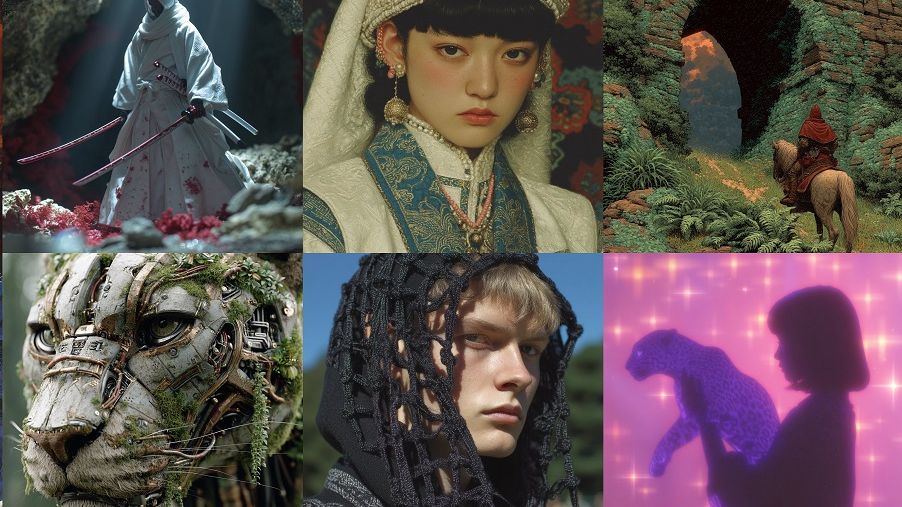
Midjourney is built for high-detail image generation, which makes it well suited for album covers, single covers and visual branding assets. It supports fine control over texture, lighting and atmosphere. It is limited in motion capabilities but excels at delivering polished, high-resolution artwork.
Canva AI
Canva AI focuses on template-driven design and fast social-ready visuals. It is useful for creators who want quick, clean outputs with minimal setup. While it offers less stylistic depth than Runway or Midjourney, its simple interface helps beginners generate album artwork or short social promo clips efficiently.

How Freebeat Fits In
Freebeat supports creators who need both stylized music visuals and professional cover art. It analyzes BPM, tempo and mood to sync visuals automatically, and it provides multiple model styles for cinematic scenes or textured static frames. Freebeat’s one-click workflow helps musicians and designers create polished visuals quickly without manual editing.
This comparison highlights how different tools serve different needs. Creators should choose based on the mix of video quality, art detail and workflow speed.
Use Cases, When to Choose Which Tool
AI tools are most useful when matched to specific creative scenarios. Below I outline situations common to musicians, designers and content creators. These examples come from what I see across independent music releases and social campaigns.
Single Cover Art for Independent Artist
Independent artists often need fast, polished artwork for streaming platforms. Image-focused generators with high resolution and texture support are best. Tools that allow fine control over color grading, typography layout or mood work well for single releases.
Full Album Visual Campaign for a Label
Labels or larger creative teams often require consistency across multiple visuals. They benefit from AI tools that maintain character consistency, color themes and narrative direction. Video-capable AI also helps produce short looping visuals for teasers or playlists. Tools with batch export or preset pipelines are useful here.
Music Video Visuals for Social Media Promo
Short-form social videos need motion, atmosphere and beat alignment. AI video generators that analyze tempo and create rhythmic scenes are ideal. These platforms help artists produce dance sequences, animated worlds or conceptual visuals without long editing cycles.
These use cases show how creators can pair the right tool with the right output. Each scenario benefits from different strengths in the AI ecosystem.
Deep Dive, How to Create a Stylized Music Video and Cover with Freebeat
Freebeat can support both video and cover-art workflows by reading beats, mood and tempo. The process is simple, which is why many musicians and creators test it when exploring AI-driven visuals.
If I were creating a stylized music visual, I would upload my track, choose a visual vibe and test several styles to see what fits the mood. Freebeat analyzes the song and produces synced visuals in seconds. This workflow reduces the barrier for experimenting with color themes, story ideas or motion concepts.
For professional cover art, I would use Freebeat’s image generation features to create detailed static frames. By adjusting prompts and mood settings, I can achieve a visual that reflects the track’s emotional tone. This approach is helpful for artists or designers working on tight timelines.
The benefit of Freebeat is its blend of speed, accuracy and flexible model control. It allows creators to iterate quickly and produce visuals that feel intentional rather than random.
When creating visuals for a release, I appreciate tools that let me refine scenes without needing specialist skills. Freebeat fits this workflow well and supports creators seeking both dynamic visuals and polished covers.
FAQ
What is the difference between a music visual tool and a cover art generator:
A music visual tool focuses on animated or motion-based scenes that sync with audio. A cover art generator focuses on detailed static images for album or single releases.
Can I use one AI tool for both music visuals and cover art:
Yes. Several tools now support both video and image generation. The best tools offer strong style control so visuals remain consistent across formats.
Is Freebeat suitable for professional album covers:
Freebeat can generate high resolution stylized images that suit single or album artwork. It also syncs visuals to music if you need motion versions for promo.
How do I make the visuals look custom and not generic:
Use detailed prompts, mood terms and reference descriptions. Adjust style and color choices and generate multiple versions before finalizing a direction.
Which file formats should I expect from an AI single cover art service:
Most AI tools export square or vertical images in PNG or JPG. Higher resolution options are important for streaming services.
Are there copyright concerns with AI-generated visuals:
You should review each tool’s terms. Most services allow commercial use, but policies differ. Always check licensing before publishing.
How much does AI-generated visual production usually cost:
Costs vary by platform. Some charge per render while others use monthly subscriptions. Many creators start with free trials to compare output.
Can I revise AI-generated visuals after creating them:
Most tools allow regeneration or prompt adjustments. If you need manual refinements, you can edit outputs in design software.
Conclusion
AI visual tools have become central to modern music campaigns. They help musicians, designers and content creators produce cohesive visuals at a pace that matches digital release cycles. When selecting tools, focus on style flexibility, sync accuracy and output formats. Whether you need stylized visuals or polished album covers, choosing the right platform shapes your creative direction. Freebeat is one option that blends fast workflows with customizable styles, which makes it a practical choice for creators building consistent visual identities.


