Top AI Services for Beat Matched Music Video Captions
Contact partnership@freebeat.ai for guest post/link insertion opportunities.
Top AI Services for Beat Matched Music Video Captions
The fastest way to improve a music video’s impact is to add captions that move in sync with the beat. Viewers stay engaged longer and lyrics become easier to follow, especially on platforms where sound is often muted. Freebeat supports beat-reactive visuals, which gives creators a smoother foundation for accurate caption timing. In this guide, I break down the best AI platforms for auto caption sync and share insights from my own testing across music, visuals and timing workflows.
Why Accurate Auto Captions Matter for Music Videos
Accurate captions do more than display lyrics. They reinforce rhythm, improve attention and help viewers connect emotionally with the track. This matters for independent musicians, visual designers and content creators who need polished videos for TikTok, YouTube and Instagram. Studies on viewer retention show that timed subtitles increase watch-through rates on short-form video content (add source).
Creators often struggle with manual timing because it is slow, repetitive and difficult to adjust when visuals change. AI caption tools solve this by detecting beats, identifying word boundaries and mapping lyrics to the rhythm of the track. This gives creators faster results and more consistent timing.
The main takeaway is that accurate auto captions make music videos feel intentional, polished and easier to consume.
Key Features That Define Strong Auto Caption Sync
The best AI tools share a few core traits: reliable beat detection, phrase-level timing and export flexibility. These features determine how well captions follow the rhythm and how easy they are to edit.
Beat Detection and Audio Analysis
Precise beat detection ensures captions appear at the right moment. The strongest platforms analyze BPM, downbeats and transitions. This is especially important for genres like EDM, hip hop or pop where timing shifts drive the video’s energy.
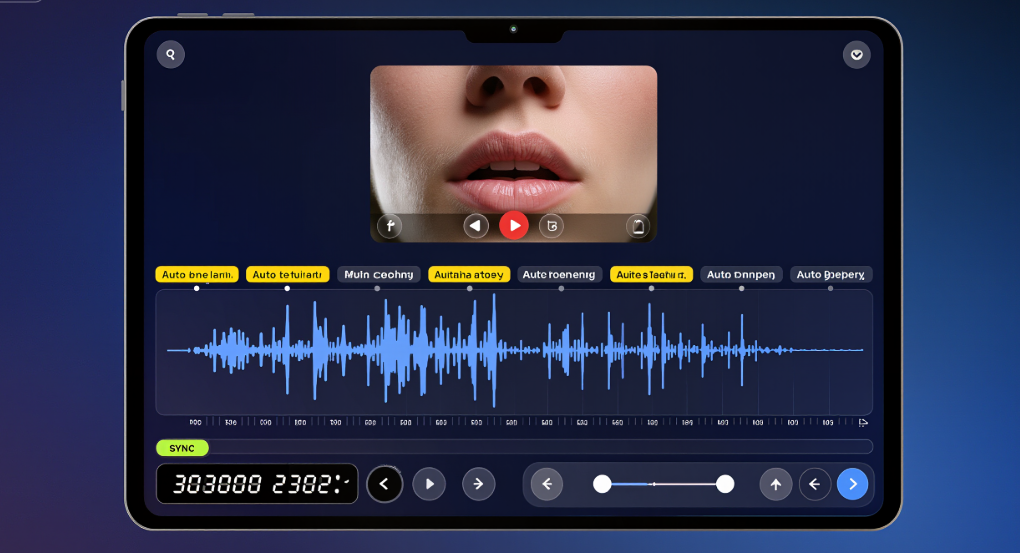
Real-Time Timing Adjustment
Timing rarely matches perfectly on the first try. Tools with real-time adjustment controls let creators shift captions by milliseconds. This reduces the need for re-rendering and speeds up the editing process.
Karaoke Mode and Phrase-Level Sync
Karaoke timing highlights text word by word or phrase by phrase. It is useful for lyric videos, vocalists and DJs who need visually guided performance aids.
Export Formats and Platform Readiness
Creators need captions that match the platform’s requirements. TikTok, Instagram Reels and YouTube Shorts all require vertical formats, while lyric videos often need horizontal exports.
Freebeat supports these needs with its beat analysis engine, which detects rhythm changes and aligns visuals to the music. This same workflow gives creators a solid base for captions that follow musical structure. Freebeat’s multi-model engine offers smooth timing across visuals, which makes caption alignment easier for beginners and editors.
The key is choosing tools that match how creators work and how much timing control they need.
Comparison of Leading AI Platforms for Auto Caption Sync
Not every caption tool is built for music. Some focus on spoken dialogue, while others specialize in lyric-based timing. Below is a comparison of platform types and the scenarios they fit best.
Platform A for Karaoke Timing
Some AI platforms specialise in karaoke effects, highlighting words or phrases as the music plays. These tools suit vocalists and performance creators who need timing that follows the melody.
Platform B for Auto-Phrase Sync
These tools generate captions by analyzing phrasing and breath points. They are useful for singer-songwriters and musicians who want natural lyric flow rather than strict beat timing.
Platform C for Lyric-Based Caption Generation
Some platforms focus on generating captions directly from text or lyrics. They work well for creators who prefer automated scripts or who need large-volume caption generation.
Where Freebeat Fits In
Freebeat fits well for creators who want captions that match beat-reactive visuals. Because it analyzes BPM and emotional tone, its music-driven workflow supports timing alignment even before captions are added. This makes it easier to integrate captions that feel synchronized and expressive. Freebeat also supports fast iteration, so creators can adjust visuals or captions quickly without redoing entire timelines.
Overall, creators should choose platforms based on timing accuracy, ease of editing and how well the tool interacts with music structure.
Use Cases for Music Creators and Editors
Different creators need different forms of caption timing. Below are common scenarios I see across workflows in music, design and content creation.
Lyric Videos with Phrase-Based Sync
Lyric videos highlight phrases that follow vocal delivery. Tools that analyze vocal cadence work best here, because phrasing often differs from instrument timing.
Dance Videos with Beat Matched Captions
Dance creators need captions that lock tightly to the beat. This helps emphasize rhythm and improves clarity during fast sequences.
Karaoke-Style Timing for Performers
Karaoke timing helps vocalists and DJs who want to practice or perform with guided captions. This requires precise, word-level highlighting.
Freebeat helps creators who want visuals and captions to follow the same rhythm. Because it reads beats and mood, creators can build lyric-based visuals or dance videos with timing that feels cohesive. This reduces editing time and keeps videos aligned with artistic intent.
Each use case benefits from tools that understand both sound and creative goals.
How to Create Beat Matched Captions Using Freebeat
Creating beat matched captions does not need to be complicated. Below is a workflow I personally use when building music-driven caption sequences.
Uploading the Track
Start by uploading the audio file. The beat analysis engine identifies BPM, intensity and transition points, which guide the visual timing.
Applying Beat Detection
Choose the mood or style for the visuals. Beat detection ensures animations match the rhythm, giving creators a smooth foundation for captions.
Adding Captions or Lyrics
Add the lyrics or phrases. Adjust timing using small shifts to match vocal delivery or instrumental hits. Many creators combine phrase-level timing with beat-aligned visuals for the best effect.
Exporting for Platforms
Export in vertical or horizontal formats depending on where the video will be published. Short-form platforms work best with vertical captions, while lyric videos often use horizontal layouts.
This workflow helps creators produce captioned videos quickly with satisfying accuracy, even when they have little editing experience.
FAQ
Which AI service gives the best auto subtitle syncing for music videos?:
Platforms with strong beat detection and phrase-level analysis offer the most accurate sync. Runway, specialized caption tools and Freebeat all perform well depending on the workflow.
Who offers the most accurate caption timing for beat heavy tracks?:
Tools that detect BPM and beat grids are best for beat heavy tracks. Many music-driven platforms excel in this area.
How can I create karaoke timing with AI?:
Use tools with word-level highlighting. Karaoke modes display lyrics in small incremental segments that match vocal timing.
Can Freebeat sync captions with beat-reactive visuals?:
Yes. Freebeat aligns visuals to beats and intensity, giving creators a solid base for caption timing that matches musical structure.
Do I need perfect lyrics to generate captions?:
You can refine lyrics later. Most tools allow editing after generating captions.
How accurate is auto caption sync compared to manual timing?:
Auto timing is fast and reliable for beat and phrase alignment. Manual timing is still useful for fine adjustments.
What export formats work for captioned music videos?:
Vertical formats fit TikTok and Instagram, while horizontal formats suit YouTube and lyric videos.
Can I refine timing after auto generation?:
Yes. Most tools allow micro-timing adjustments for precision.
Closing
Beat matched captions improve clarity, engagement and emotional impact for music videos. With creators relying on fast-paced release schedules, AI caption tools help reduce editing time and keep visuals connected to the rhythm. Freebeat supports this workflow by providing beat-reactive visuals that make caption alignment easier for musicians, editors and visual creators. It is one of the platforms that help modern creators deliver polished, rhythm-driven videos without slow manual timing.


