EP Release Timeline: Spotify & Apple Music Step-by-Step
Contact partnership@freebeat.ai for guest post/link insertion opportunities.
You finally have the masters, the cover art, and that “this is the one” feeling—then reality hits: How do I release an EP on Spotify and Apple Music without messing up dates, credits, or playlist chances? I’ve shipped releases both smoothly and painfully, and the difference is almost always timing + metadata. This guide lays out a practical EP release timeline you can follow step-by-step, built around how distributors, Spotify, and Apple Music actually ingest and review releases.
The fast answer: how releasing an EP on Spotify & Apple Music works
To release an EP on Spotify and Apple Music as an independent artist, you typically upload through a music distributor (not directly to the DSPs), set a future release date, and ensure your audio, artwork, and metadata meet platform rules. Spotify and Apple Music then ingest what your distributor delivers—meaning the names, credits, and titles you enter are exactly what fans will see (and what royalties get tracked to). Spotify recommends setting a live date at least 7 days out to allow playlist pitching time, but in practice you’ll want longer.
Helpful official/authoritative references as you plan:
- Spotify metadata formatting guidelines: Spotify metadata formatting guidelines
- Apple’s release and artist tools hub: Apple Music for Artists – Release
- Apple’s metadata standards (more technical, but important): Apple Music metadata standards
EP release timeline (recommended): 6 weeks to launch day
If you want the least stress, plan an EP release timeline of 4–6 weeks. Many distributors quote rough delivery windows like Spotify 2–5 days and Apple Music 1–7 days, with occasional manual review delays—so buffer is your friend (example timing reference: DistroKid timing overview).
Quick timeline at a glance
Time before release
What you do
Why it matters
6–5 weeks
Lock masters, artwork, credits, and identifiers
Prevent takedowns, delays, wrong credits
5–4 weeks
Upload EP to distributor + set release date
Gives DSPs time to ingest and you time to pitch
4–3 weeks
Claim/verify Spotify for Artists + Apple Music for Artists
Enables pitching, profile prep, links
3–2 weeks
Pitch focus track (Spotify) + request Apple editorial pitch via distributor (if available)
Playlist consideration windows are time-sensitive
2–1 weeks
Pre-save + content schedule + press/blog outreach
Builds momentum before release day
Release week
Confirm links, publish videos/shorts, drive saves and follows
Improves early signals and conversion
1–2 weeks after
Update pitches, collect UGC, push best track
Extends the EP’s life beyond day-one

Step-by-step: how to release an EP on Spotify and Apple Music
1) Lock your EP deliverables (audio + artwork)
Before you touch a distributor upload form, finalize these items:
- Final masters (same versions you intend to release everywhere)
- Clean/explicit decisions per track (don’t put “(Explicit)” in titles—use the explicit tag)
- EP cover art that meets DSP specs (your distributor will list requirements)
- Track order and exact track titles
From experience: the most common “silent killer” is a last-minute master swap after you’ve already started pitching. Even if your distributor allows updates, it can reset review/ingestion timing and break links.
2) Prepare bulletproof metadata (this is where releases go wrong)
Metadata is not admin work—it’s royalty routing + discoverability. Spotify and Apple display what your distributor delivers, so if it’s wrong, your EP looks wrong.
Have this ready in a single doc/spreadsheet:
- Artist name (exact spelling/casing) and featured artists
- Songwriter/composer credits (where applicable)
- Producer credits (and other roles if your distributor supports them)
- Release title, track titles (avoid stuffing names into titles)
- Release date + territories (worldwide or selected)
- ISRCs (your distributor can often generate them; consistency matters)
- Language, genre tags, explicit flags
Spotify explicitly calls out that artist roles and credits must be set properly at release-level and track-level, and you shouldn’t add artist names in track titles: Spotify metadata formatting guidelines. Apple similarly emphasizes metadata accuracy to avoid “tickets” and disruptions: Apple Music metadata standards.
3) Choose a distributor (you need one if you’re independent)
To release an EP on Spotify and Apple Music independently, you’ll use a distributor such as DistroKid, TuneCore, CD Baby, AWAL, etc. The “best” pick depends on your goals (speed, support, splits, label services), but what matters most for your timeline is:
- Can you set a future release date?
- Can you easily edit metadata before release?
- Do they support Apple editorial pitching (some do, some don’t)?
- Do they provide pre-save tools (Spotify/Apple links)?
A real-world distribution note: partner relationships can affect turnaround time; some preferred partners can deliver faster, but you should still plan buffers for QA and fixes (see AWAL’s discussion of delivery and reliability: The journey of your music to Spotify, Apple Music, & more).
4) Upload the EP and set a release date (don’t rush this)
In your distributor dashboard:
- Select EP (or “album” depending on their taxonomy—many treat EPs under album releases).
- Upload audio files and artwork.
- Enter metadata carefully (copy/paste from your prepared sheet).
- Set release date at least 3–4 weeks out if you care about pitching and clean execution.
Spotify notes it can take a few days for delivery and recommends at least 7 days lead time for pitching—use that as a minimum, not the goal: Spotify metadata formatting guidelines.
5) Claim and polish Spotify for Artists + Apple Music for Artists
You can’t directly “upload” music via these tools, but you can control your presence and prep for promotion.
- Claim your profile in Spotify for Artists (tool link for context; your distributor triggers the release delivery).
- Claim in Apple Music for Artists.
- Add/update:
- Artist image
- Bio
- Social links
- Artist pick / profile highlights (Spotify)
- Band/artist essentials that make you look credible to new listeners
This is one of those steps people skip—then wonder why new fans bounce. Your EP release timeline should treat profile setup as part of distribution, not “marketing later.”
6) Pitch for playlists (Spotify focus track + Apple editorial)
Playlist pitching is never guaranteed, but missing the window is a guaranteed loss.
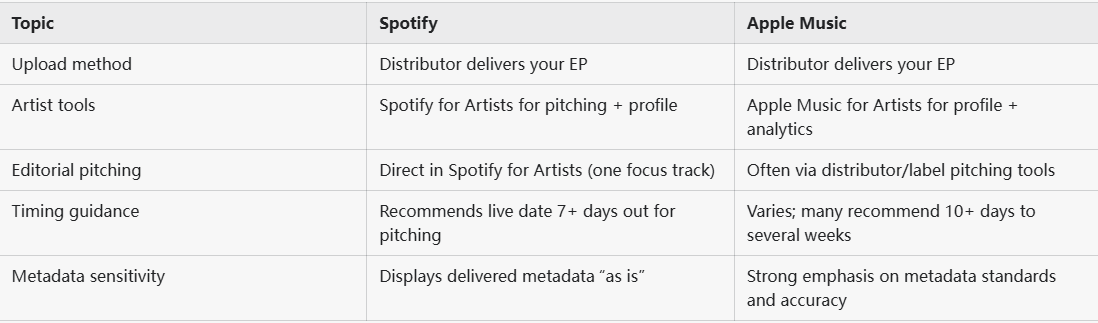
Spotify editorial pitching (free, inside Spotify for Artists):
- You can pitch one focus track per release.
- Pitching requires the track to be unreleased and delivered with enough lead time.
- While Spotify cites 7+ days, many marketers recommend 3–6 weeks to maximize consideration.
A solid overview on lead time expectations: How to get on Spotify Editorial Playlists.
Apple Music editorial pitching:
- Often handled via distributor/label pitching tools rather than directly by artists.
- Many industry operators suggest pitching ~3 weeks ahead, and some pitching guides suggest 10+ days for full consideration.
Useful perspective on timing and what curators look for: How to pitch Apple Music editorial playlists.
What I’ve found works best in pitches:
- One-sentence sonic description (accurate, not aspirational)
- A clear “story” (why now, what’s unique, any press/UGC traction)
- Comparable artists sparingly
- Concrete marketing actions (live show, content plan, collabs)
7) Build your pre-save + content runway (make the EP visible)
Your EP won’t market itself. A clean pre-release plan includes:
- Pre-save page (Spotify + Apple where available via your distributor)
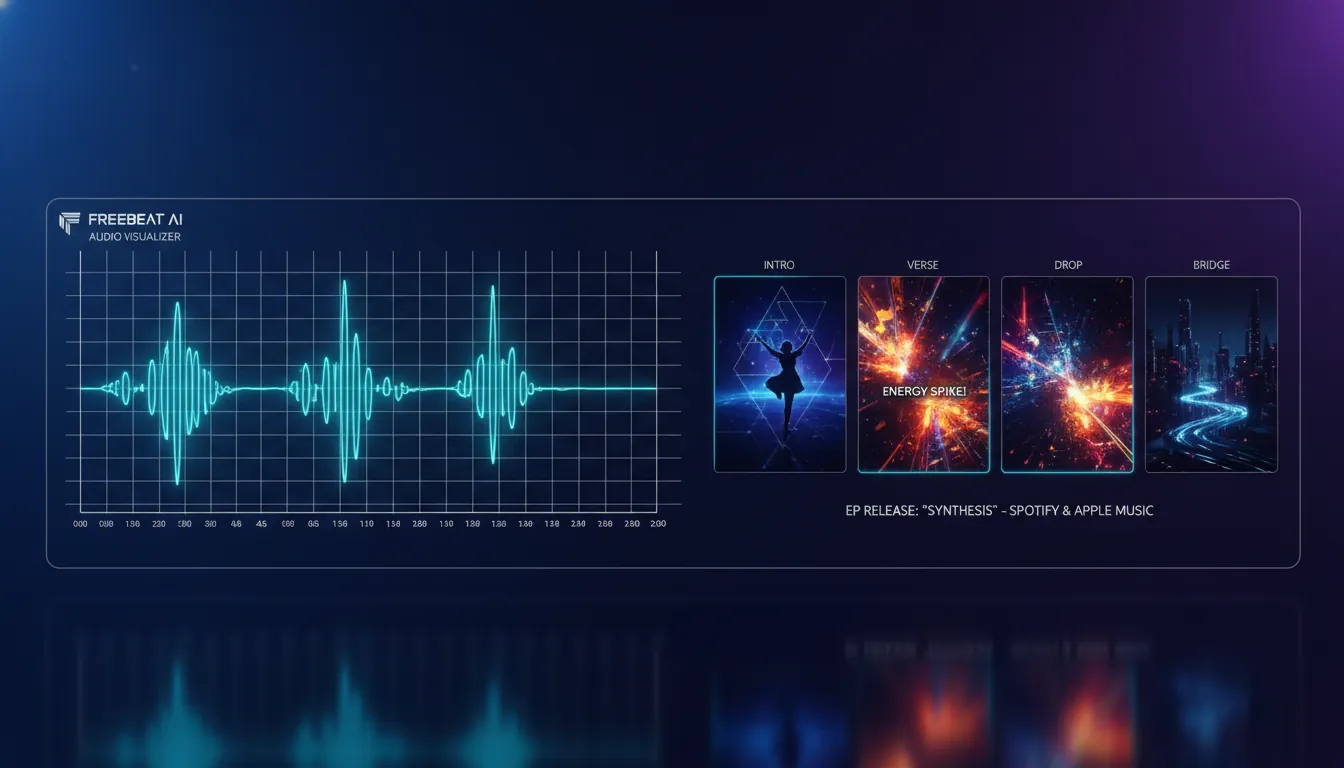
- Short-form content mapped to musical moments (hook, drop, bridge)
- Lyric snippets and behind-the-scenes clips
- A simple email/text list ask (“pre-save + follow”)
This is where Freebeat AI fits naturally in an EP release timeline: you can turn each track into platform-native visuals without manual beat mapping. I tested audio-reactive generation against a traditional editing workflow for a 4-track release, and the biggest win was consistency—camera motion and transitions actually followed the energy changes across the whole song, not random loop cuts.
Ways creators typically use Freebeat AI around an EP drop:
- Audio-reactive music videos for the focus track (optimized pacing + transitions)
- Lyric videos with karaoke-style timing for each track
- Performance-style visuals for TikTok/Reels/Shorts
- Reusable character/artist avatar so fans recognize you across clips
How to Submit to Spotify Editorial Playlists (Full Walkthrough)
8) Release week checklist (protect the launch)
Release day is mostly verification + traffic direction. Your checklist:
- Confirm EP is live on Spotify and Apple Music (and that artist pages are correct).
- Test playback, explicit tags, and track order.
- Update links everywhere (bio link, pinned posts, YouTube description).
- Drive saves, playlist adds, and follows (these are higher-intent than passive streams).
- Post 2–4 pieces of content that point to one action: “listen/save the EP.”
If something is wrong (wrong artist profile, misspelling, incorrect credits), fix it through your distributor, not Spotify/Apple directly—because that’s where the delivered metadata originates.
A practical EP release timeline you can copy (week-by-week)
Week -6 to -5: “Lock” week
- Final masters exported and labeled consistently
- Cover art final (correct specs)
- Credits verified with collaborators
- Decide focus track for pitching
Week -5 to -4: Upload week
- Upload EP to distributor
- Set release date 3–6 weeks out
- Double-check metadata (titles, roles, explicit flags)
Week -4 to -3: Profile + pitching prep
- Claim Spotify for Artists + Apple Music for Artists
- Update photos, bio, links
- Prepare pitch copy (story + genre/mood tags + marketing plan)
Week -3 to -2: Pitch week
- Pitch the focus track in Spotify for Artists
- Request Apple editorial pitch via distributor (if available)
- Outreach to blogs/curators (small, relevant lists beat giant spam lists)
Week -2 to -1: Content sprint
- Pre-save push (light but consistent)
- Schedule short-form content around key moments
- Build 1 flagship asset (music video or lyric video)
Week 0: Launch
- Confirm everything is live + correct
- Direct fans to one canonical link
- Post your best visual asset within 24 hours
Spotify vs Apple Music: what’s different for EP releases?
Common mistakes (and how to avoid them)
- Setting release date too soon: If you want playlist consideration and a calm launch, avoid “upload today, release Friday.”
- Inconsistent artist naming: One extra punctuation mark can split your catalog across profiles.
- Wrong explicit tagging: Don’t embed it in titles; use the explicit flag.
- Last-minute audio swaps: Can trigger delays or mismatched versions across DSPs.
- Forgetting the visual plan: Attention is visual-first on social; your EP needs assets that move with the music.
After release: extend the EP lifecycle (don’t stop at day one)
Most EPs don’t fail because the music is bad—they fail because the campaign ends on release day.
Do this in the 1–2 weeks after:
- Identify the track with the best early saves/completion rate and push it harder.
- Cut 5–10 short clips from your best-performing section (hook/drop).
- If you get meaningful momentum (press, radio, viral clip), ask your distributor about re-pitching context to Apple editorial (some teams will consider follow-ups when there’s new signal).
Conclusion: your EP deserves a calm, controlled launch
Releasing an EP on Spotify and Apple Music is less about luck and more about running a clean timeline: finalize deliverables, deliver through a distributor early, pitch within the right windows, and show up with visuals that match your music’s structure. I’ve seen the same EP perform wildly differently simply because one launch had time for metadata QA + pitching and the other didn’t.
If you’re building your EP rollout now, consider pairing the release with audio-reactive content (music videos, lyric videos, performance visuals) so each track has a job on social—not just a spot on streaming.
📌 ai music generation create lyrics music with freebeat ai 2
FAQ: how to release an EP on Spotify and Apple Music
1) How do I release music independently on Spotify and Apple Music?
Use a third-party distributor to upload your EP, set a future release date, and deliver to Spotify and Apple Music. Then manage your profile and pitching via Spotify for Artists and Apple Music for Artists.
2) How far in advance should I upload my EP to a distributor?
Safest is 3–6 weeks before release. You can do it faster, but you risk delays, missed pitching windows, and less time to fix metadata issues.
3) Can I pitch an EP to Spotify editorial playlists?
Yes—pitch one focus track from the EP inside Spotify for Artists, and do it while the track is still unreleased (ideally weeks ahead).
4) How do I pitch to Apple Music playlists?
Many editorial pitches are handled through your distributor/label tools. Plan for at least 10+ days (better: ~3 weeks) before the release date to maximize consideration.
5) Why is metadata so important when releasing an EP?
Metadata controls how your EP appears (titles, credits, artist linking) and how royalties are tracked. Bad metadata can cause profile splits, wrong credits, and even takedowns or re-delivery delays.
6) Who pays better: Spotify or Apple Music?
Payout rates vary by country, subscription type, and many other factors. Don’t plan budgets on a single per-stream number—focus on growing saves, followers, and repeat listeners across platforms.
7) Can I release singles first and later bundle them into an EP?
Often yes, but the exact workflow depends on your distributor and whether you keep identifiers consistent (ISRCs) so streams can aggregate correctly. Plan this early to avoid duplicates and split stats.


