Lyric App With Instrumental Sync: Feature Checklist
Contact partnership@freebeat.ai for guest post/link insertion opportunities.
A lyric app with instrumental sync feature sounds simple—until you try to keep lyrics perfectly timed through an intro riff, a 16-bar drop, and a long instrumental break. I’ve shipped lyric-based video assets for short-form platforms, and the biggest pain is never “typing the words”—it’s managing timing drift, version mismatches, and those quiet gaps where the singer stops but the energy shouldn’t. So if you’re choosing (or building) a lyric app with instrumental sync feature, use this checklist to avoid the common traps and get clean, karaoke-style timing that still feels musical.
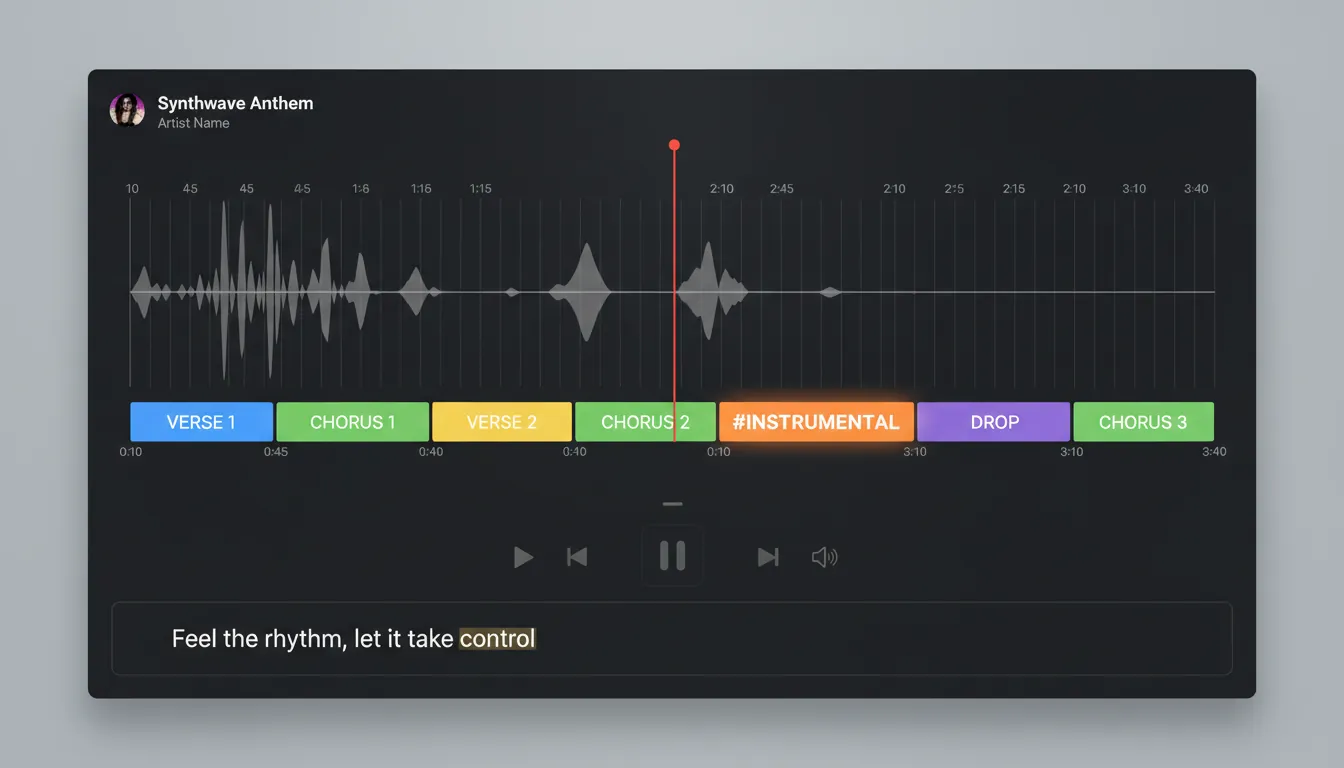
1) Instrumental-aware timing (the non-negotiable)
A real lyric app with instrumental sync feature must treat instrumentals as first-class timeline events, not “empty space.” If there are long stretches without vocals, the app should preserve pacing with an explicit instrumental marker rather than letting the UI jump awkwardly. Community standards like Musixmatch’s guidance recommend tagging 15+ seconds without lyrics using #INSTRUMENTAL and syncing it like a lyric line, which keeps structure readable and timing consistent (Musixmatch guidelines).
What to look for:
#INSTRUMENTALor equivalent tag you can place between sections (verse/chorus/bridge)- Separate section tags (intro/verse/chorus/drop) so instrumentals sit cleanly between them
- A visible “countdown” or progress indicator during instrumental bars
2) Beat grid + BPM detection (so instrumentals stay tight)
Instrumentals expose timing errors fast. If your lyric app with instrumental sync feature lacks BPM/beat mapping, your “no-lyrics” segments will feel late or rushed when the next line hits. For modern workflows, beat grids anchored to bars and drops let you keep lyric entrances consistent even when the arrangement changes energy.
Checklist:
- Auto-detected BPM with manual override
- Bar/beat ruler with snap-to-grid for instrumental segments
- Drop/section detection (intro → verse → chorus → bridge) for predictable transitions
3) Word-level vs line-level sync (choose the right granularity)
Word-level sync feels premium but costs time and data. Line-level is faster but can look “floaty” during fast vocal runs. The best lyric app with instrumental sync feature lets you mix granularities: word-level for hooks, line-level for verses, and section-level for instrumentals. Timing granularity is a core design decision in lyric-sync systems, and word-level timing increases editing effort and file size (Medium overview).
Practical rule I use:
- Hooks/chorus: word-level or syllable-level
- Verses: line-level with good lead-in
- Instrumentals: section marker + bar count
4) Version locking (remix-proof your sync)
Synced lyrics are version-specific—a radio edit, live take, or remaster can break timestamps even if the lyrics are identical. Strong tools tie lyric maps to the exact audio via fingerprinting or hashing so you don’t publish “almost right” sync that feels wrong. This is especially important for instrumental sync because intros/outros often change between versions.
Look for:
- Audio fingerprint match before applying an existing lyric map
- Warnings when the uploaded audio differs from the original reference
- Separate lyric maps per version (album, clean, instrumental, live)
5) Tight offsets and micro-adjust controls (milliseconds matter)
When you’re building a lyric app with instrumental sync feature for real audiences, you need precise nudging. Accessibility and subtitle timing research suggests tight synchronization thresholds; W3C notes a strong recommendation around ±20 ms relative to authored time for captions, with broader guidance acknowledging 100 ms limits in some standards (W3C SAUR). For lyric highlighting, you’ll want similar micro-controls—especially at vocal re-entries after instrumental breaks.
Must-have controls:
- Global offset (+/- ms) for device or render latency
- Per-line or per-word nudge buttons
- Waveform zoom to place starts at consonant onset (not the beat)
6) “Follow the vocals, not the beat” mode (to prevent common syncing mistakes)
One classic failure: creators sync lyric highlights to the kick/snare instead of the vocal onset. Good lyric tools remind you to align to what listeners perceive—vocals—while still using beats as a guide. This is a widely repeated best practice in lyric-video workflows (VizMigo timing tips).
Look for UX cues like:
- Vocal-energy visualization or vocal probability overlay
- Playback looping around a line start
- Quick A/B preview: “snap to vocal” vs “snap to beat”
7) Export formats that travel (LRC + WebVTT/TTML)
A lyric app with instrumental sync feature shouldn’t trap your work. LRC is lightweight and common for music players, while WebVTT and TTML are standard timed-text formats widely supported in video/subtitle ecosystems. Supporting multiple formats (and conversion) future-proofs your catalog and makes it easier to reuse timing data across tools (Medium on formats).
Export checklist:
- LRC (line or word enhanced if supported)
- WebVTT for video platforms and web players
- TTML for richer styling and pro pipelines
- Retains instrumental markers as timed “events,” not deleted lines
8) Performance + reliability (no lag during playback)
Instrumental sync features are only as good as the playback engine. If the app stutters, you’ll see highlight jitter and missed transitions—especially on mobile. Strong performance and reliability are foundational UX requirements for streaming-style experiences (Onething Design).
Ask before you commit:
- Does it pre-cache the audio and lyric map for smooth scrubbing?
- Does it stay stable on mid-range phones?
- Can it render previews without re-encoding every time?
9) Legal and licensing sanity (especially when pairing audio to visuals)
If your lyric app with instrumental sync feature outputs videos (lyric videos, karaoke clips, reels), licensing matters. Pairing music with visuals can trigger synchronization rights considerations; apps and creators should understand the difference between composition rights and master rights, and secure the proper permissions for intended use (sync license overview). For app-based streaming or distribution, broader licensing compliance (performance/mechanical/sync) can also apply (Audiorista).
Practical checklist:
- Clear policy on user-uploaded copyrighted tracks
- Content ID / takedown workflow if publishing is supported
- Export settings that preserve ownership metadata (title/ISRC if available)
Quick comparison table: what “good” looks like
Freebeat AI: a practical fit if your “lyrics” are really a video deliverable
If your end goal is a lyric video (not just an in-player lyric view), a lyric app with instrumental sync feature should also drive visual pacing—especially through instrumental drops. That’s where Freebeat AI stands out: it’s purpose-built for audio-reactive video generation that understands BPM, beats, bars, drops, and song sections, then uses that structure to control transitions and camera motion.
In my own testing with audio-reactive tools, the difference shows up in the instrumental parts: generic editors often “loop movement,” while music-structure-aware systems keep the video evolving until vocals return. If you want instrumentals to feel synced (not merely timed), look for:
- Beat-accurate transitions on drops and fills
- Section-aware scene planning (verse vs chorus vs bridge energy)
- Karaoke-style lyric timing layered on top of rhythm-based visuals
Helpful starting points (internal):
The Ultimate Lyrics Sync Tutorial: Perfect Timing for Your Karaoke Videos
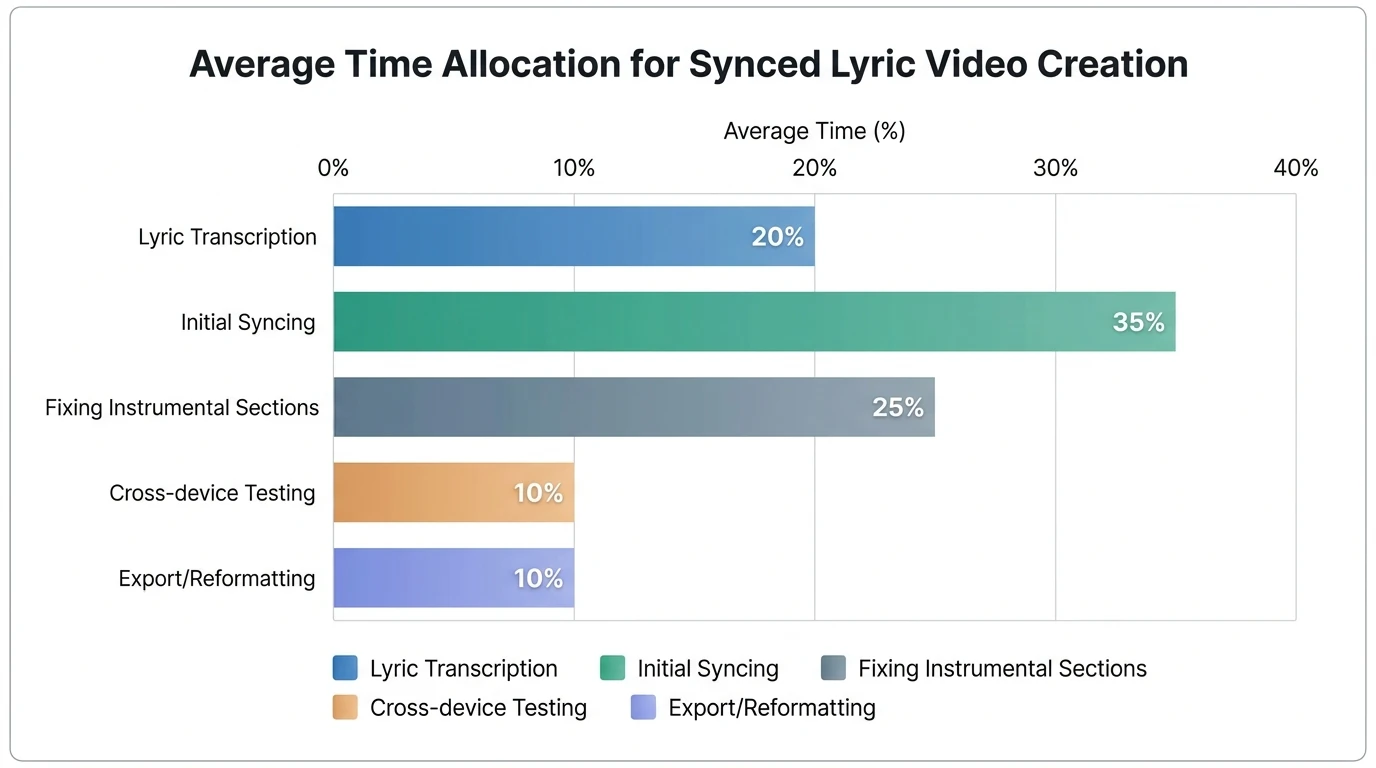
Data reality check: where most creators lose time
From what I see in production pipelines, creators spend more time fixing instrumental transitions and timing drift than typing lyrics. The moment a song has a long intro, guitar solo, or EDM drop, you need structure tags and reliable beat mapping—or you’re stuck nudging lines endlessly.
Mini checklist you can copy/paste before choosing an app
Use this to evaluate any lyric app with instrumental sync feature in 3 minutes:
- Does it support instrumental tags/events (not just blank space)?
- Can I snap timings to bars/beats and still align to vocal onset?
- Can I lock lyric maps to the exact audio version (fingerprint/hash)?
- Are there millisecond nudges and per-line/per-word adjustments?
- Does it export LRC + WebVTT/TTML cleanly?
- Does it preview smoothly on mobile (no jitter)?
- If it outputs video, does it handle drops and section changes intelligently?
FAQ: Lyric app with instrumental sync feature
1) What is the app that syncs video with music?
Apps in this category either (a) provide a beat grid and timed text, or (b) generate audio-reactive video that uses BPM/section detection to drive edits. If you’re publishing, prioritize tools that understand drops/bars and can keep visuals active during instrumentals.
2) How do I sync video and audio together without drift?
Use a single source-of-truth audio file, lock your lyric timing to that exact version (ideally via fingerprinting), and apply micro-offset adjustments in milliseconds. Always test on mobile and desktop because playback pipelines can vary slightly.
3) Is there an app to make a song instrumental?
Yes—many tools can isolate vocals or remove them, but quality varies by genre and mix. For clean results, use official instrumental stems when possible; separation can introduce artifacts that make lyric alignment harder.
4) Should lyrics be synced to the beat or the vocals?
Vocals. Beat grids help you stay organized, but the highlight should land when the word is sung—otherwise it feels “wrong” even if it’s musically on-beat.
5) What formats should a lyric sync app export?
At minimum: LRC for music players. For video workflows and accessibility: WebVTT or TTML. Having more than one export format prevents lock-in.
6) How do instrumental breaks get represented in synced lyrics?
Good tools use an explicit tag (often #INSTRUMENTAL) timed like a lyric line, placed cleanly between structured sections. This keeps long non-vocal parts intentional and navigable.
7) How accurate does lyric timing need to be?
For a polished feel, you generally want tight timing—often within tens of milliseconds for the start of a line—plus easy per-line nudging for device/render differences.
Conclusion: pick sync that respects the song, not just the words
A lyric app with instrumental sync feature is really a “song structure app” in disguise. When instrumentals are treated as real sections—with beat grids, tags, and version-locked timing—your lyric experience (or lyric video) stops feeling like captions and starts feeling like performance. If you’re building for short-form platforms, consider pairing lyric timing with audio-reactive visuals so drops, fills, and breaks stay engaging all the way through.
📌 ai music generation create lyrics music with freebeat ai


