Quiz: How to Tell If Music Is AI Generated Fast
Contact partnership@freebeat.ai for guest post/link insertion opportunities
You’re scrolling, a “new artist” drops a flawless hook, and the mix sounds too clean for a bedroom release. Is it a talented newcomer—or a model output that slipped into your feed? This how-to quiz helps you spot AI-generated music quickly using listening cues, simple checks anyone can do, and a few lightweight forensic tricks. Along the way, you’ll learn where even experts get fooled—and how to raise your confidence without turning into a full-time audio investigator.

Why it’s getting harder to tell (and why your “gut” is unreliable)
In my own tests, I can often flag obvious AI tracks in 10–20 seconds—but I still miss edge cases when the music is post-processed in a DAW or re-recorded. Research and industry reporting agree the gap is closing: detectors can hit very high accuracy in controlled conditions, but real-world audio edits and new model versions can reduce reliability. The BBC notes streaming platforms are only starting to tag or detect AI music at scale, and there’s no universal labeling requirement yet (so “trust the platform” won’t work) (BBC report on AI music detection and tagging).
What works best in practice is a stacked approach:
- Fast listening quiz (human perception)
- Provenance checks (artist/credits/metadata)
- Optional forensics (spectral artifacts, timing variance)
- Cross-validation (tools + common sense)
The 90-second quiz: how to tell if music is AI generated fast
Score each question as you listen to 30–60 seconds (verse → pre → chorus if possible). Add points and check the results at the end.
1) Does the vocal feel “perfect but empty”? (+2)
AI singing often nails pitch and timing while missing tiny human behaviors: intentional strain, breath control arcs, and believable consonant chaos on fast syllables. Listen for:
- Over-smooth vibrato that starts/stops like a switch
- Consonants that sound “painted on” (t, k, s)
- Emotional intensity that doesn’t change with lyrical meaning
If it’s a voice clone, you may hear realism—but also occasional weirdness on sibilants (“s” and “sh”) or on sustained vowels.
2) Are the lyrics generic, repetitive, or oddly on-the-nose? (+1)
Many AI tracks lean on safe imagery and repeated phrases—especially in pop/EDM hooks. Red flags include:
- Chorus repeats too many times with minimal variation
- Rhymes that feel mechanically “fine” but not specific
- Familiar AI-ish word clusters (neon/shadows/whispers-style clichés)
3) Do transitions feel “snapped to grid” with no human looseness? (+2)
A technical tell is micro-timing variance: humans drift slightly, even in electronic genres. Some detection guides describe AI drums and transients as being unusually quantized (near-perfect inter-beat intervals). You can hear it as:
- Drops that land with mathematical sameness
- Hi-hats and percussion that never “lean” ahead/behind
- Fills that sound copied-and-pasted across sections
4) Do you hear “glassy,” metallic high-end shimmer? (+1)
This is subtle, but common enough that experienced listeners notice it—especially in cymbals, shakers, and bright synths. Some research attributes consistent spectral quirks to generator architectures (systematic frequency artifacts), not just training data (arXiv on spectral peak artifacts and detection).
5) Is the arrangement structurally predictable in a too-clean way? (+1)
AI often follows learned patterns rigidly:
- Perfect 4/8/16 bar phrasing everywhere
- Energy rises that feel “template-correct” but not intentional
- Minimal surprise: no odd stops, imperfect pickups, or human mischief
6) Are there small “impossible” glitches? (+2)
Listen for moments a human mix rarely produces:
- Brief warbles on a held vocal note
- A transient that smears unnaturally (like a drum hit liquefying)
- Reverb tails that behave inconsistently across similar phrases
7) Can you verify provenance quickly? (+0 to +3)
This is the highest-signal check when available.
- +3: No credible artist footprint (no live clips, no consistent identity, brand-new accounts with stock imagery)
- +2: Credits/ISRC/label info missing or suspiciously vague
- +1: The “artist” has content, but it’s all AI-adjacent and inconsistent (faces/voices/styles change abruptly)
Tip: platforms and distributors increasingly require AI disclosure in uploads, but it’s inconsistent across services (Identity Music distribution guidance).
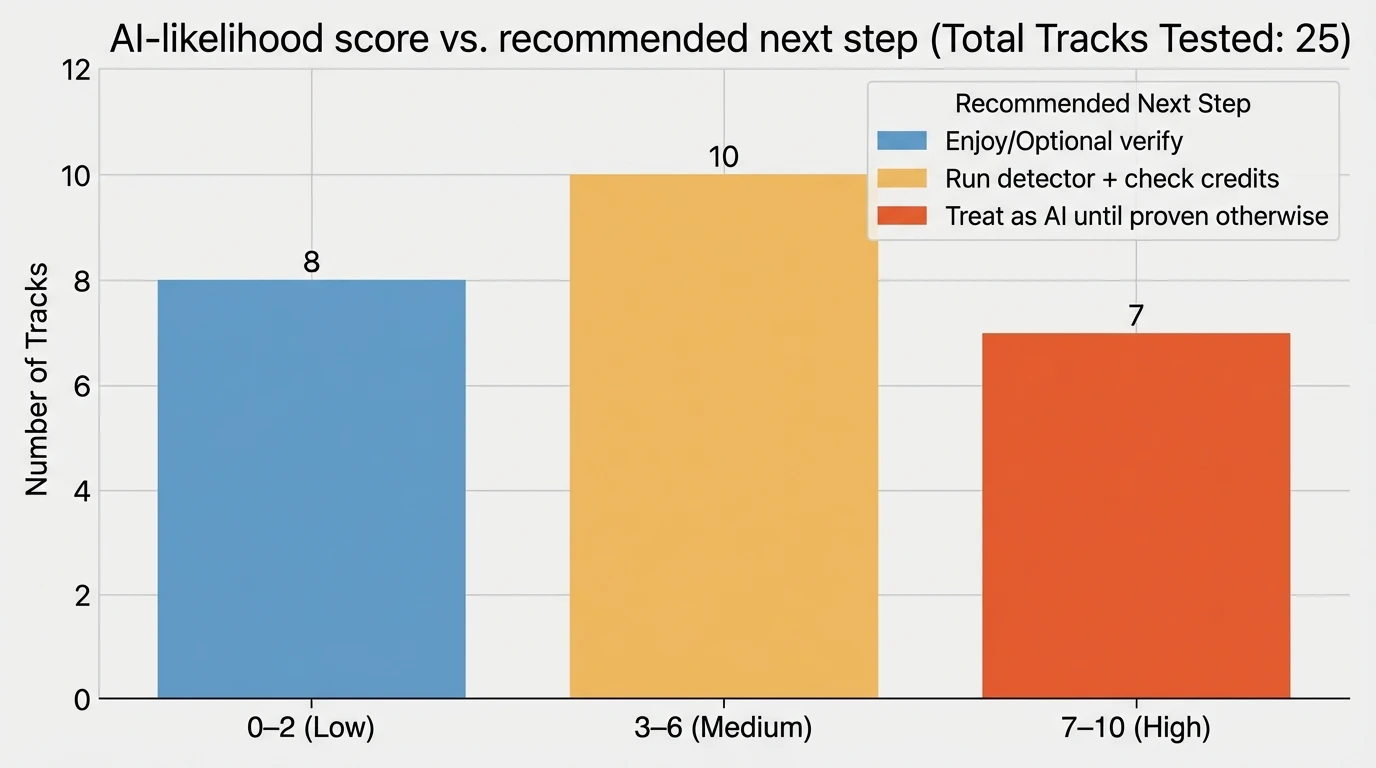
Score interpretation (quick answer)
- 0–2 points: Likely human-made or high-quality AI with strong post-production. Continue with checks below if it matters.
- 3–6 points: Mixed signals. Use the tool-based checks and provenance steps.
- 7+ points: High likelihood the music is AI generated (or heavily AI-assisted).
How to confirm (without being an audio engineer)
When the stakes are real (copyright, label submissions, monetization, journalism), don’t rely on ears alone. Use this sequence.
Step 1: Find the earliest upload + cross-platform consistency
AI tracks often appear as mass uploads or get reposted with different “artists.” Check:
- Earliest YouTube/SoundCloud/TikTok upload date
- Whether the same audio appears under multiple names
- Whether the artist has a history of releases that evolve naturally
If the audio is tied to a news story or controversy, look for reputable reporting or direct statements.
Step 2: Check credits, identifiers, and distribution metadata
Look for:
- Label/distributor name
- ISRC (recording identifier)
- Songwriter/producer credits that match real people with consistent catalogs
If the metadata is empty or inconsistent, it doesn’t prove AI—but it raises risk.
Step 3: Use a detector—but treat it like a “second opinion”
Academic and industry sources show very high accuracy in some scenarios, including approaches using spectrogram-based models and interpretable spectral criteria. But even proponents warn that simple transformations (resampling, pitch shifting, heavy mastering) can break classifiers, and newer generators can change artifacts over time.
Practical workflow:
- Run one detector
- If it flags high confidence, run a second detector or use a different method (e.g., spectral view + provenance)
- Document results (screenshots, timestamps, tool version)
For a deeper overview of the detection “arms race,” see the ISMIR Transactions paper on AI-music detection, features, and limitations (The AI Music Arms Race: On the Detection of AI-Generated Music).
The “spectrogram check” anyone can do (free tools)
If you can open a spectrogram (many free apps and DAWs can), you can sometimes spot suspicious patterns.
What to look for:
- Repeated narrowband peaks that appear too regularly across time
- Unnatural high-frequency cutoffs that don’t match the genre/recording chain
- Overly uniform “texture” where you’d expect noisy variety (cymbals, room tone)
Important: this is not foolproof. A skilled producer can also create clean, regular spectral patterns—and AI music can be mastered to hide artifacts.
Cheat sheet: human vs AI-generated music signals (fast comparison)
Use this table while you do the quiz.
Signal
More common in human-made music
More common in AI-generated music
What to do next
Vocal phrasing
Breath-driven arcs, slight pitch drift, expressive consonants
“Perfect” pitch with oddly flat emotion; sibilant weirdness
Compare to live clips; listen to sustained vowels
Timing
Micro-timing push/pull, even in tight genres
Near-grid quantization; identical transient spacing
Check percussive sections + fills
Lyrics
Specific details, coherent perspective shifts
Generic imagery, repetitive hooks, safe rhymes
Search unique lyric lines; look for other uploads
Arrangement
Intentional surprises, “mistakes,” human choices
Highly template-like sections and builds
Jump between sections; see if energy changes feel earned
Audio texture
Natural noise, room tone, imperfect layers
Glassy shimmer, odd smears, “too consistent” texture
Spectrogram check + second-opinion detector
Provenance
Clear credits, history, consistent identity
Thin footprint, frequent re-uploads, mismatched credits
Verify earliest source + metadata
What about “AI-assisted” music (the gray zone)?
A lot of modern tracks are AI-assisted (stem separation, pitch correction, drum replacement, mastering assistants). That doesn’t mean the song is AI generated. When you’re deciding how to tell if music is AI generated, ask one key question:
- Was the core composition/performance created by a model from prompts (melody, vocals, arrangement), or did AI just help polish/edit?
Some distributors now ask creators to mark tracks that include AI-generated elements (not merely AI tools used in production), which hints at where the industry is drawing lines (Identity Music’s “Includes AI” explanation).
If you’re a creator: what to do when you want transparency
If you release AI-assisted or AI-generated music, keep an audit trail:
- Save prompts, project files, stems, and edit history
- Credit tools used (where appropriate)
- Avoid misleading marketing that implies a human performance if there wasn’t one
Copyright rules vary by country, and fully AI-generated works may face limited protection in some jurisdictions—so documentation matters for disputes and takedowns.
Using Freebeat AI to turn any track into a music video (and why detection still matters)
Creators often ask me: “If the music might be AI, should I still build content around it?” If you have the rights (or the platform license) and you’re transparent, you can absolutely create compelling visuals.
Freebeat AI is built specifically for music-driven video generation—it reads BPM, beats, bars, drops, and sections to drive camera motion, transitions, and pacing. That means whether your audio is human-made, AI-assisted, or fully generated, you can produce audio-reactive videos that feel edited by hand—without spending days keyframing.
Useful internal reads:
Conclusion: trust your ears—but verify like a pro
The fastest way to answer “how to tell if music is AI generated” is a stacked method: quick listening tells, then provenance checks, then (if needed) a detector or spectrogram view. I’ve found that when you combine those signals, your accuracy jumps—and you avoid the most common mistake: assuming “polished” automatically means “AI.” If you’re building content, protect yourself with clear sourcing and rights checks, then focus on what audiences actually feel: pacing, story, and visuals that hit on the drop.
📌 10 creative projects you can make with freebeat ai in under an hour
FAQ: how to tell if music is AI generated
1) Can you detect AI-generated music?
Yes—sometimes with high accuracy in controlled conditions using spectral features, timing statistics, and machine learning. In the wild, results can be less reliable after resampling, heavy mastering, or re-recording, so use detectors as one input, not the only proof.
2) Can you tell if audio is AI just by listening?
Often you can suspect it by listening (vocal artifacts, overly perfect timing, odd transitions), but confirmation usually needs provenance checks or tool-based analysis—especially for high-quality outputs.
3) How can you tell if an artist is AI?
Check for a consistent real-world footprint: live clips, interviews, recurring collaborators, and stable identity across platforms. A thin or inconsistent presence doesn’t prove AI, but it’s a strong risk signal.
4) Can you tell which piece of audio was made by AI?
Sometimes. Some detectors attempt platform attribution (e.g., distinguishing different generator “fingerprints”), but attribution is harder than a simple AI/not-AI label and can break with edits.
5) Is it illegal to make a song with AI?
Not automatically. Legality depends on training data issues, voice cloning permissions, licensing, and how you use/distribute the track. Copyright protection for fully AI-generated works can also be limited in some jurisdictions—get informed for your region.
6) What are the most common signs AI music is “hiding”?
Look for re-upload patterns, inconsistent credits, unusually template-like structure, and vocals that are technically perfect but emotionally uniform. If you can’t find an original source or credible creator history, treat it as unverified.
7) What should I do if I suspect a track is AI-generated on a streaming platform?
Save evidence (link, date, screenshots), check for duplicates and the earliest upload, and use the platform’s reporting tools if it’s impersonation or misleading metadata. If you’re a label or curator, route it to manual review when the risk is high.


