Spotify Artist Verification: Requirements, Steps & Timeframe
Contact partnership@freebeat.ai for guest post/link insertion opportunities.
You finally got your music on Spotify. Then you notice: some artists have a “Verified by Spotify” check, and you don’t. You start wondering, Do I need a label? A certain stream count? Did I miss a form? This guide breaks down how to get verified on Spotify as artist in 2026—what Spotify actually looks for, what you can control today, and what timelines are realistic.

What “Verified by Spotify” means (and what it doesn’t)
Spotify’s new Verified by Spotify badge is meant to signal authenticity and trust—especially as AI-generated content and impersonation increase. According to Spotify, verification review looks for an identifiable artist presence on- and off-platform, sustained listener engagement over time, and good standing with Spotify policies (Spotify Support).
Here’s what it doesn’t mean:
- It’s not a guarantee of playlisting or growth.
- It’s not something you can “buy.”
- It’s not strictly tied to a public minimum follower/monthly listener number (Spotify hasn’t published one).
If you’re trying to figure out how to get verified on Spotify as artist, think of it like passing a credibility check: Are you a real, active human artist with consistent fan intent?
Spotify artist verification requirements (the signals Spotify checks)
Spotify hasn’t published a single checklist with exact thresholds, but multiple official and industry sources point to the same set of signals:
1) Real artist presence (on and off Spotify)
Spotify explicitly mentions these authenticity markers:
- Linked social accounts
- Concert/tour dates
- Merch
- An identifiable, consistent artist identity
Source: Verified by Spotify (Spotify Support) and reporting like TechCrunch.
2) Consistent listener activity over time
Spotify emphasizes sustained, intentional listener demand—not a one-week spike. This matches what many marketers are seeing in the field: consistent growth and repeat listening tends to correlate with getting reviewed.
- Spotify’s statement: they prioritize profiles listeners actively seek out over time (Spotify Support).
- Industry commentary also highlights long-term engagement over one-off virality (Playlist Push analysis).
3) Good standing with platform policies
Avoid anything that looks like manipulation:
- Bot streams
- Fake followers
- Misleading metadata
- Impersonation-style branding
Spotify states good standing with policies is part of verification review (Spotify Support).
4) AI use is allowed—AI persona profiles may not be
Spotify’s nuance matters: using AI tools in your creative process can still be eligible, but profiles that primarily represent AI-generated music or AI-persona artists are not eligible at launch (per Spotify’s own language and coverage like TechCrunch).
Step-by-step: how to get verified on Spotify as artist (do this in order)
Step 1: Release music to Spotify with clean metadata
Verification gets messy when your artist name, roles, or credits don’t match what your distributor delivered. I’ve seen claims delayed because “Artist Name” used an extra symbol on the release, or because a featured artist got mapped to the main profile.
Do this before distribution:
- Use one consistent artist name (same spelling, capitalization, and punctuation)
- Upload a high-res cover image that matches your brand
- Confirm primary artist vs. featured artist roles
- Keep credits consistent across releases
Step 2: Claim your Spotify for Artists profile
This is the administrative step many artists confuse with the “Verified by Spotify” badge. Claiming your profile gives you control of your page and access to tools like pitching, analytics, Artist Pick, merch links, and more.
Start here: Spotify for Artists
If you distribute through partners (e.g., TuneCore, Ditto, LANDR), many provide a shortcut to claim access through their dashboard flows (examples: TuneCore, LANDR, Ditto).
Step 3: Make your profile “review-ready” (30–60 minutes of work)
This is where most artists leave verification equity on the table. Optimize the profile so a reviewer (and fans) immediately see a real, active human project.
- Add a clear artist image and header
- Write a short bio (2–5 sentences) with location + sound + proof points
- Link Instagram/TikTok/YouTube
- Add merch links (if you have them)
- Add tour dates (even small local shows count)
- Use Artist Pick to pin your best track, not your newest by default
Step 4: Build sustained listener intent (the part you can’t “hack”)
If you’re serious about how to get verified on Spotify as artist, treat “consistent activity” like a campaign, not a wish.
A practical weekly loop:
- Drop a short-form video (15–30 sec) that clearly uses your song
- Drive to one Spotify goal (pre-save, a specific track link, or your profile)
- Watch saves, repeat listening, and follower conversion—not just plays
- Repeat for 6–12 weeks with one core track before switching focus
Where Freebeat AI fits (real-world workflow): when I tested audio-reactive video tools for music promo, the biggest win wasn’t “prettier visuals”—it was consistent output that stayed on-beat and matched the song’s energy changes. Freebeat AI is designed specifically for that: it understands BPM, drops, sections, and transitions, so your clips feel edited instead of templated. That makes it easier to publish more often without your videos drifting off-beat or losing pacing—exactly what you need to create the sustained demand Spotify wants to see.
Spotify's NEW "Real Artist" Definition Is Ridiculous
Step 5: Stay compliant and avoid “verification killers”
The fastest way to delay review (or get flagged) is suspicious activity. Avoid:
- Paying for botted streams or “guaranteed playlist” services
- Aggressive follow/unfollow automation
- Misleading artist names designed to siphon search traffic
- Re-uploading the same track repeatedly to game algorithms
If you’re doing ads, drive them to your Spotify profile or a single track, and let engagement grow naturally.
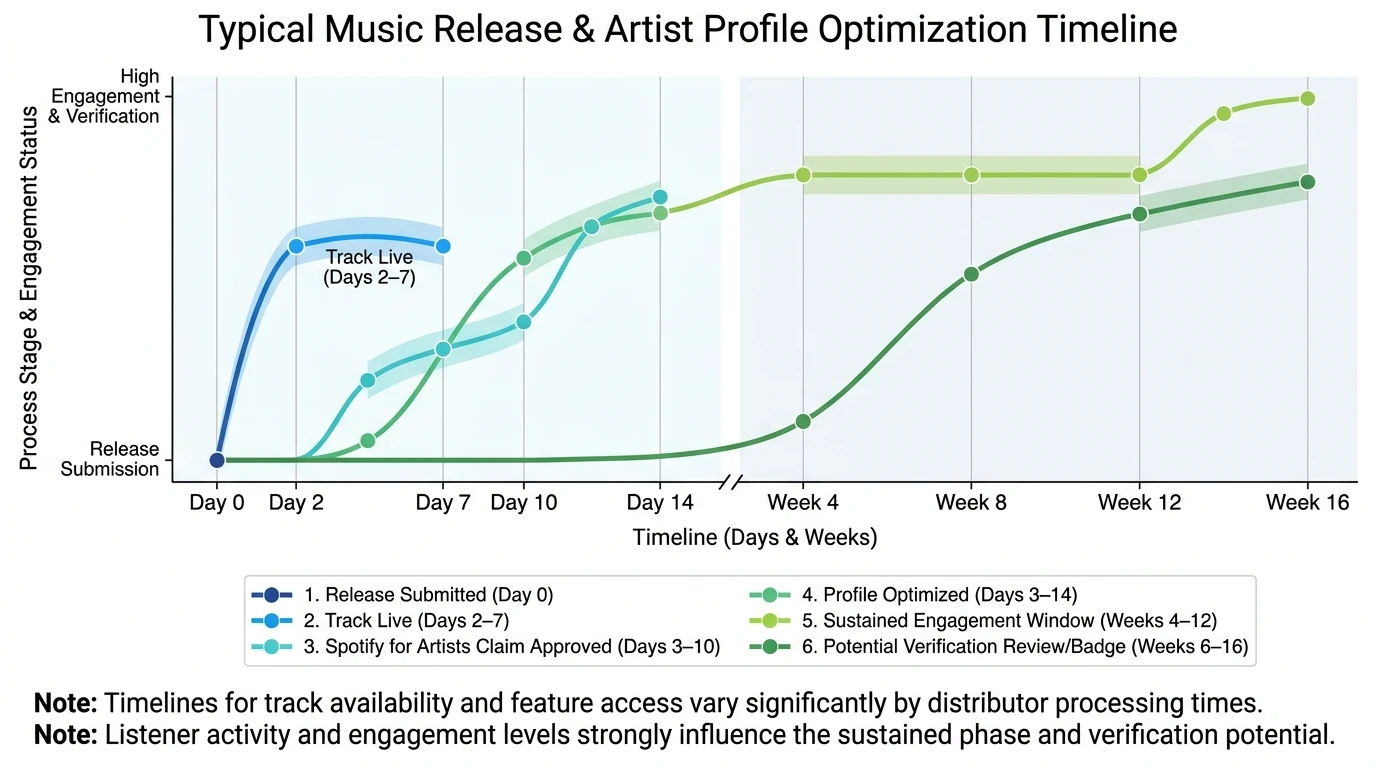
Timeframe: how long Spotify artist verification takes
There are two different timelines people mix up:
- Getting access to Spotify for Artists (claiming): often fast once your release is live and your profile exists.
- Receiving the “Verified by Spotify” badge: can take longer because it’s an ongoing rollout and includes review signals.
Here’s a realistic view:
- Profile claiming access: often 24–72 hours, sometimes faster with certain distributor integrations (many industry guides report this range).
- Badge appearance: days to weeks (or longer) depending on whether you’re in the pool Spotify is reviewing and whether you meet the sustained engagement/authenticity signals.
Spotify has also said verification rolls out on an ongoing basis, and not seeing it yet doesn’t mean you won’t later (Spotify Support).
Quick comparison: “Claimed” vs. “Verified by Spotify”
Practical checklist: increase your odds in 14 days
If you want a tight action plan, here’s a 2-week sprint I’ve used with emerging artists to get their profiles “verification-ready” (even if the badge comes later):
- Day 1–2: Claim Spotify for Artists, confirm the correct profile mapping.
- Day 2–3: Upload profile photo + header, write bio, link socials.
- Day 3–5: Add Artist Pick and refresh your “This Is” messaging (pins, canvases if available).
- Day 5–7: Publish 3–5 short videos using the same hook of your track.
- Day 8–14: Drive consistent traffic to one Spotify link; monitor saves, follows, and repeat listeners.
If you’re producing those short videos, a music-driven generator like Freebeat AI can help you stay consistent without spending hours manually cutting on beats—especially for lyric videos, performance visuals, and story-aware clips designed around drops and sections.
Money questions people ask (quick, honest context)
A lot of searches around how to get verified on Spotify as artist overlap with income milestones. Verification is not a payout lever, but here are clean answers to common questions:
- How much does it cost to be a verified artist on Spotify? Spotify for Artists is free; verification isn’t a paid feature.
- How much is 10,000 streams on Spotify worth? Using typical per-stream ranges often cited in 2026 discussions, 10,000 streams ≈ $30–$50 (varies by region, subscription mix, and other factors).
- Is 200k monthly listeners good? It’s strong, and many artists can build meaningful income with ~200k–800k monthly listeners, depending on audience location and revenue mix (streams + merch + shows + sync).
Common problems (and fixes) when verification doesn’t happen
Problem: “I claimed my profile but I don’t have the verified badge.”
Fix: Claiming ≠ badge. Keep building sustained engagement and complete authenticity signals (social links, shows, merch). Spotify’s badge is an ongoing rollout.
Problem: “My artist page is split into two profiles.”
Fix: This is usually metadata mapping. Contact your distributor first and request a Spotify artist mapping fix. Don’t keep uploading to “test” it—splits can get worse.
Problem: “I had a viral spike, still no verification.”
Fix: Spotify has explicitly emphasized sustained engagement over one-time spikes. Turn the spike into repeat behavior: follows, saves, playlist adds, and consistent discovery over weeks.
Conclusion: the clean path to Spotify artist verification
Getting verified isn’t about gaming a hidden form—it’s about proving you’re real, active, and consistently sought out. If you focus on the fundamentals—clean metadata, a complete Spotify for Artists profile, real-world presence signals, and steady listener intent—you’ll be aligned with what Spotify says it’s reviewing for how to get verified on Spotify as artist.
If you want one lever that helps most: publish consistent, on-beat promo content that matches your song’s energy. That’s exactly the kind of output Freebeat AI is built to scale—without turning your week into a full-time editing job.
📌 behind the magic how creators use freebeat ai to go viral
FAQ: Spotify artist verification (2026)
1) How can I be a verified artist on Spotify?
Claim your Spotify for Artists profile, complete authenticity signals (bio, photos, socials, merch/tours), stay policy-compliant, and build sustained listener engagement so Spotify includes you in review for the “Verified by Spotify” badge.
2) Do I need a label to get verified on Spotify as artist?
No. Spotify and industry reporting indicate many verified artists are independent; verification focuses on authenticity and engagement, not label affiliation.
3) Does Spotify verification require a minimum number of monthly listeners?
Spotify hasn’t published an official minimum. The official language emphasizes sustained, intentional listener activity over time.
4) How long does Spotify artist verification take?
Claiming Spotify for Artists access is often 24–72 hours once your release is live, but the “Verified by Spotify” badge can take weeks or longer because it’s an ongoing rollout and depends on eligibility signals.
5) Are AI-generated artists eligible for Spotify verification?
Spotify states profiles that primarily represent AI-generated music or AI personas are not eligible at launch, but human artists using AI tools responsibly can still be eligible if they present themselves authentically.
6) What’s the fastest way to improve my chances of getting verified?
Make your profile complete (social links, bio, images, merch/tours) and run a 6–12 week consistency push that drives real Spotify behaviors: follows, saves, repeat listening, and intentional search.
7) Will getting verified help me get on editorial playlists?
Verification doesn’t guarantee playlist placement, but claiming Spotify for Artists lets you pitch releases and present a professional, trustworthy profile—both of which support your pitching efforts.


