24-bit WAV Mixing Advantage: Myth vs Reality
Contact partnership@freebeat.ai for guest post/link insertion opportunities.
You’re about to export a mix, and the question pops up like a nervous assistant: “16-bit or 24-bit WAV?” If you’ve ever worried that choosing 16-bit will “ruin the mix,” you’re not alone. I’ve heard the same concern from artists right before deadlines—especially when they’re sending files to a mastering engineer or uploading audio for video content. Let’s separate what 24-bit WAV mixing advantage actually does from what people think it does.

What “24-bit” really means (in plain English)
Bit depth is about level precision, not “more highs,” “more bass,” or “more 3D.” The easiest way to think about it: higher bit depth pushes the theoretical noise floor lower, giving you more usable dynamic range.
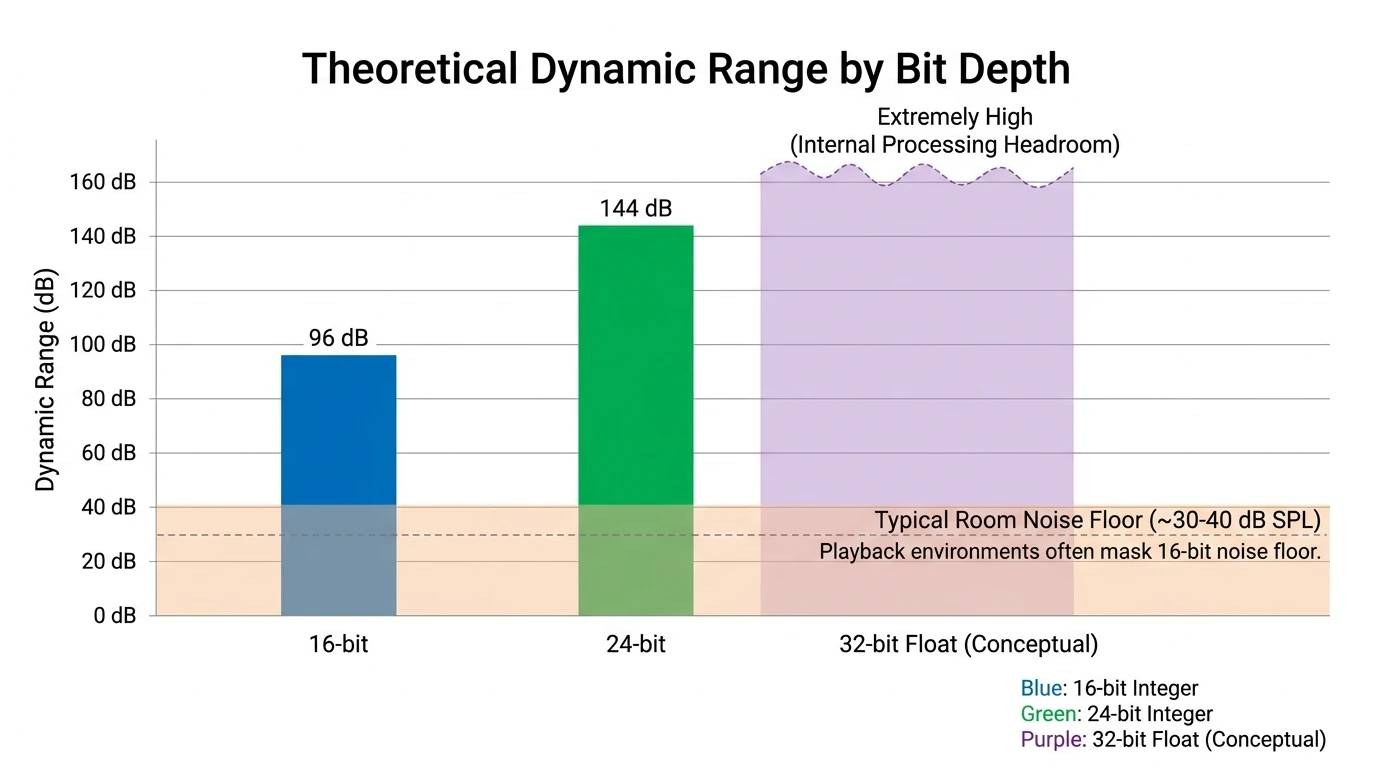
- 16-bit audio has ~96 dB of theoretical dynamic range.
- 24-bit audio has ~144 dB of theoretical dynamic range.
- The audible difference in normal listening is often tiny, because real rooms and gear have their own noise floors.
This is why consumer debates about “24-bit sounding better” often miss the point. The 24-bit WAV mixing advantage is mainly about production safety and cumulative noise, not magical playback improvements (see the explanations from SoundGuys and Xiph’s well-known deep dive on hi-res myths and workflows: Xiph / Monty).
Myth vs reality: the true 24-bit WAV mixing advantage
Myth 1: “24-bit always sounds better than 16-bit”
In final playback, often not in a controlled, reliably audible way—especially once streaming encoding and listening environments come into play. Blind tests and practical analyses regularly show that most listeners can’t consistently identify a difference when the mastering is identical.
Reality: Many “24-bit releases” that sound better do so because they’re mastered differently, not because the container is 24-bit (a point also raised in Archimago’s listening test discussion: Archimago’s Musings).
Myth 2: “If I mix in 24-bit, my mix will be louder”
Bit depth doesn’t increase loudness. Loudness is controlled by your gain staging, compression/limiting choices, arrangement, and mastering decisions.
Reality: 24-bit gives you room to be conservative with recording and stem levels (peaks like -12 dBFS to -6 dBFS) without worrying that quiet details will crumble into quantization artifacts later.
Myth 3: “Exporting 24-bit is pointless because DAWs mix in 32-bit float anyway”
It’s true most DAWs process internally in 32-bit float (sometimes 64-bit float). But the second you render a file, you’re committing to a fixed format.
Reality: The 24-bit WAV mixing advantage still matters for deliverables: stems, mix prints, and files for mastering. 24-bit fixed-point is a widely accepted “pro handoff” format that preserves a low noise floor and avoids needless truncation.
For more nuance on bit depth misunderstandings (and why internal float vs file formats get confused), SonicScoop has a useful overview: SonicScoop.
Where 24-bit helps the most: recording, stems, and heavy processing
1) Recording & gain staging without fear
If you track vocals or instruments and leave headroom (as you should), 24-bit helps keep the captured signal clean even if levels are set defensively.
- In real sessions, I often see creators track at -18 dBFS average to avoid clipping sudden peaks.
- At 24-bit, this still leaves plenty of resolution; at 16-bit, you’re closer to the noise floor in quiet passages.
2) Mixing lots of tracks and plugins (cumulative noise)
Every time you process audio—EQ, compression, saturation, resampling—rounding errors and noise can stack up, especially in complex sessions. Xiph’s explanation frames it well: 16-bit noise may be inaudible on playback, but after thousands of operations, it can become more relevant; 24-bit keeps that accumulated floor lower (Xiph).
3) Collaboration and mastering handoff
If you send a mix to mastering, 24-bit WAV is the default expectation in many studios because it preserves headroom and keeps the file uncompressed.
A practical studio-oriented reference: TYX notes typical delivery standards like WAV/AIFF at minimum 44.1kHz/24-bit, with headroom guidance for mastering prep (TYX mixing vs mastering).
Quick comparison: 16-bit vs 24-bit WAV for mixing and delivery
The part people miss: dithering (where the real damage can happen)
If you export a 24-bit mix down to 16-bit, you should dither once, at the final step where bit depth is reduced. Dither replaces quantization distortion with a tiny, randomized noise floor that is usually less audible and more natural.
- Dither only when reducing bit depth (e.g., 24 → 16).
- Don’t dither stems that will be processed further.
- Don’t dither multiple times.
iZotope provides a clear, practical guide, including why 24-bit dither is often inaudible but still helps avoid distortion artifacts: iZotope on dithering.
So… should you always use 24-bit WAV?
For mixing work, yes, most of the time—because it’s a safe, standard, low-risk choice. The 24-bit WAV mixing advantage is real in production workflows: headroom, lower cumulative noise, and smoother collaboration.
But for listeners, 24-bit rarely guarantees audible improvement by itself. If you hear a big difference, it’s often due to:
- A different master
- Level matching not being controlled
- Playback chain or DSP differences
- Expectation bias
What this means for Freebeat AI creators (music-driven video workflows)
If your goal is to generate tight, punchy, audio-reactive videos, the most important thing is clean structure and dynamics—clear transients for beat detection, consistent loudness, and unclipped peaks. In my experience, creators get better results when they export:
- A clean mix with headroom (no crushed limiter on the master unless it’s a stylistic choice)
- 24-bit WAV for the upload/master source, then platform encodes downstream as needed
- Consistent sample rate (often 48 kHz for video workflows)
If you’re building repeatable visual identities and character consistency, you’ll also want consistent audio deliverables so the pacing and energy changes map reliably across different releases.
Internal links:
- Learn how audio structure drives visuals in Freebeat AI Music Video Agent
- Explore options for performance-style visuals in stage performance music videos
- Create sing-along content with lyric videos with karaoke timing
Best Song Export Settings EXPLAINED | Levels? Dither? 16 vs 24 bit?
Practical export settings (safe defaults)
If you want a simple rule set that won’t get you in trouble:
- During production: keep sessions/stems at 24-bit WAV (or 32-bit float if your pipeline supports it end-to-end).
- Send to mastering: 24-bit WAV, same sample rate as the session, with peaks around -6 dBFS.
- Final delivery to 16-bit formats: convert at the end and dither once.
- Don’t upconvert 16-bit sources to 24-bit expecting better quality—it won’t add real detail.

Conclusion: the “advantage” is workflow, not magic
Think of 24-bit like wearing a safety harness: it doesn’t make you a better climber, but it reduces the cost of small mistakes. The 24-bit WAV mixing advantage is most real before the listener ever hits play—during recording, mixing, exporting stems, and handing off to mastering. If you’re creating music-driven videos, that extra margin helps you keep transients clean, dynamics intentional, and renders consistent across projects.
📌 sync like a pro discover ai tools for seamless music and beat integration
FAQ: 24-bit WAV mixing advantage (People Also Ask)
1) What are the benefits of 24-bit audio?
Mainly lower theoretical noise floor and more headroom during recording and mixing, making it easier to avoid clipping while keeping quiet details clean.
2) Is 24-bit WAV good for mixing?
Yes. It’s a common professional standard for stems and mix prints because it’s uncompressed and preserves headroom for processing and mastering.
3) Is 16-bit or 24-bit better for music listening?
For most playback situations, 16-bit is already enough. Differences people hear are often due to mastering, not bit depth alone.
4) Is WAV 24-bit better than FLAC?
They can be effectively equivalent in audio content if FLAC is truly lossless. WAV is uncompressed; FLAC is compressed without losing data.
5) Should I dither when exporting 24-bit WAV?
Only if you’re reducing bit depth (like 24 → 16). If you export 24-bit and stay 24-bit, you typically don’t dither.
6) Does Spotify use 16-bit or 24-bit?
Most streaming delivery is effectively around 16-bit/44.1 kHz for standard lossless tiers (where available) and lossy codecs otherwise; setting your device higher won’t add real information to the stream.
7) If my DAW is 32-bit float internally, do my source files need to be 24-bit?
Source files still matter for recording headroom and practical noise. 24-bit sources are safer for gain staging and future processing, even if internal math is float.


