logo
Agent
History
    Library
    Refer & Earn
      Tutorial
      Pricing
      30% OFF
      Meet OnBeat Effects
      Create pro visualizers instantly. Perfect sync, zero effort.
      Try the magic
      0/1500
      Remove watermark

      Create with the MiniMax 3.0 AI Video Generator

      MiniMax 3.0 generates video from text or images with native 2K resolution and synced audio. freebeat brings it together with 40+ other top AI models in one affordable, all-in-one platform.

      • Native 2K resolution output
      • 2K video with native synchronized audio
      • Re-edit clips without redoing all 15 seconds
      • Access 40+ video & image models
      • 500 free credits on sign-up — no credit card
      Trusted Worldwide

      Why Do 1M+ Creators Build With freebeat?

      Over a million creators trust the freebeat AI platform for their video projects. Our studio brings leading models like MiniMax 3.0 into a single, reliable workflow rated 4.8/5 stars and used in over 150 countries.

      1,000,000+
      Creators worldwide
      As of May 2026, freebeat has served over 1 million creators across the world.
      1,000,000,000+
      Seconds of music visualized
      As of May 2026, the platform has rendered over 1 billion seconds of AI music visuals.
      Over 150
      Countries resonated
      As of May 2026, creators from more than 150 countries have built music videos with freebeat.
      Forbes
      Featured 2026
      In May 2026, Forbes featured freebeat in its coverage of how AI is reshaping music video production.
      Yamaha
      Creator Pass partner
      Since March 2026, freebeat has been an official partner in the Yamaha Creator Pass program.
      Simple Workflow

      How Do You Create a Video with MiniMax 3.0?

      Generate videos with MiniMax H3 (Hailuo 3.0) on our platform in three steps. Our AI studio handles the setup so you can focus on creating, not configuring.

      ✨
      01

      Describe Your Scene or Upload an Image

      Start with a text prompt describing the video you want to create. You can also upload up to 9 reference images or 3 video clips to guide the MiniMax 3.0 model.

      💎
      02

      Select MiniMax 3.0 and Configure

      Choose MiniMax H3 (Hailuo 3.0) from our library of 40+ AI models. Adjust settings like output duration, which can be up to 15 seconds per clip for this model.

      🌙
      03

      Generate and Export Your Video

      Generate your clip in 2K resolution with native stereo audio. Download your MP4 file or continue editing by chaining clips or adding effects in the freebeat editor.

      Core Capabilities

      What Makes Our MiniMax 3.0 Tool Different?

      Create with MiniMax H3 inside a platform built for creators. We combine its unique features with a full production suite, giving you more power than a standalone API.

      High-resolution video frame of a futuristic city by MiniMax 3.0
      OUTPUT QUALITY

      Generate 2K Video with Synchronized Audio

      MiniMax 3.0 creates video and sound in a single step. This model generates visuals in crisp 2K resolution at 24fps, complete with native stereo audio that matches the on-screen action, eliminating the need for a separate sound design tool.

      • Native 2K resolution
      • 24 frames per second
      • Integrated stereo audio
      • Up to 15 seconds per clip
      User interface showing text instructions editing an AI video clip
      CREATIVE CONTROL

      Edit Your Video with Plain Language

      Side-by-Side

      How Does freebeat Compare to Other Video Generators?

      freebeat provides access to MiniMax 3.0 and 40+ models in one subscription. See how our all-in-one platform compares to standalone AI video generation tools.

      Feature
      freebeat
      Runway
      Kaiber
      Access to Models
      MiniMax 3.0 + 40+ models in one place
      Proprietary Gen-4 / Gen-4.5 models
      Aggregates several models like Veo & Kling
      Music Video Focus
      AI Director for beat-synced music videos
      Not music-driven; no native beat-sync
      User Outcomes

      What Can You Achieve with MiniMax 3.0 on freebeat?

      Go from a simple idea to a finished video faster. Our platform combines the power of models like MiniMax H3 with a workflow built for creators.

      ✨

      Create Without Technical Setup

      Access MiniMax 3.0 instantly in your browser. You don't need to manage API keys or install any software. We handle the infrastructure so you can start creating immediately.
      💎

      Produce Higher Quality Video

      Generate your video content in native 2K resolution. With MiniMax H3, your visuals are crisp and professional, perfect for projects where quality is key.
      🌙

      Save Time with Integrated Audio

      Your video and audio are created in one go. You don't need to find sound effects or music separately, because MiniMax 3.0 generates synchronized stereo audio with your video.
      🔮

      Never Juggle Subscriptions Again

      Your freebeat account gives you access to MiniMax 3.0 and over 40 other leading AI models. Stop paying for multiple single-purpose tools and get everything you need in one App.
      Explore More

      Explore More Freebeat Tools

      Every freebeat tool you need to take music from idea to publishable visual content — in one platform.

      AI Music Video GeneratorAI Music VisualizerAudio to VideoSuno to VideoAI Lyrics Video GeneratorAI Video GeneratorAI Lip Sync VideoGoogle Veo 3 FastWan 2.7Kling 2.0Wan 2.1 ProKling 1.6 ProRunway Gen 3Kling V3 ProSeedance 1.0 LitePixverse V4Google Veo 3
      Voices From Creators

      Why Do Creators Choose freebeat for AI Video?

      Artists, marketers, and independent creators use freebeat to access the latest AI models like MiniMax 3.0 without the technical overhead. Our platform is trusted by a community of over 1,000,000 users.

      4.8/5
      ★★★★★
      From 1,000,000+ Creators Featured on TAAFT
      KT
      Kenji Tanaka
      Digital Artist
      ★★★★★
      Accessing models like MiniMax 3.0 without dealing with APIs is a huge time-saver. The 2K output quality is fantastic for my visual projects. The freebeat platform makes it simple.
      MG
      Maria Garcia
      Social Media Manager
      ★★★★★
      The instruction-based editing is incredible. I can tweak a clip for a client just by typing what I want changed. MiniMax H3 on freebeat is perfect for quick, high-quality ad content.
      SC
      Sam 'Synthwave' Chen
      Music Producer
      Creator Workflows

      Who Creates with MiniMax 3.0 on freebeat?

      From social media experts to artists, creators use our platform to leverage powerful models like MiniMax H3 for a wide range of video projects.

      ✨

      Social Media Marketers

      They use MiniMax 3.0 to quickly generate eye-catching, short-form video ads and content for platforms like TikTok and Instagram. The integrated audio and 2K quality make their posts stand out.
      💎

      Independent Musicians

      Artists use short clips from MiniMax H3 as B-roll for their full-length music videos created with freebeat's AI Director, blending different visual styles into one cohesive, 6-minute final product.
      🌙

      Digital Artists & VJs

      They experiment with MiniMax 3.0's text-to-video capabilities to create unique visual loops and animations for live shows, using the instruction-based editing to fine-tune every detail.
      🔮

      YouTubers and Content Creators

      Common Questions

      What Should You Know About MiniMax 3.0?

      Find answers to common questions about creating with the MiniMax H3 (Hailuo 3.0) video model, its capabilities, and how it works within the freebeat platform.

      What is MiniMax 3.0?

      MiniMax 3.0, also known as MiniMax H3 or Hailuo 3.0, is an advanced AI model released in July 2026 that generates video from text or image prompts. It is known for producing high-quality 2K resolution video with natively synchronized stereo audio. On freebeat, you can access this model alongside 40+ others.

      Is MiniMax 3.0 free to use?

      Yes, you can use MiniMax 3.0 for free on freebeat. When you sign up, you receive 500 free credits with no credit card required, which you can use to generate video clips with MiniMax H3 and any other model on our platform.

      What is MiniMax 3.0 best for?

      MiniMax 3.0 excels at creating short video clips up to 15 seconds long with high visual fidelity and integrated audio. Its unique strengths, available on freebeat, include its native 2K resolution, synchronized sound generation, and the ability to edit clips using simple text instructions.

      How does MiniMax 3.0 compare to other models like Kling or Veo?

      MiniMax 3.0's key differentiators are its single-pass 2K video with audio and its instruction-based editing. While models like Kling 3.0 may offer longer clip durations, MiniMax H3 focuses on high quality and iterative control. freebeat lets you access all of these models to choose the best one for each shot.
      From the blog

      Insights, tutorials & creator stories

      Stay sharp on what's working in AI music video right now.
      View all articles →
      Comparing 2025's Leading AI Platforms for Cinematic Music VideosARTICLE

      Comparing 2025's Leading AI Platforms for Cinematic Music Videos

      Compare leading AI music video generators by realism, audio sync, customization, narrative tools, and mobile or social media…

      May 2026 · 12 min·freebeat blog
      Best AI Music Video Tools Compared for Output QualityARTICLE

      Best AI Music Video Tools Compared for Output Quality

      Compare the best AI music video generators in 2025 — Neural Frames, Kaiber, Runway ML, PIKA, and Freebeat — to find which…

      May 2026 · 7 minfreebeat blog
      What is MiniMax 3.0?
      MiniMax 3.0, also known as MiniMax H3 or Hailuo 3.0, is an advanced AI model released in July 2026 that generates video from text or image prompts. It is known for producing high-quality 2K resolution video with natively synchronized stereo audio. On freebeat, you can access this model alongside 40+ others.
      Is MiniMax 3.0 free to use?
      Yes, you can use MiniMax 3.0 for free on freebeat. When you sign up, you receive 500 free credits with no credit card required, which you can use to generate video clips with MiniMax H3 and any other model on our platform.
      What is MiniMax 3.0 best for?
      MiniMax 3.0 excels at creating short video clips up to 15 seconds long with high visual fidelity and integrated audio. Its unique strengths, available on freebeat, include its native 2K resolution, synchronized sound generation, and the ability to edit clips using simple text instructions.
      How does MiniMax 3.0 compare to other models like Kling or Veo?
      MiniMax 3.0's key differentiators are its single-pass 2K video with audio and its instruction-based editing. While models like Kling 3.0 may offer longer clip durations, MiniMax H3 focuses on high quality and iterative control. freebeat lets you access all of these models to choose the best one for each shot.
      Can I use videos made with MiniMax 3.0 commercially?
      Yes. Every video you create on freebeat, including those made with MiniMax 3.0, comes with a full commercial-use license. You own the copyright to your generated content and are free to publish and monetize it on platforms like YouTube, TikTok, and Instagram.
      How long can a video from MiniMax 3.0 be?
      A single clip generated by the MiniMax 3.0 model can be between 4 and 15 seconds long. However, within the freebeat platform, you can use our AI Director to turn these clips into a full-length, beat-synced music video up to 6 minutes long.
      Can I make a music video with MiniMax 3.0 on freebeat?
      Yes, absolutely. freebeat's specialized Music Video Generator can use clips from MiniMax 3.0 as part of a larger production. Our AI analyzes your song and directs a full video, syncing scenes to the beat and maintaining character consistency for a final output of up to 6 minutes.
      What inputs can I use to create a video with MiniMax 3.0?
      To generate a video with MiniMax H3 on freebeat, you can start with a text description. You can also provide significant multimodal input to guide the model, including up to 9 reference images, 3 reference video clips, and 3 reference audio clips for a single generation.
      Refine your output without starting over. After MiniMax H3 generates a clip, you can provide simple text instructions to change a character, adjust the scene, or modify the pacing. This iterative process gives you more precise control.
      • Describe changes in English
      • Adjust characters & objects
      • Modify scene pacing or sound
      • Skip re-rendering all 15 seconds from scratch
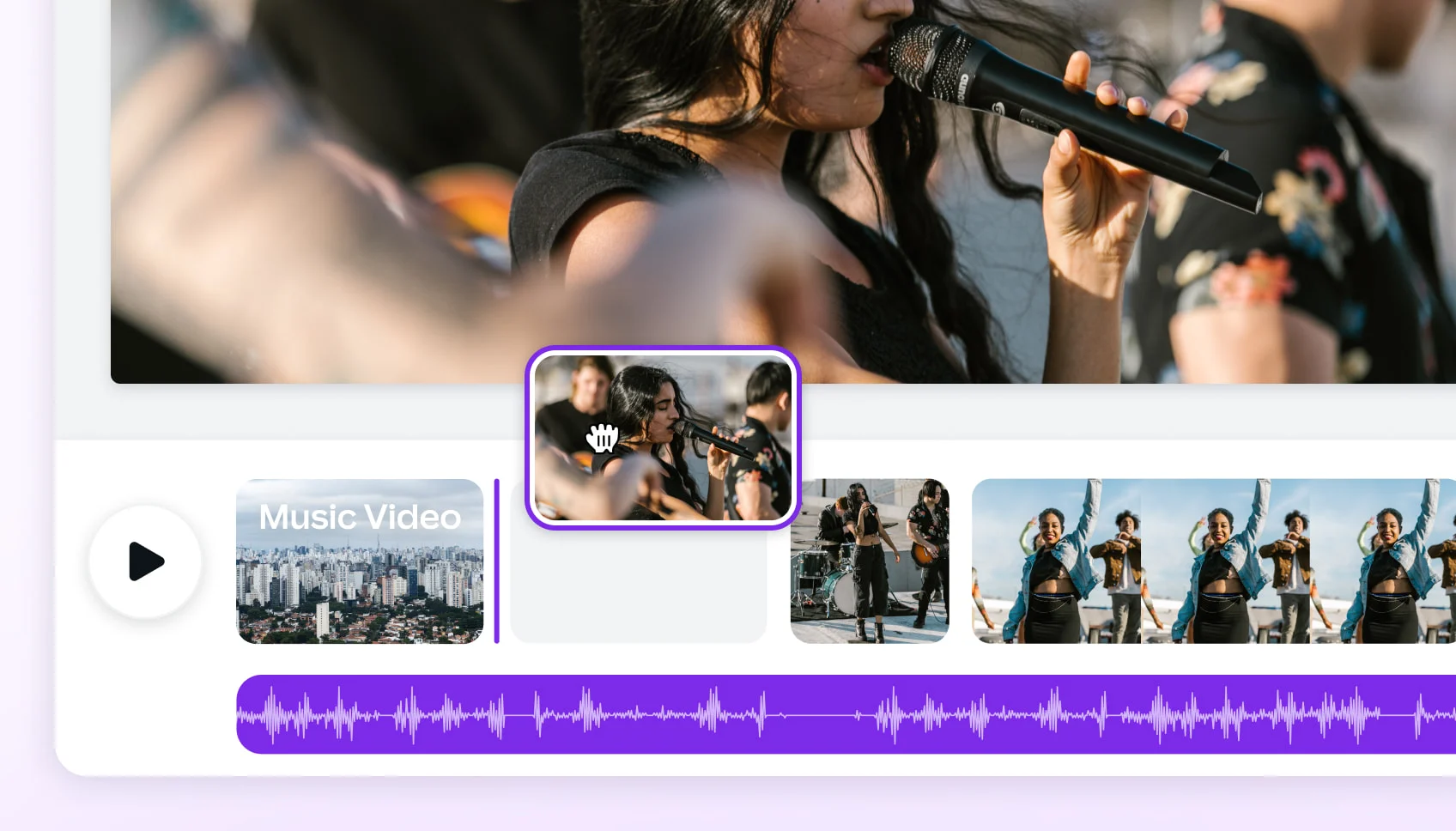
      Timeline showing short clips assembled into a full music video
      MUSIC VIDEO MAKER

      Turn MiniMax 3.0 Clips into a Full Music Video

      While MiniMax 3.0 is great for short clips, our AI Director uses it to create full-length music videos. We analyze your song's structure and use models like MiniMax H3 to generate beat-synced scenes for a complete 6-minute video.

      • Up to 6-minute full-length output
      • Beat-synced to your song's structure
      • AI Director manages A-roll & B-roll
      • Consistent character across all shots
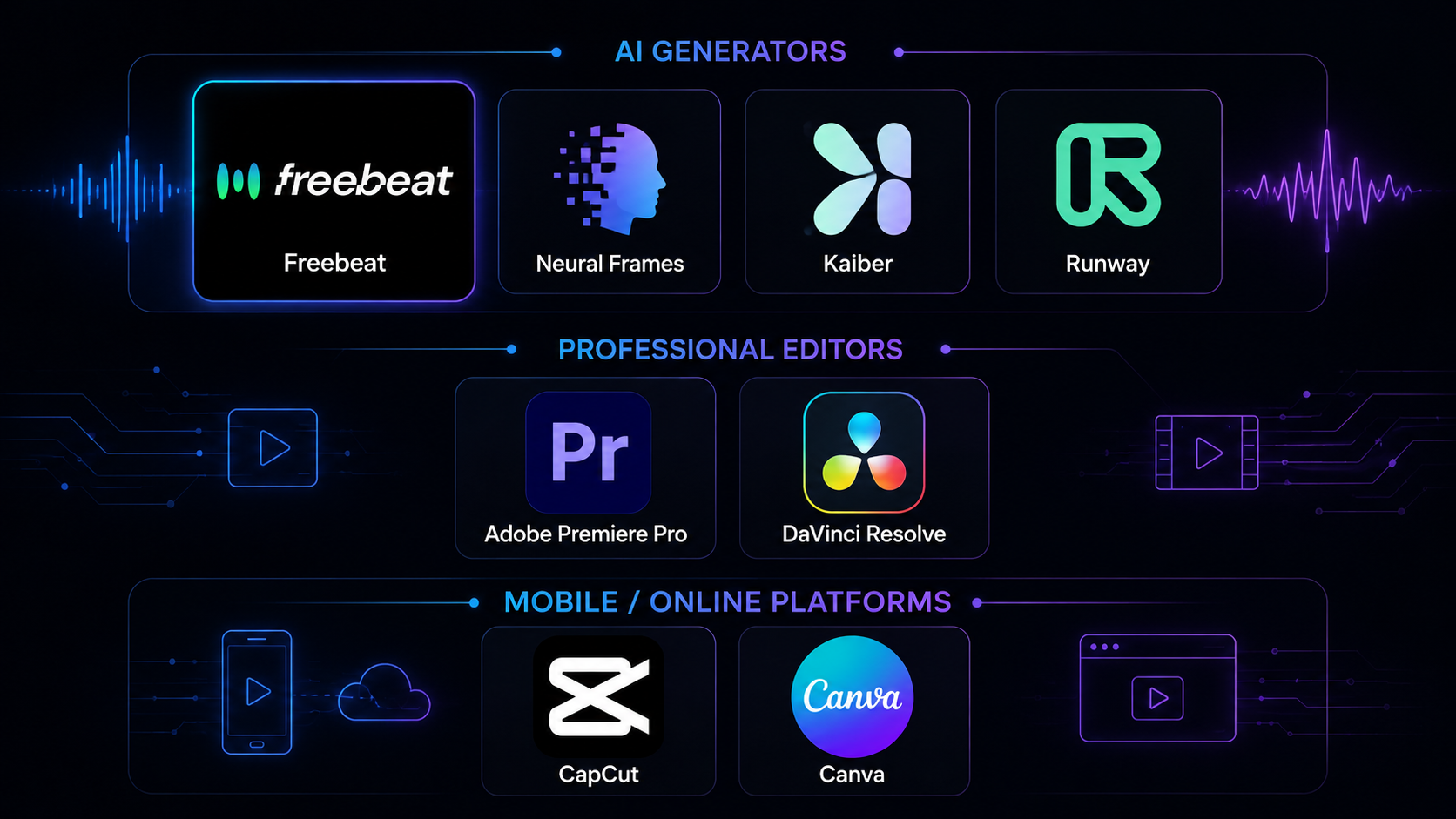
      Grid of logos representing various AI models on the freebeat platform
      ALL-IN-ONE PLATFORM

      One Account for Every Top AI Model

      freebeat is more than just a single tool. Your account gives you access to MiniMax 3.0 alongside 40+ other video and image models, plus a full suite of 30+ free tools for musicians, from an AI Lyrics Generator to a Spotify Canvas Maker.
      • 40+ video and image models
      • 30+ free musician-dedicated tools
      • One account, one billing system
      • Full commercial-use license
      Beat Sync feature aligns visuals to audio
      Maximum Video Length
      Up to 6 minutes for full music videos
      ~10-20s clips, requires manual extension
      Extended length on higher paid plans
      Free Trial
      500 free credits, no credit card
      One-time 125 credits
      Limited free option
      Output Resolution
      Up to 4K (MiniMax 3.0 is native 2K)
      Up to 4K via upscaling
      Upscaling on paid tiers
      Audio Generation
      Model-dependent (MiniMax 3.0 is native)
      No native audio generation
      No native sound generation
      Editing Workflow
      In-browser editor with overlays & effects
      Suite with motion brush & pro tools
      Timeline editor on higher plans
      Commercial Use
      Full commercial license included
      Requires paid plan for no watermark
      Requires paid plan
      🌈

      Iterate on Ideas Faster

      Use plain-language instructions to edit your video clips. This unique feature of MiniMax 3.0 on our platform lets you refine your work without starting from scratch every time.
      ⭐

      Own and Monetize Your Content

      You own the copyright to every video you generate. Your creations come with a full commercial-use license, ready to be published and monetized on any platform.
      Kling 2.1 Master
      Kling V3 Standard
      Seedance 2.5
      ★★★★★
      I used MiniMax 3.0 to create some short loops, then used the Music Video Generator to build a full visual for my track. Having everything in one tool, from short clips to a 6-minute video, is so efficient.
      FA
      Fatima Al-Jamil
      Indie Filmmaker
      ★★★★★
      The native audio generation is a standout feature. Getting video and synchronized sound in one pass with MiniMax 3.0 is a workflow revolution. Plus, the library of 40+ other models on freebeat gives me so many options.
      AV
      Alexei Volkov
      YouTube Creator
      ★★★★☆
      Being able to use up to 9 reference images gives me so much control over the final look. It helps keep the style consistent. MiniMax 3.0 is a powerful addition to the freebeat toolkit.
      CK
      Chloe Kim
      Marketing Consultant
      ★★★★★
      I recommend freebeat to all my clients. The value of having dozens of top models like MiniMax H3 under one affordable subscription is unbeatable. The commercial license is clear and simple.
      Creators generate custom intro sequences, explainer animations, and background visuals for their channels. Having access to MiniMax 3.0 and 40+ other models on freebeat provides an endless library of creative assets.

      Can I use videos made with MiniMax 3.0 commercially?

      Yes. Every video you create on freebeat, including those made with MiniMax 3.0, comes with a full commercial-use license. You own the copyright to your generated content and are free to publish and monetize it on platforms like YouTube, TikTok, and Instagram.

      How long can a video from MiniMax 3.0 be?

      A single clip generated by the MiniMax 3.0 model can be between 4 and 15 seconds long. However, within the freebeat platform, you can use our AI Director to turn these clips into a full-length, beat-synced music video up to 6 minutes long.

      Can I make a music video with MiniMax 3.0 on freebeat?

      Yes, absolutely. freebeat's specialized Music Video Generator can use clips from MiniMax 3.0 as part of a larger production. Our AI analyzes your song and directs a full video, syncing scenes to the beat and maintaining character consistency for a final output of up to 6 minutes.

      What inputs can I use to create a video with MiniMax 3.0?

      To generate a video with MiniMax H3 on freebeat, you can start with a text description. You can also provide significant multimodal input to guide the model, including up to 9 reference images, 3 reference video clips, and 3 reference audio clips for a single generation.

      What video formats does freebeat export?

      freebeat exports videos as MP4 files, which are compatible with all major platforms. You can create projects in 5 different aspect ratios: 16:9 for YouTube, 9:16 for TikTok and Reels, 1:1 for Instagram, and both 4:3 and 3:4.

      Do I need to install any software to use MiniMax 3.0?

      No, you do not need to install anything. freebeat is a fully browser-based software platform. You can access MiniMax 3.0 and our entire suite of AI tools from any device with a modern web browser, including desktops, laptops, tablets, and phones.
      ·
      Best Music Video Tools in 2026: 8 Options TestedCOMPARISON

      Best Music Video Tools in 2026: 8 Options Tested

      We tested 8 music video tools — AI generators, desktop editors, and mobile apps — on audio sync, output quality, speed, and…

      May 2026 · 14 min·freebeat blog
      Freebeat vs Neural Frames: Which AI Music Video Generator Should You Choose in 2026?ARTICLE

      Freebeat vs Neural Frames: Which AI Music Video Generator Should You Choose in 2026?

      Compare Freebeat vs Neural Frames in 2026 for AI music videos, character consistency, beat sync, lip sync, audio-reactive…

      May 2026 · 13 min·freebeat blog
      What video formats does freebeat export?
      freebeat exports videos as MP4 files, which are compatible with all major platforms. You can create projects in 5 different aspect ratios: 16:9 for YouTube, 9:16 for TikTok and Reels, 1:1 for Instagram, and both 4:3 and 3:4.
      Do I need to install any software to use MiniMax 3.0?
      No, you do not need to install anything. freebeat is a fully browser-based software platform. You can access MiniMax 3.0 and our entire suite of AI tools from any device with a modern web browser, including desktops, laptops, tablets, and phones.