Pika Labs Explained: What It Is and Why It Matters
You’ve got an idea for a video—maybe a product teaser, a quick meme clip, or a music visual—but you don’t have the time (or patience) for a full edit timeline. That’s the exact moment Pika Labs starts to make sense. It’s built for fast, high-impact AI clips where you generate, review, tweak, and regenerate until it feels right. So what is Pika Labs really doing under the hood, and why are creators leaning on it so heavily?
What Is Pika Labs?
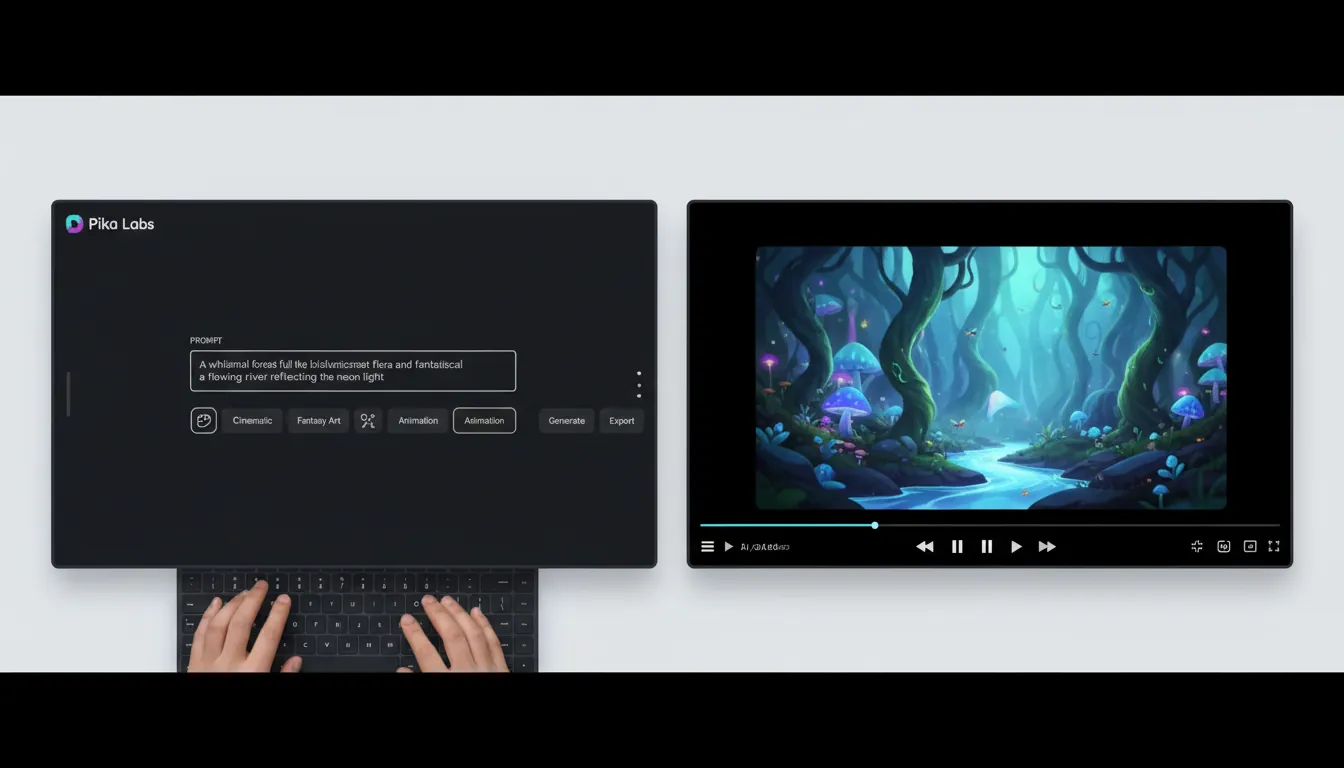
Pika Labs (often branded as Pika) is an AI video generator focused on turning text prompts and images into short videos that are optimized for social platforms. Instead of starting with raw footage and editing on a timeline, you start with a concept, generate a clip, then iterate. This “generation loop” design is a big reason Pika Labs feels fast for everyday creators.
In practice, Pika Labs is best for:
- Short-form content (think TikTok/Reels/Shorts pacing)
- Quick concept tests (storyboards, ad angles, hooks)
- Stylized effects and transformations (VFX-like moments)
For a broad overview of Pika’s major release updates and new “scene building” direction, see The Decoder’s coverage of Pika 2.0 and Scene Ingredients.
Why Pika Labs Matters (Beyond the Hype)
The biggest shift isn’t “AI can make video.” It’s that Pika Labs reduces the cost of iteration—the part of video production that usually burns time and budget. I’ve used tools in this category for marketing tests, and the practical win is momentum: you can try five hooks, two styles, and three camera directions in the time it used to take to export one rough cut.
Pika Labs matters because it enables:
- Faster creative testing: generate variants for different audiences quickly
- Lower skill barrier: no timeline editing required for a first draft
- More “idea throughput”: creators can ship more experiments per week
How Pika Labs Works (Simple Mental Model)
Pika Labs is less like Premiere and more like a rapid prototyping engine. The workflow usually looks like this:
- Start with a prompt or reference image (or both).
- Choose a style/motion direction (cinematic, anime, cartoon, etc.).
- Generate a short clip (often seconds long).
- Adjust the prompt or controls (camera, motion, effects).
- Regenerate until the clip matches your intent.
This matches what many guides describe as Pika’s “loop-first” interface model (prompt → generate → refine), rather than a timeline-first editor.
How to use Pika Labs - Image to Video Generator (Latest Features 2024)
Key Features to Know (And What They’re For)
Pika Labs capabilities evolve quickly, but a few themes show up consistently across versions and creator workflows.
1) Text-to-video and image-to-video generation
You can describe a scene (“a sneaker floating through neon fog”) or provide an image and animate it. This is the core of Pika Labs: speed-to-first-result.
2) “Scene Ingredients” / compositing-like workflows
Pika introduced the idea of building scenes from multiple uploaded elements (people/objects/environments) and then animating them together. It’s not traditional compositing—but it’s a meaningful step toward controllable scene construction.
3) Social-first outputs
Pika Labs is designed around short clips and common aspect ratios used on social platforms, which reduces friction when you’re creating at internet speed.
4) Iteration and motion controls (Pikaframes, turbo modes, etc.)
Newer Pika versions emphasize smoother transitions, higher resolution options, and faster generation modes—useful when you’re experimenting a lot.
Tip from experience: keep each shot focused—one subject, one main action, one core effect. When prompts get crowded, consistency tends to drop.
Pika Labs Pricing: Is Pika Labs Still Free?
Yes, Pika Labs typically offers a free tier that’s meant for testing and learning. At the time of writing, many creators report a free plan with monthly credits (commonly cited as 80 monthly video credits) and access to key tools, with paid tiers unlocking more speed, higher usage, and advanced features.
For current plan details, always verify on the official pricing page. Third-party pricing summaries can also be helpful for quick benchmarking—see SaaSworthy’s Pika Labs pricing overview for a snapshot of common tiers and starting price points.
Pika Labs vs Other AI Video Generators (When It’s the Right Choice)
Pika Labs is often strongest when you need fast, punchy clips and you’re willing to iterate. If you need long-form continuity, complex multi-shot storytelling, or deep editorial control, you may pair it with other tools.
Here’s a practical comparison (creator-oriented, not hype-oriented):
| Tool | Best For | Typical Strength | Typical Tradeoff |
| ---------------------------------- | ------------------------------------- | ----------------------------------------------------- | ------------------------------------------------- |
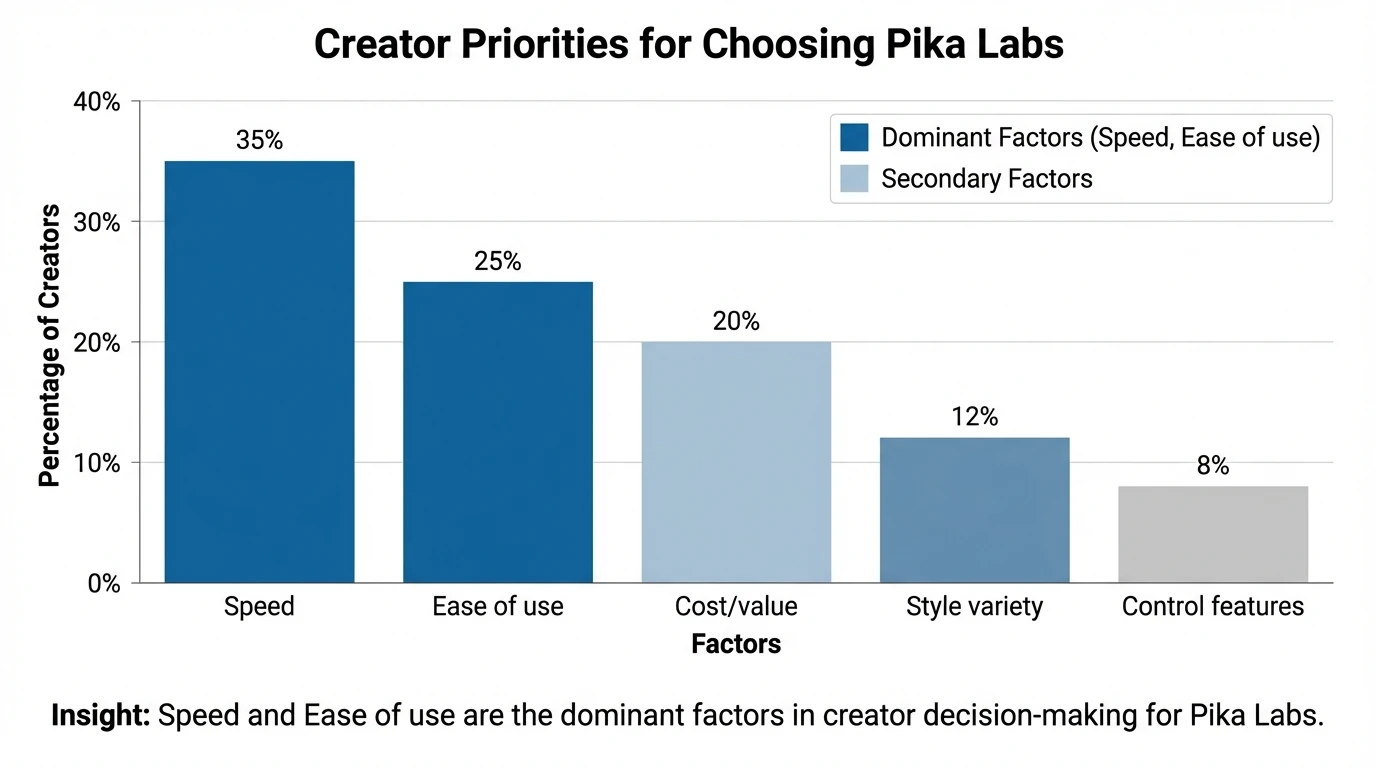
| **Pika Labs** | Short social clips, fast iteration | Speed + ease of use + creator-friendly effects | Short durations; continuity can vary across shots |
| **Runway** | Filmmaking workflows, tool depth | More “pro” control surface and editing-style features | More knobs to learn; can slow ideation |
| **Luma Dream Machine** | Realistic motion brainstorming | Natural motion in short clips | Less predictable art direction in some prompts |
| **OpenAI Sora** | Long-form coherence (when accessible) | Strong continuity + cinematic demos | Access/limits and higher cost for full capability |
| **Adobe Firefly (partner models)** | Commercial workflows and ecosystem | Integration and policy-friendly positioning | Less “wild” experimentation depending on workflow |
If you’re using Adobe’s ecosystem, Adobe also documents how partner models like Pika can be used inside its tooling—see Adobe’s guide to generating videos with Pika models.
Best Use Cases for Pika Labs (Real-World Creator Scenarios)
Pika Labs tends to shine when you’re producing many small assets, not one “perfect” film.
Common high-ROI use cases:
- Ad concept testing: generate 5–10 visual angles before committing to production
- Product teasers: quick motion promos for launches and drops
- Explainers and micro-demos: simple visuals to support a point fast
- Music visuals: loops and stylized scenes to match a vibe (more on this below)
Where Pika Labs Can Fall Short (So You Don’t Waste Time)
Pika Labs is powerful, but it’s not magic. You’ll save time if you plan for these realities:
- Shot-to-shot consistency: character details and object continuity can drift
- Exact brand compliance: logos, typography, and precise layouts are better added in post
- Long narratives: stitching many AI shots into a coherent story still takes effort
My rule: use Pika Labs for ideation + hero moments, then finish with light editing elsewhere.
“Why It Matters” for Music Creators (And Where Freebeat AI Fits)
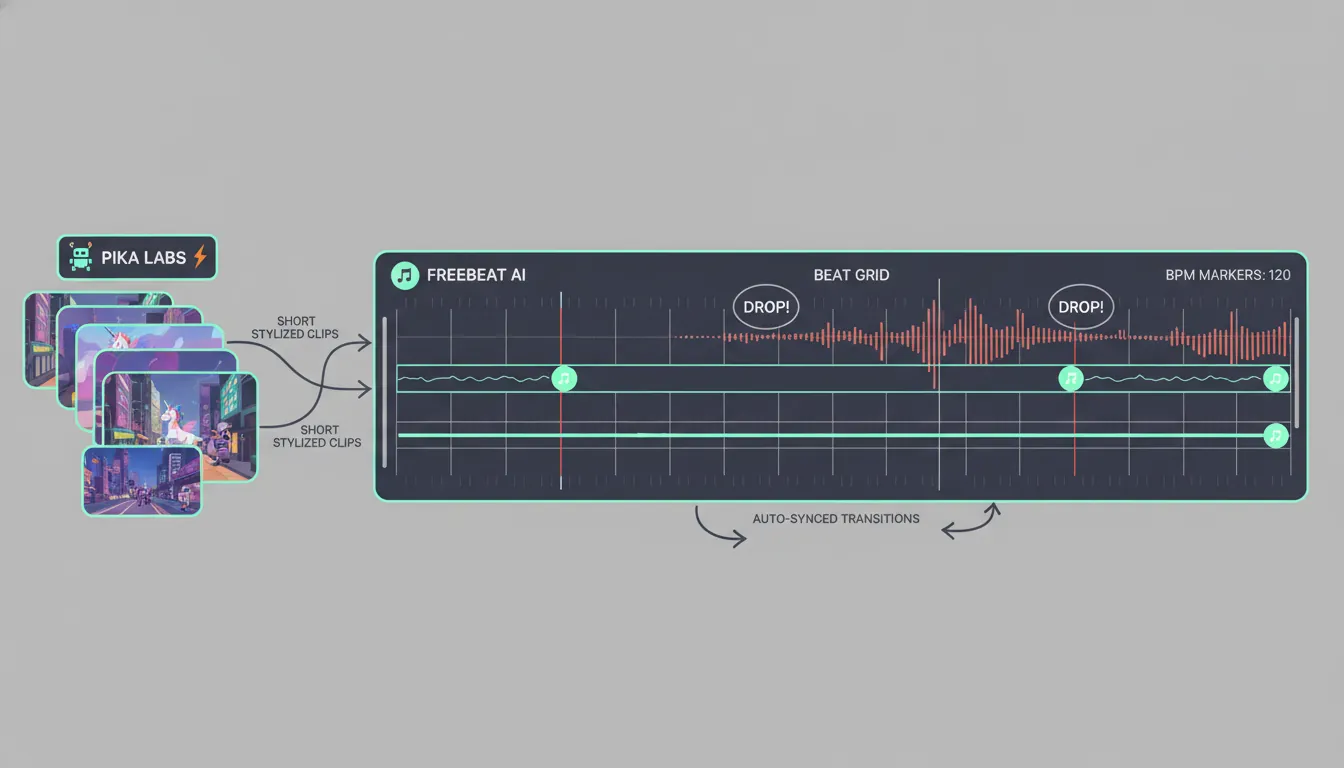
If you’re a musician, Pika Labs can generate cool visuals—but it doesn’t inherently understand your song structure. In many projects I’ve seen, creators end up manually syncing cuts to the beat, especially around drops and section changes.
That’s where an audio-first platform can be a better primary tool. Freebeat AI is designed specifically to turn songs and beats into music-driven videos that follow BPM, bars, drops, and energy changes. Instead of prompting isolated clips, you’re effectively generating a planned music video with pacing logic built in.
A practical workflow many creators use:
- Use Pika Labs for a few standout shots (a portal moment, a stylized character intro, a surreal B-roll idea).
- Use Freebeat AI to assemble (or generate) the full track-synced video around those moments—especially for consistent rhythm transitions.
Internal links you may find useful:
Quick Start: How to Get Better Results in Pika Labs
Use this checklist to improve quality without overcomplicating your prompts:
- Anchor the subject (who/what is the focus?)
- Specify one action (running, turning, exploding, dancing)
- Define the environment (location + lighting)
- Add camera intent (close-up, dolly in, handheld, wide)
- Lock style terms (cinematic neon, anime cel-shaded, claymation)
Keep a “prompt spine” you reuse so your outputs feel like one brand, not random clips.
Conclusion: Pika Labs in One Sentence (And Your Next Step)
Pika Labs matters because it makes video creation feel like rapid experimentation—prompt, generate, tweak, repeat—so creators can ship more ideas with less friction. If you mostly need short, scroll-stopping clips, it’s a smart tool to keep in your stack. If your goal is a full music video that stays tightly synced to a song’s structure, pairing Pika-style shots with an audio-reactive platform can save hours of manual timing work.
📌 master ai music creation how to generate beats and videos seamlessly
FAQ: Pika Labs (People Also Ask)
1) Is Pika Labs still free?
Pika Labs commonly offers a free tier with monthly credits so you can test the tool before paying. Limits apply, and higher usage/speed typically require a subscription.
2) How much do Pika Labs cost?
Pricing changes over time, but Pika Labs is often cited as starting around entry-level monthly plans, with higher tiers for more credits and faster generation. Check the current plan page before subscribing.
3) Is Pika AI legit?
Yes—Pika Labs is widely used by creators and marketers, and its speed is frequently cited as a standout advantage. Like all AI video tools, output consistency can vary, so expect to iterate.
4) How do I cancel my Pika AI subscription?
Typically you can cancel in account settings, or contact support if needed. Cancellation usually takes effect at the end of the billing cycle (confirm in your account terms).
5) What is the best app to generate AI videos for free?
It depends on your goal: some tools are better for cinematic coherence, others for social speed. Many creators test multiple tools—Pika Labs for quick iterations, and other generators for longer or more controlled sequences.
6) Is there a 100% free AI video generator?
Most platforms offer free credits or freemium tiers, but “100% free” usually comes with strict limits (watermarks, low resolution, small monthly quotas, or restricted features).
7) Can ChatGPT create videos for free?
ChatGPT itself doesn’t inherently “render video” without connected video tools or integrations. In practice, creators use ChatGPT to write prompts and shot lists, then generate video in tools like Pika Labs or other AI video platforms.


