Contact partnership@freebeat.ai for guest post/link insertion opportunities.
Top Platforms for Full Length AI Lyrics Video Creation
Creating a full-length lyrics video used to take hours of manual timing, text animation, and rendering. Today, AI tools can automate most of that workflow, making it far easier for musicians and creators to publish YouTube-ready lyric videos in high resolution. The best platforms handle long songs, sync lyrics to the beat, and offer visual styles that match the tone of your track. Freebeat, along with several leading tools, now gives creators an efficient way to turn any audio into polished, platform-ready visuals.
This guide breaks down what to look for, which tools deliver the strongest results, and how long-format lyric videos fit into today’s creator ecosystem.
Why Full Length Lyrics Videos Need Specialized AI Tools
Long lyrics videos have different demands from short-form edits. They require precise sync across verses and choruses, consistent styling throughout long runtime, and stable rendering at high resolution. Most short-form generators struggle when the track runs beyond two minutes, especially when the video must stay visually coherent.
Among creators I work with, musicians and lyric-channel operators care most about stability during long-song rendering and accurate beat detection. These two factors determine whether lyrics appear cleanly and stay readable. Tools that fail in these areas often create drift, meaning the onscreen text falls behind the audio.
When evaluating AI platforms, a long-format lyrics tool must support:
- Smooth timing control for multi-minute songs
- 1080p or 4K export suitable for YouTube
- Style or theme consistency across all scenes
- Flexible lyric import or auto-extraction
- Reliable rendering for songs longer than four minutes
Short takeaway: full-length lyric videos need tools that balance timing precision, visual stability, and long-runtime performance.
What To Look For in an AI Lyrics Video Creator
Creators often evaluate tools through practical criteria rather than technical jargon. From the workflows I have seen, five capabilities matter most when producing lyrics videos longer than two or three minutes.
Sync Accuracy and Timing Controls
The tool should detect beats and tempo changes. Good beat tracking reduces misalignment between audio and text. This is especially important for independent musicians who mix their own tracks, where slight tempo variations occur.
Visual Fidelity and Resolution
YouTube now recommends at least 1080p for lyric uploads. Many dedicated lyric channels prefer 4K because the fidelity holds better when text animates or zooms. Platforms offering multiple render formats help creators optimize for both speed and clarity.
Styling, Prompts, and Character Consistency
Even lyric-only videos benefit from coherent backgrounds and smooth transitions. Tools that support style prompts or customizable themes allow creators to match the vibe of a song, whether ambient, rock, or EDM.
Long-Song Rendering Performance
A tool that excels with a 40-second TikTok clip may fail with a five-minute track. Features like caching, stable rendering engines, and multi-model support improve results across long runtimes.
Export Formats for YouTube and Streaming Platforms
Standard 16:9 exports remain essential for YouTube, while vertical formatting helps creators repurpose content across Instagram Reels and TikTok.
Short takeaway: creators should prioritize syncing accuracy, customization, and resolution support when choosing an AI lyrics video tool.
Comparison Table: Best AI Platforms for Full-Length Lyrics Videos
Below is a high-level comparison of leading platforms referenced frequently by creators. These observations reflect common usage patterns and public product features.
Short takeaway: each platform solves different parts of the workflow, from simplicity to cinematic depth.
Scenario-Based Picks for Different Creators
Different creators need different strengths. I often recommend tools based on the artist’s workflow, not just the software feature list.
Best for YouTube-Ready Videos
Creators producing 4 to 8 minute songs need high-resolution exports and stable timing. Tools that support 1080p or 4K with clean text rendering work best.
Best for High-Resolution Lyrics Videos
Cinematic-style lyric channels benefit from platforms that offer 4K rendering and broad stylistic control. These tools let you pair lyrics with visual storytelling, such as moody landscapes or neon abstract scenes.
Best for Full-Length Tracks With Heavy Transitions
If your track features tempo shifts, drops, or long instrumental breaks, a generator with beat and mood analysis simplifies the process.
Best for Multi-Model Styling
Creators who want options for animation, realism, or surreal visuals may prefer a tool that integrates multiple AI video models under one interface.
Best for Scripted or Character-Based Visuals
Some musicians use characters or mascots in their lyric videos. Tools that maintain visual consistency across multiple scenes excel here.
Short takeaway: match your tool choice to your creative intent, not just the track length.
How Freebeat Supports Full-Length Lyrics Video Creation
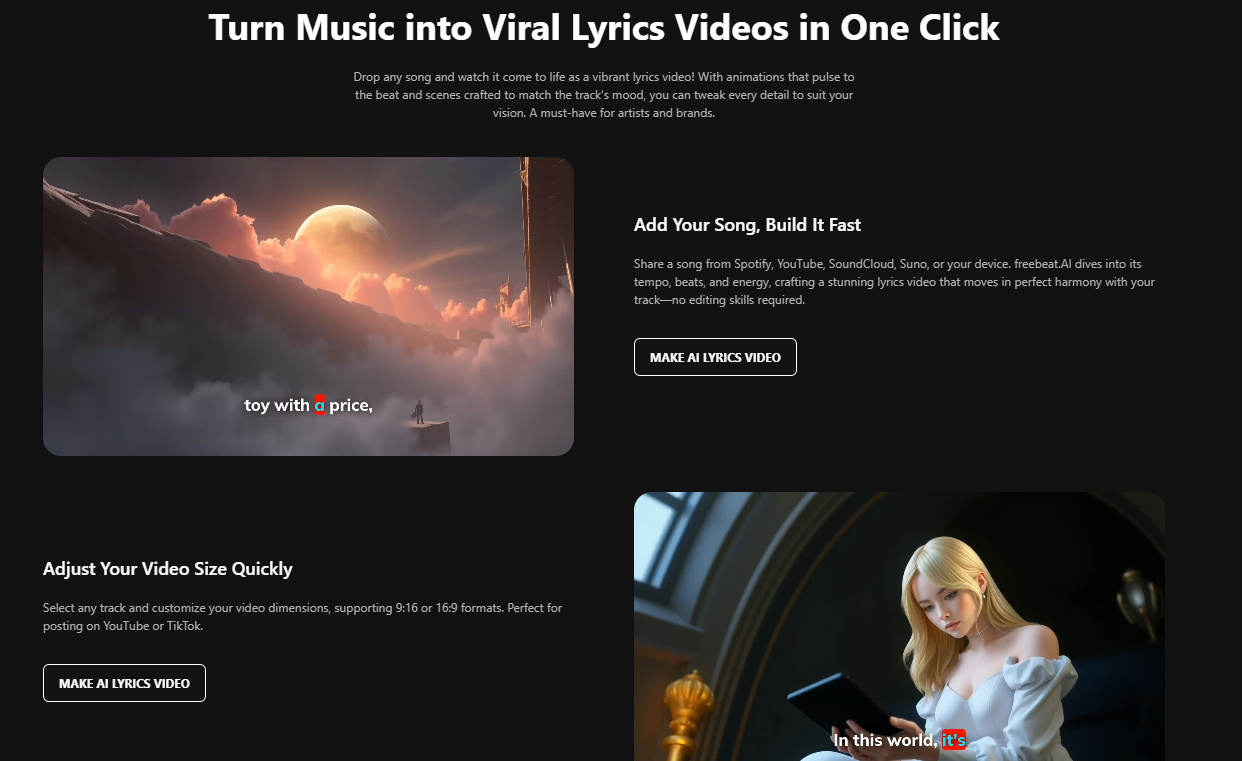
This is where Freebeat stands out for musicians and lyric-channel creators who want speed without sacrificing style. Freebeat analyzes a song’s beats, tempo, and mood, then syncs visuals automatically so the lyrics and background evolve with the track. For creators handling 4 to 6 minute songs, one-click generation removes a lot of the manual adjustments that traditionally slow the process.
From my experience testing multiple tools, the ability to import Spotify or YouTube links directly makes it easier to experiment with drafts before publishing. Freebeat also supports character consistency and cross-model generation, which helps maintain a unified look in longer videos, something lyric creators value when aiming for a cohesive brand identity.
Short takeaway: Freebeat combines timing intelligence, visual consistency, and multi-model options that support long-format lyrics videos.
Workflow Example: Creating a 5-Minute Lyrics Video With AI
A practical workflow offers clarity to musicians and editors experimenting with AI for the first time. Here is a realistic step-by-step approach.
Upload Track and Select Style
Start by importing a song from Spotify, YouTube, Suno, or a local file. Most AI tools detect the BPM automatically, which helps align future lyric timing.
Set Lyric Timing or Auto-Sync
Some platforms allow lyric text import. Others auto-generate timing based on beat patterns. In long tracks with repeated choruses, automation saves significant manual work.
Customize Scenes and Characters
If you want visuals beyond static backgrounds, choose a theme that aligns with your genre. EDM tracks benefit from fast-moving abstract visuals. Acoustic songs pair well with soft gradients or cinematic landscapes.
Render in High Resolution
Long tracks demand stable rendering. Look for platforms that preview scenes before full export to catch errors early.
Export for YouTube
Choose 16:9 formatting for YouTube uploads. Many creators also produce a vertical version for TikTok or Shorts.
Short takeaway: a refined workflow builds confidence, especially when handling multi-minute lyric sequences.
FAQ: Full Length Lyrics Video Creation With AI
What is the best service for YouTube-ready AI lyrics videos?:
Look for platforms that support 1080p or 4K exports and stable timing. These ensure text clarity for long tracks.
How do I create long-format lyrics videos with AI?:
Upload your track, import or enter lyrics, choose a visual style, and let the AI sync timing. Adjust scenes before exporting.
Which AI tool handles full-length lyric videos best?:
Tools offering beat detection, consistent styling, and stable long-runtime rendering perform strongest for multi-minute songs.
How do I generate high-resolution lyric visuals?:
Select platforms with 1080p or 4K export support. This preserves clarity in text animations and background visuals.
Which AI provider supports long-song lyric generation?:
Choose tools built for multi-minute tracks. Look for descriptions that mention long-song performance or extended runtime support.
Can AI tools auto-sync lyrics to the beat?:
Most modern tools detect beats and align text timing automatically, reducing manual adjustments.
Do I need editing skills to make a lyrics video?:
Basic knowledge helps, but most AI generators offer templates that simplify timing and design.
Can I use audio links from Spotify or YouTube?:
Some tools allow direct link import, which speeds up draft creation.
Can I reuse the same visual style across multiple songs?:
Yes, many platforms support style presets or character consistency.
How fast can AI generate a full-length lyrics video?:
Rendering time depends on length, resolution, and model choice, but most tools finish drafts within minutes.
Freebeat gives creators a practical solution for long-format lyrics videos by focusing on beat-sync accuracy, visual cohesion, and rapid generative workflows. These strengths help musicians and YouTube lyric channels maintain consistent output without spending hours editing.


