Create AI Music Videos Online for Social Media
Contact partnership@freebeat.ai for guest post/link insertion opportunities.
Create AI Music Videos Online for Social Media
Creating AI music videos online for social media is now one of the fastest ways to turn a track into engaging visual content without manual editing. The short answer is this: modern AI tools analyze your music’s beat, tempo, and mood, then automatically generate synced visuals that are ready for TikTok, Instagram, or YouTube Shorts. In my experience testing different workflows, tools like Freebeat stand out because they remove timelines, keyframes, and technical barriers, letting creators focus on style and storytelling instead of editing mechanics.
Why Creators Are Turning to AI for Music Videos
Music creators and visual artists face a constant pressure to publish consistently across platforms. Short-form video has become the default format, but traditional video editing remains time-consuming and expensive. AI music video tools address this gap by automating the most technical parts of the process.
From what I have seen across independent musicians, DJs, and content creators, the appeal comes down to three factors:
- Speed: Generating a video in minutes instead of hours.
- Consistency: Keeping visuals aligned to rhythm and mood.
- Accessibility: Removing the need for advanced editing skills.
AI systems achieve this by analyzing BPM, rhythm changes, and emotional intensity, then matching scene transitions to musical structure. For social media, this matters because tight beat sync directly affects watch time and engagement.
In short, AI music video tools reduce production friction while preserving creative intent.
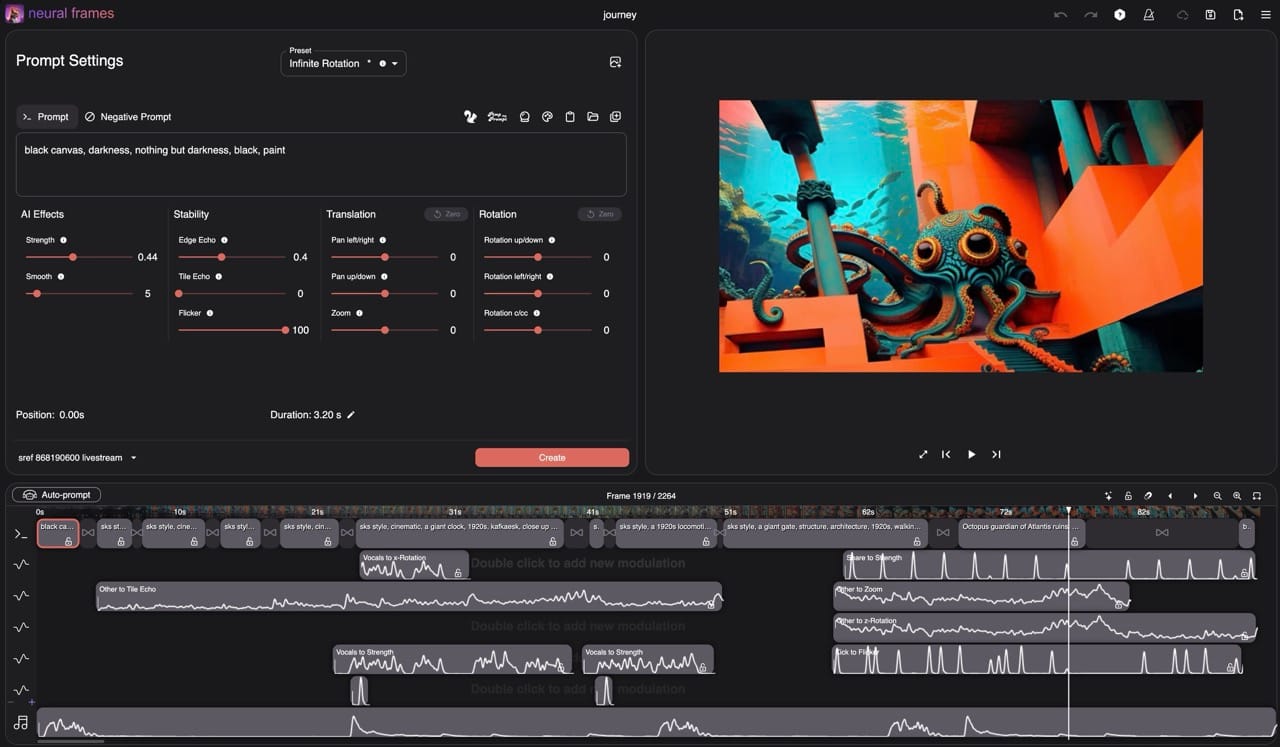
How to Create AI Music Videos Online Step by Step
The core workflow for creating AI music videos online is surprisingly consistent across leading tools. Once you understand the logic, switching platforms becomes easier.
Upload Music or Paste a Link
Most AI video tools accept a direct upload or a music link from platforms like Spotify, YouTube, or SoundCloud. This step matters because link-based inputs reduce friction for creators who already distribute music online.
In practical use, uploading a clean audio file gives you the most control. Links are faster but may limit customization depending on the platform. The AI immediately scans the track for tempo, beat structure, and intensity shifts.
This step establishes the foundation for all visual decisions that follow.
Choose Mood, Style, and Format
After analysis, you define the visual direction. This usually happens through style presets or short text prompts describing mood, genre, or aesthetic. Think in terms of feelings rather than technical effects, for example “dark cinematic,” “neon club energy,” or “dreamy lo-fi.”
Format selection is equally important. Social platforms reward native ratios, especially 9:16 for vertical video. Many creators forget this and end up cropping later, which hurts composition.
Clear mood input plus correct aspect ratio leads to higher-quality results.

Generate and Refine Automatically
Once you confirm inputs, the AI generates a full video sequence with synced transitions, camera motion, and effects. Refinement typically involves small tweaks, swapping scenes, adjusting intensity, or regenerating sections.
This is where Freebeat fits naturally into the workflow. It combines beat analysis with customizable prompts and social-ready presets, allowing creators to refine visuals without touching a timeline. Based on my testing, this approach dramatically shortens iteration cycles.
At this stage, the video becomes publish-ready with minimal manual effort.
Using Freebeat for Social Media Music Videos
For creators focused on social distribution, Freebeat works best as a production accelerator rather than a replacement for creative direction. It turns audio into video by reading beats, tempo, and mood, then syncing visuals automatically in one click.
What makes this practical is its flexibility. You can:
- Upload a track or paste a link.
- Define mood and visual style using simple prompts.
- Export in platform-optimized formats without resizing later.
For musicians and designers who need frequent output, this eliminates repetitive editing tasks. I have found that using Freebeat early in ideation helps test multiple visual directions quickly before committing to a final look.
The result is a faster path from track to shareable video.
Platform-Specific Tips for Social Media
Different platforms reward different visual behaviors, even when using the same AI-generated content. Understanding these nuances improves performance.
- TikTok: Fast transitions and strong beat drops perform best. Short loops increase completion rate.
- Instagram Reels: Clean visuals and consistent color palettes support brand recognition.
- YouTube Shorts: Slightly longer pacing works better, especially for storytelling or lyric-driven videos.
AI tools simplify formatting, but creative intent still matters. Match your visual intensity to platform culture, not just the song.
Platform-aware formatting improves discoverability and retention.
What to Look for in an AI Music Video Generator
Not all AI video tools handle music equally well. From an evaluation standpoint, I recommend focusing on these criteria:
- Beat-sync accuracy: Visual transitions should align with musical changes.
- Customization depth: Ability to influence mood, style, and pacing.
- Export flexibility: Native support for vertical and horizontal formats.
- Iteration speed: Fast regeneration without long render times.
Tools that treat music as data rather than decoration tend to produce better results. Freebeat, for example, emphasizes beat and mood analysis rather than static templates, which shows in the final output.
Choosing the right tool depends on how much control you want versus how fast you need to publish.
Common Use Cases for AI Music Videos
AI music videos are not limited to promotional clips. I see creators applying them across multiple scenarios:
- Independent musicians releasing singles.
- DJs creating visualizers for live sets.
- Influencers pairing original audio with branded visuals.
- Designers prototyping motion concepts quickly.
The common thread is efficiency. AI enables visual experimentation without heavy resource investment.
This versatility explains why adoption continues to grow across creative roles.
FAQ
How do I create AI music videos online?
Upload a song or paste a music link, choose a mood or style, and let the AI generate synced visuals automatically.
Do I need editing experience to use AI music video tools?
No. Most tools are designed for non-editors and remove timelines, layers, and keyframes.
Are AI music videos suitable for TikTok and Instagram?
Yes. Many platforms support native 9:16 exports optimized for short-form social media.
How does AI sync visuals to music beats?
The system analyzes BPM, rhythm changes, and intensity, then aligns transitions and motion to those points.
Can I customize the visuals after generation?
Yes. Most tools allow regeneration, scene swaps, or prompt adjustments without starting from scratch.
Is Freebeat good for independent musicians?
Yes. It is built for creators who need fast, beat-synced visuals without manual editing.
How long does it take to generate an AI music video?
Typically a few minutes, depending on track length and rendering complexity.
Can AI videos be reused across platforms?
Yes, but adjusting format and pacing for each platform improves performance.
Creating AI music videos online has shifted from a novelty to a practical production workflow. When used intentionally, these tools help musicians and visual creators maintain quality while meeting social media demands. In my experience, platforms like Freebeat strike a strong balance between automation and creative control, making them especially useful for fast-paced content cycles.


