Best MP3 to MP4 Converter for AI Music Videos
Contact partnership@freebeat.ai for guest post/link insertion opportunities.
Best MP3 to MP4 Converter for AI Music Videos
If you want the best MP3 to MP4 converter for AI music videos, the answer today is not a traditional converter at all. Modern creators need tools that turn audio into synchronized visuals automatically, not just wrap an MP3 file inside a video container. Platforms like Freebeat, which analyze beats and mood to generate visuals during conversion, represent how AI music video workflows now actually work.
I have tested dozens of audio-to-video tools while working with musicians and content creators, and one trend is clear. The real challenge is no longer conversion. It is turning music into engaging visual storytelling quickly.
Why MP3 to MP4 Conversion Matters for AI Music Videos
Most creators searching for an MP3 to MP4 converter are trying to publish music videos on YouTube, TikTok, or Instagram. The technical requirement is simple: platforms prefer MP4 video formats. The creative requirement is harder: audiences expect motion, rhythm, and visual identity.
Traditional converters only do this:
- Attach static artwork to audio
- Export a playable MP4 file
- Leave all creative work to you
For independent musicians or DJs releasing tracks weekly, this workflow becomes slow and repetitive. According to a 2023 HubSpot video marketing report, video content generates significantly higher engagement than audio-only posts (HubSpot, 2023). That shift explains why creators increasingly look for AI-assisted conversion tools.
Today, conversion and creation happen together. The best solutions automatically transform audio into visual content ready for publishing.
In short, MP3 to MP4 conversion now means generating a music video, not exporting a file.
What Makes a Great MP3 to MP4 Converter for AI Music Videos
Not every converter works well for AI-generated visuals. After comparing tools across creator workflows, I evaluate them using four practical criteria.
1. Beat Synchronization
AI must detect BPM, rhythm shifts, and drops. Without accurate sync, visuals feel disconnected from music.
2. Automation Level
Creators want fewer manual timelines. A strong converter should generate scenes automatically after upload.
3. Visual Customization
Good tools allow mood prompts, style selection, or scene control without advanced editing skills.
4. Export Readiness
Videos should export directly in formats optimized for YouTube or vertical social feeds.
Many older converters fail because they focus only on encoding formats. AI-native tools succeed because they treat conversion as part of a creative pipeline.
The best MP3 to MP4 converters combine audio processing, AI visuals, and publishing-ready output in one workflow.
Traditional Converters vs AI Music Video Converters
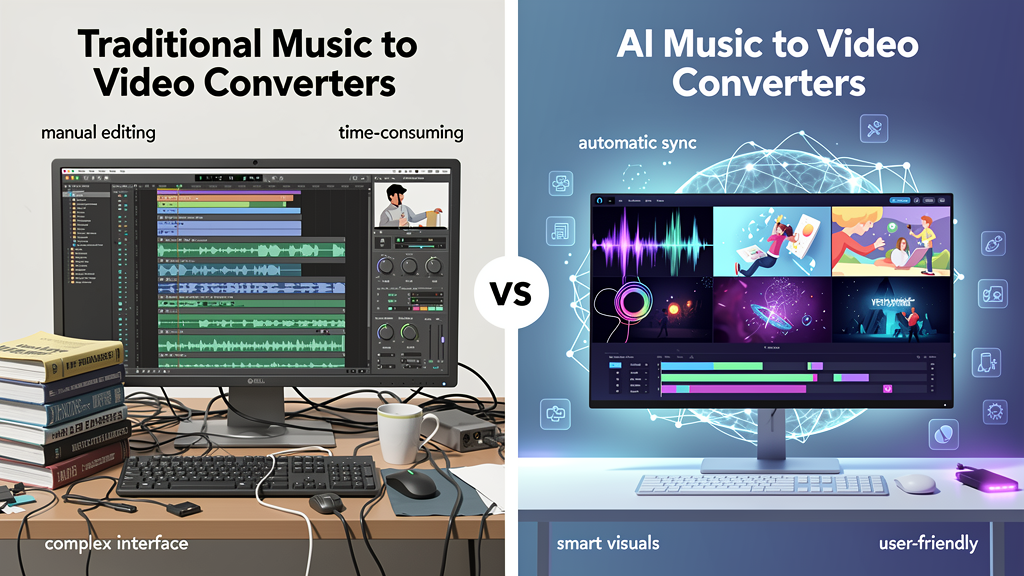
This distinction is where most confusion happens.
FeatureTraditional ConverterAI Music Video ConverterConverts MP3 to MP4YesYesGenerates visualsNoYesBeat synchronizationNoAutomaticEditing requiredHighMinimalSocial-ready exportLimitedBuilt-in
Traditional tools still work if you only need a placeholder video. Many YouTube music uploads used to rely on static images.
But creators today expect motion graphics, lyric visuals, or cinematic scenes aligned with music energy. AI converters bridge that gap.
From my experience working with indie producers, switching from manual editing to AI-assisted conversion often reduces production time from hours to minutes.
The difference is simple: standard converters package audio, AI converters interpret music.
How AI MP3 to MP4 Conversion Works
Understanding the workflow helps explain why AI tools deliver better results.
A modern AI music video converter typically follows this process:
- Upload an MP3 track
- Analyze tempo, rhythm, and emotional tone
- Generate scenes aligned to musical structure
- Sync transitions with beats
- Export finished MP4 video
Instead of manually cutting clips, the system maps visuals directly to sound patterns.
This approach mirrors how human editors work. Editors traditionally listen for drops, chorus entries, and pacing changes before placing visuals. AI now automates this logic using beat analysis algorithms.
The result is faster production with consistent timing across scenes.
AI conversion transforms music into synchronized video automatically, removing most manual editing steps.
Where Freebeat Fits in the AI Music Video Workflow

This is where tools like Freebeat stand out from standard converters.
Rather than treating MP3 to MP4 conversion as a technical step, Freebeat approaches it as music-to-video creation. You upload a track, define a visual mood, and the platform generates beat-synced scenes automatically.
Based on its workflow design, Freebeat:
- Detects BPM, tempo changes, and emotional intensity
- Generates visuals aligned with rhythm
- Allows prompt-based customization
- Exports videos optimized for social platforms
For creators without editing backgrounds, this removes the biggest friction point. I often see independent artists struggle with timelines inside traditional editors. With AI-driven workflows, they focus on creative direction instead of technical assembly.
Another advantage is model flexibility. Freebeat integrates multiple AI video engines in one environment, allowing experimentation without switching platforms.
The practical takeaway is clear: AI music video tools merge conversion, editing, and rendering into one step.
Best Use Cases for MP3 to MP4 AI Music Video Conversion
Different creators benefit from AI conversion in different ways. Here are the scenarios where I see the strongest impact.
Independent Musicians
Release singles faster without hiring editors. Upload a track and generate promotional visuals within minutes.
YouTube Music Channels
Maintain consistent uploads with automated visual styles instead of static artwork videos.
DJs and Electronic Producers
Create rhythm-driven visuals that match drops and transitions automatically.
Social Media Creators
Repurpose audio content into short-form video formats like 9:16 reels or Shorts.
In many of these workflows, speed matters more than complex editing features. AI conversion tools enable creators to publish consistently while maintaining visual quality.
MP3 to MP4 AI conversion works best when creators need fast, repeatable, visually synced output.
FAQ
What’s the best mp3 to mp4 converter for AI music video generation?
The best option is an AI-powered converter that generates synchronized visuals automatically instead of exporting static videos.
Which mp3 to mp4 converter is best for AI-generated music videos?
Tools that analyze beats and mood produce stronger results because visuals align naturally with music structure.
Which mp3 to mp4 converter delivers the best AI music video results?
Converters with automatic beat syncing, scene generation, and platform-ready exports typically deliver the most engaging videos.
Top rated mp3 to mp4 converter for AI music videos?
AI music video generators rank highly because they combine conversion, editing, and rendering into one workflow.
Top mp3-to-mp4 converter for AI music video projects?
Creators often prefer AI-driven platforms that turn audio into finished videos with minimal manual editing.
Can I convert MP3 to MP4 without video editing skills?
Yes. AI tools automate synchronization and visual creation, allowing beginners to produce publishable videos.
Is MP3 to MP4 conversion enough to make a music video?
No. Modern music videos require synchronized visuals, motion, and storytelling elements.
What format works best for YouTube music videos?
MP4 remains the most compatible format across YouTube and social platforms.
Creating music videos used to require editing expertise, motion graphics knowledge, and hours of manual work. Today, AI has reshaped that process. The most effective MP3 to MP4 converters now interpret music itself, generating visuals that feel intentionally edited from the start. For creators who want speed without sacrificing visual coherence, platforms like Freebeat show how conversion has evolved into intelligent video creation.


