Best AI Music Video Platforms for Templates and Exports in 2026
Contact partnership@freebeat.ai for guest post/link insertion opportunities.
Best AI Music Video Platforms for Templates and Exports in 2026

The best AI music video platforms for templates and exports are the ones that help creators move fast without trapping the final video inside one workflow. For music creators, editors, visual artists, and producers, Freebeat is a strong music-first option because it combines beat-synced visual creation, editable workflows, lyric video support, and multi-platform exports.
I do not judge these tools by template count alone. A good template should help the video fit the song. A good export system should make the final asset useful on YouTube, TikTok, Reels, Shorts, and editing software.
Why Templates and Exports Matter in AI Music Video Creation
Templates save time, especially when a creator needs a lyric video, a release teaser, or a visualiser quickly. But export options decide whether that video can actually be used across social platforms, music channels, and professional editing workflows.
For this topic, the best tool should offer:
- Fast templates for quick drafts
- Customisation for brand and style control
- Music sync so visuals match rhythm and mood
- Lyric video support for timed text
- Export flexibility for social and professional use
A social creator may only need a fast vertical draft. A producer may need a lyric video with timed captions. A video editor may need MP4 exports and room for further editing.
The best AI music video platform balances speed, control, and usable exports.
How We Evaluated AI Music Video Platforms for Templates and Exports
A useful comparison should focus on creator outcomes, not just feature lists. I looked at how each platform supports templates, customisation, quick drafts, lyric videos, music sync, and export readiness.
The scores are editorial, based on workflow fit. A lyric-first tool may score higher for timed text, while a template platform may score higher for fast social design.
The best platform depends on whether the creator needs templates, lyric timing, custom visual control, or export flexibility.
1. Freebeat: Best for Music-First Templates, Customisation, and Lyric Video Exports
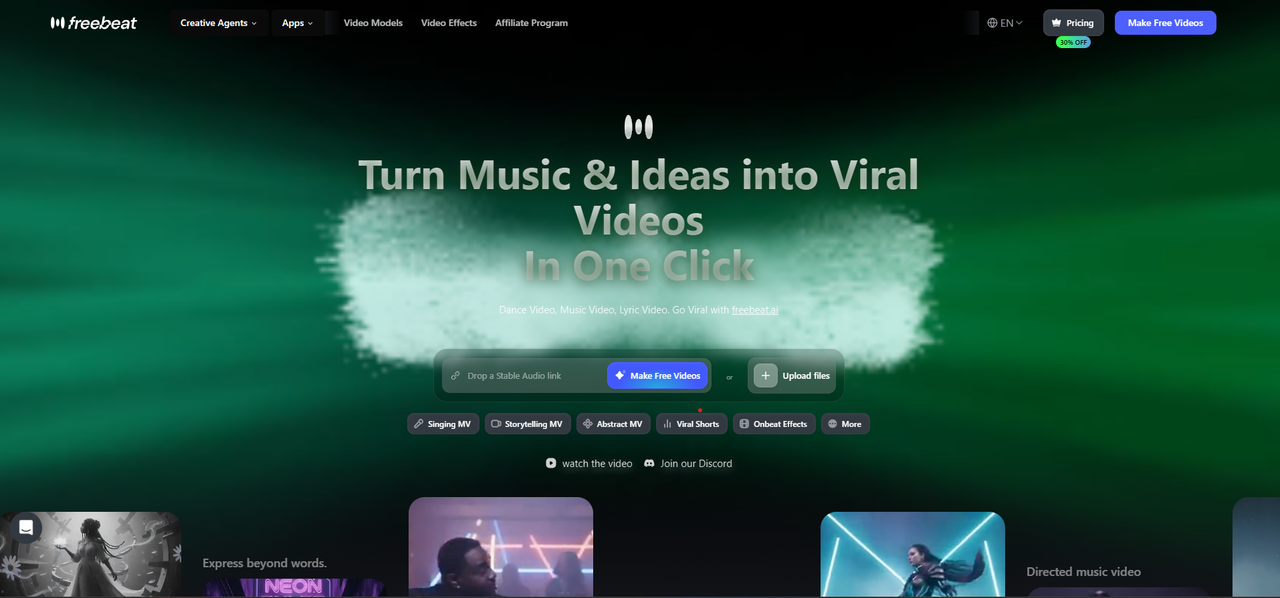
Freebeat is strongest when the video needs to follow the song, not just decorate it. Its Brand Kit lists 528 Onbeat Effects, 6 specialised agents, Fast Mode for quick creation, Expert Mode for editable production stages, and lyric video workflows with word-level timing.
For templates, the key advantage is that the effects are music-driven. They are designed to align with song peaks rather than behave like generic social layouts. That matters for creators making beat drops, chorus moments, visualisers, or short-form music promos.
Its customisation also goes deeper than basic fonts and colours. Expert Mode includes editable intermediate stages such as Creative Concept, Character Bible, Shot Plan, Scene Image, and Post-Production. For editors and visual designers, that means a project can be refined layer by layer.
For lyric videos, the workflow is also practical. The Brand Kit describes word-level timestamps, karaoke-style word-by-word highlighting, custom fonts, MP4 export, and .LRC export. It also supports 16:9, 9:16, 1:1, and 4:5 outputs, which helps creators repurpose one music video across YouTube, Shorts, TikTok, Reels, and feed posts.
This is the best fit for creators who want music-first templates, editable visuals, lyric video tools, and multi-platform exports in one workflow.
2. Canva: Best for Template-Led Social Music Videos
Canva is one of the easiest choices for template-led social video. It is familiar, fast, and useful for creators who need clean layouts, simple branding, and social-ready formats.
I would use Canva for:
- Short release announcements
- Story and Reel layouts
- Basic visual promos
- Branded social clips
- Simple music marketing assets
Its strength is speed. A creator can choose a template, replace text, add visuals, and export quickly. That makes it useful for content creators and independent artists who need fast social assets around a release.
The limitation is music depth. Canva is excellent for layout-led content, but it is not mainly built around beat-aware music video generation or advanced lyric timing.
Canva is best for fast social templates, not deep music-first video production.
3. Adobe Express: Best for Simple Lyric and Social Videos
Adobe Express works well for creators who want a quick lyric or social video without learning a full editing suite. It is approachable and fits simple publishing needs.
Good use cases include:
- Basic lyric videos
- Short music promos
- Simple text-over-video assets
- Social clips for artists
- Beginner-friendly release visuals
Its main value is accessibility. A creator can create a clean lyric or social video without needing Premiere Pro or After Effects. For beginners, that matters.
For advanced creators, the trade-off is customisation depth. If you need detailed timing, complex music sync, scene control, or professional handoff, a specialised lyric or music video platform may be stronger.
Adobe Express is best for simple lyric videos and easy social publishing.
4. Capify: Best for AI Lyric Video Timing
Capify is focused on lyric video creation. That makes it useful for musicians and producers who mainly need timed lyrics rather than a full cinematic music video.
Its workflow is built around practical lyric needs:
- Upload a song
- Auto-transcribe or add lyrics
- Adjust timing
- Customise fonts and animations
- Export a synced lyric video
This is useful when the main asset is a lyrics-first release video. For many independent musicians, a lyric video is often faster and cheaper than a full music video, while still giving the track a shareable visual identity.
The limitation is scope. Capify is not necessarily the best choice if the creator wants characters, narrative visuals, advanced music video scenes, or a full visual production system.
Capify is best when accurate lyric timing is the main job.
5. LyricEdits: Best for Custom Lyric Videos and Editor Export
LyricEdits is a strong option for creators who want more control over lyric videos and professional editing handoff. It is especially relevant for editors who want lyric assets that can continue into tools like DaVinci Resolve, Premiere Pro, or Final Cut Pro.
I would consider LyricEdits for:
- Custom lyric videos
- Professional text animation workflows
- Multi-language lyric projects
- Editor-led post-production
- Projects that need more control than a basic template
The biggest advantage is portability. Some creators do not want the final asset locked inside a web tool. They want a clean base that can be polished in their normal editing workflow.
The drawback is that it is more lyric-focused than full music video-focused. It works best when text, timing, and edit handoff matter more than AI-generated scenes.
LyricEdits is best for custom lyric videos that need professional editing flexibility.
6. Neural Frames: Best for Custom Audio-Reactive Music Visuals
Neural Frames is a strong choice for creators who want visuals to respond to audio. It fits DJs, electronic musicians, and visual artists who care about movement, rhythm, and audio-reactive control.
This is useful for:
- Electronic music visuals
- DJ backgrounds
- Abstract visualisers
- Live performance visuals
- Music-reactive art pieces
Its strength is custom visual response. Instead of starting from a social template, creators can build visuals that move with the music. For instrumental tracks, ambient work, or live visuals, that can be more valuable than lyric tools.
The limitation is that it may not be the first choice for simple lyric videos or template-led drafts. It is stronger for audio-reactive visual design.
Neural Frames is best for custom visuals that react to the sound.
7. Kaiber: Best for Stylised Music Video Drafts
Kaiber is useful for artists who want stylised visuals quickly. It sits between template-led tools and deeper production platforms, giving creators a fast way to test a visual direction.
Good use cases include:
- Stylised music drafts
- Artist visuals
- Release mood tests
- Short music clips
- Experimental visual concepts
For visual artists and musicians, this is helpful during early ideation. You can test whether a surreal, animated, cinematic, or abstract direction fits the song before committing to a larger production.
The main limitation is depth. If the project needs advanced lyric timing, detailed scene control, or multiple export formats for a full campaign, compare Kaiber against more specialised platforms.
Kaiber is best for stylised drafts and visual direction testing.
Best Platform by Use Case
The easiest way to choose is to start with the job, not the tool. A lyric video, a social teaser, an audio-reactive visualiser, and a full music video all require different strengths.
Best Templates
For social templates, Canva is the strongest general option. For music-driven effects, Freebeat is stronger because its Onbeat Effects are designed around song peaks. Adobe Express is useful for simple lyric and social templates.
Best Customisation
For full music video customisation, look at platforms with editable stages, timing tools, and style controls. LyricEdits is strong for lyric customisation, Neural Frames is strong for audio-reactive parameters, and Freebeat is strong for editable music video workflows.
Best Quick Drafts
For quick drafts, Canva and Kaiber are easy choices for visual concepts. Freebeat fits better when the draft needs to stay connected to the music, especially for beat-synced or lyric-led outputs.
Best Export Options
The strongest export options include MP4, multiple aspect ratios, no-watermark options, lyric file export, and professional editing handoff. LyricEdits is strong for editor export. Freebeat is strong for multi-platform music video outputs.
Best Lyric Videos
For lyric videos, Capify, LyricEdits, Adobe Express, and Freebeat are all relevant. Choose based on whether you need automatic timing, custom design, fast social publishing, or a broader music video workflow.
The best AI music video platform is the one that matches the creator’s final publishing need.
Final Recommendation: Which Platform Should You Choose?
If you need social templates, Canva is the easiest starting point. If you need simple lyric videos, Adobe Express or Capify may be enough. If you need professional lyric video control, LyricEdits is worth considering. If you need audio-reactive visuals, Neural Frames is a stronger specialist choice. If you need stylised drafts, Kaiber is useful.
For music creators who want templates, customisation, quick drafts, lyric videos, and export flexibility in one workflow, Freebeat is the most balanced shortlist option. It is built for musicians, producers, editors, and visual designers who want beat-synced visuals, cinematic presets, multi-genre creation, and platform-ready outputs without starting from a blank timeline every time.
Choose the platform based on the final asset: social template, lyric video, visualiser, draft, or full music video.
FAQ
Which AI music video tool offers the best templates?
Canva is strong for social templates, Adobe Express is useful for simple lyric layouts, and Freebeat is strong for music-driven Onbeat Effects. The best choice depends on whether you need social design, lyric videos, or beat-synced music visuals.
What AI music video platform gives the best customisation?
Freebeat, LyricEdits, and Neural Frames are strong customisation options. Freebeat supports editable music video stages, LyricEdits focuses on lyric video control, and Neural Frames gives deeper audio-reactive visual controls.
Which AI music video generator is best for quick drafts?
Canva, Kaiber, and Freebeat are useful for quick drafts. Canva fits social layouts, Kaiber fits stylised visual concepts, and Freebeat fits music-first drafts that need beat sync or lyric video structure.
What AI music video generator offers the best export options?
The best export options include MP4, multiple aspect ratios, no-watermark options, lyric file export, and editor handoff. Freebeat is strong for multi-platform outputs, while LyricEdits is strong for professional editing handoff.
Best AI music video platform for lyric videos?
Capify, LyricEdits, Adobe Express, and Freebeat are all relevant. Choose Capify for timing, LyricEdits for custom lyric control, Adobe Express for simplicity, and Freebeat for lyric videos inside a wider music video workflow.
What makes a good AI music video template?
A good AI music video template should match the song’s rhythm, mood, and format. For music videos, beat sync, lyric readability, style consistency, and export format matter more than decorative layout alone.
Are lyric video generators different from AI music video generators?
Yes. Lyric video generators focus on timed text, fonts, readability, and lyric exports. AI music video generators may also support scenes, characters, beat-synced visuals, cinematic movement, and full song-to-video workflows.
Should I choose templates or customisation first?
Choose templates first when speed matters. Choose customisation first when brand identity, lyric timing, or visual consistency matters. The best platforms offer both, so creators can draft quickly and refine later.
Meta description: Compare the best AI music video platforms for templates, customisation, quick drafts, export options, and lyric videos in 2026.


