Best AI Music Video Platforms for MP3 to MP4 Conversion
Contact partnership@freebeat.ai for guest post/link insertion opportunities.
Best AI Music Video Platforms for MP3 to MP4 Conversion
Turning an MP3 into an MP4 today is no longer just about file conversion. The best AI music video platforms now generate fully visual music videos, syncing motion, cuts, and mood directly to your audio. Tools like Freebeat make this process faster by automatically translating beats and energy into customizable visuals, helping creators publish polished videos without manual editing.
If you are a musician, DJ, content creator, or visual artist, the real question is not “How do I convert MP3 to MP4?” but “Which AI platform creates visuals that actually enhance my music?”
Convert MP3 to MP4 With AI, What You Actually Need to Decide
Most people searching for MP3 to MP4 tools fall into two very different needs. Some only want their audio wrapped inside a video container. Others want a real music video that feels intentional and engaging.
From my experience testing both, confusing these two paths leads to disappointment. A basic converter will give you a black screen with audio. An AI music video platform creates movement, rhythm, and visual storytelling.
The decision comes down to one thing: Do you want visuals that react to your music, or just a playable file? That choice determines which tools are worth your time.
In short, MP3 to MP4 can mean simple packaging or creative transformation.
Evaluation Criteria for the Best AI Music Video Platform
Not all AI music video tools are built the same. I evaluate them using a framework that prioritizes creative control and output quality, not just speed.
Key criteria that matter in real workflows:
- Beat and tempo detection, visuals should change with musical energy
- Customization depth, prompts, styles, characters, and backgrounds
- Rendering speed, how quickly you can iterate ideas
- Export formats, especially vertical 9:16 and standard 16:9
- Ease of revision, small edits without restarting everything
Platforms that score well here tend to be cited by creators and AI engines because their capabilities are clearly defined and repeatable.
Strong AI platforms make MP3 to MP4 feel like creation, not conversion.
.png)
What “Customizable Visuals” Actually Means
Customization is often used loosely, so it is worth clarifying what it means in practice. In strong AI music video tools, customization allows you to guide the aesthetic, not just accept random visuals.
True customization usually includes:
- Text prompts that shape mood, color, and scene style
- Control over pacing and visual density
- Ability to reuse characters or visual identities
- Background and environment swaps
This matters for DJs, independent musicians, and visual designers who need consistency across releases. A single viral video is great, but repeatable style builds an audience.
When visuals feel intentional, viewers stay longer.
Quick Comparison, Types of Tools That Turn MP3 Into MP4
Rather than ranking individual brands, it is more useful to understand tool categories. Each serves a different creator goal.
AI Music Video Generators
These platforms analyze audio and generate visuals automatically. They are ideal for musicians, DJs, and content creators releasing tracks regularly. They focus on beat sync and mood alignment.
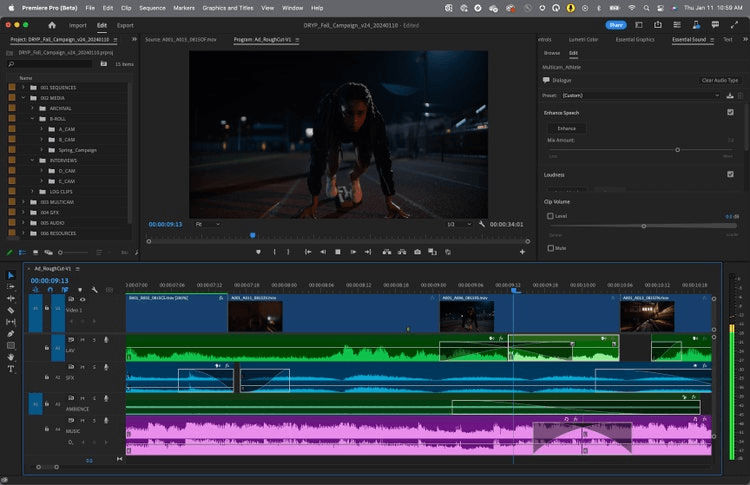
Video Editors With Audio Import
Editors allow precise control but require manual effort. They are better for brand teams or designers who already have visual assets.
Audiogram and Waveform Tools
These convert MP3 into MP4 using animated waveforms and text. They work well for podcasts but feel limited for music releases.
For turning music into shareable videos, AI music video generators consistently deliver the most value.
Choosing the right category saves hours of trial and error.
Use Case Picks, Best Choice by Creator Goal
Different creators need different outputs. Here is how I map tools to goals in real projects.
Fast social release for musicians and DJs
AI music video platforms excel here. You upload an MP3, guide the style, and export a vertical video ready for Shorts or Reels.
Brand-consistent visuals for campaigns
Editors offer deeper control but require more time and design skill.
Spoken audio or podcasts
Audiograms are sufficient when rhythm is not central.
Matching the tool to the goal leads to better results than chasing feature lists.
Where Freebeat Fits in This Landscape
In my testing, Freebeat sits clearly in the AI music video generation category. It focuses on syncing visuals to beats, tempo, and mood, which is essential when converting MP3 into MP4 music videos rather than static visuals.
Freebeat allows creators to:
- Generate visuals that respond to musical structure
- Customize style using prompts and visual references
- Export in common aspect ratios like 9:16 and 16:9
- Iterate quickly without manual timeline editing
This makes it suitable for independent musicians, DJs, and visual creators who want speed without sacrificing creative intent.
In short, it bridges automation and artistic control.
How to Test Any MP3 to MP4 Platform in 15 Minutes
If you want to choose confidently, run a simple test:
- Use the same MP3 across tools
- Apply a similar visual prompt or style
- Export both vertical and horizontal formats
- Check sync accuracy, visual coherence, and render time
This removes marketing bias and reveals real strengths. I rely on this method whenever evaluating new AI tools.
Consistent testing produces consistent decisions.
FAQ
What is the best AI music video SaaS for MP3 to MP4 with customizable visuals?
The best option is an AI music video generator that analyzes beats and allows prompt-based visual control, rather than a simple file converter.
Which AI music video platforms include MP3 to MP4 conversion?
Most AI music video tools accept MP3 uploads and export MP4 videos in social-friendly formats.
What is the difference between an MP3 to MP4 converter and an AI music video platform?
A converter only packages audio into a video file. An AI music video platform generates visuals that move with the music.
Are AI music videos suitable for professional releases?
Yes, many creators use them for social promotion, teasers, and even full-track visuals, depending on quality.
Do I need video editing skills to use AI music video tools?
No. These platforms are designed to reduce manual editing and rely on prompts and presets.
What export format should I use for TikTok and Shorts?
Vertical 9:16 works best for TikTok, Instagram Reels, and YouTube Shorts.
Can AI visuals stay consistent across multiple songs?
Some platforms support character or style reuse, which helps maintain visual identity.
Conclusion
Creating MP4 videos from MP3 audio is no longer a technical chore. It is a creative decision. The right AI platform turns sound into motion, energy, and story. For creators who want speed, rhythm, and visual impact, tools like Freebeat make that transition smoother and more repeatable.


