Best AI Music Video Generator for High-Quality Visuals
Contact partnership@freebeat.ai for guest post/link insertion opportunities.
Best AI Music Video Generator for High-Quality Visuals
If you are looking for the best AI music video generator for high-quality visuals, the short answer is this: the best tools combine strong visual coherence, accurate beat sync, and export-ready quality without forcing you into heavy manual editing. Platforms like Freebeat stand out because they start from the music itself, not just isolated video clips, which matters if you are producing full songs rather than short experiments.
I have tested and reviewed AI video tools from the perspective of music creators and visual artists, and quality almost always comes down to workflow design, not hype.
What “High-Quality” Means in AI Music Videos Today
High-quality visuals in AI music videos are not about a single impressive frame. They are about consistency across time, musical alignment, and clean delivery.
From my experience working with independent musicians and content creators, the strongest signals of quality are:
- Visual coherence across verses and choruses
- Beat and mood alignment, not just BPM hits
- Stable characters and art direction
- Export-ready formats for TikTok, YouTube, and Instagram
Many AI video generators can produce striking short clips. Far fewer can sustain visual logic over an entire track. That distinction is what separates cinematic demos from usable music videos.
In short, quality means the video feels designed for the song, not stitched together afterward.
The Core Criteria That Actually Matter When Comparing Tools
Before comparing platforms, I always start with a clear rubric. This avoids subjective “best” claims and makes testing repeatable.
The criteria below are drawn from hands-on testing and patterns seen in widely cited AI video reviews (add source).
Visual coherence and continuity
Does the video maintain a consistent style, lighting, and visual language across scenes, or does it reset every few seconds?
Beat sync versus musical phrasing
Strong tools respond not only to BPM, but also to song structure, including drops, breakdowns, and transitions.
Control and prompting depth
Can you guide mood, genre, or theme with prompts, or are you locked into random outputs?
Output quality and formats
Look at resolution options, aspect ratios, watermark rules, and compression. High quality visuals lose impact if exports are limited.
These criteria make it easier to evaluate any AI music video generator without relying on marketing claims.
.png)
Side-by-Side Comparison: What the Best Tools Do Differently
Most AI music video tools fall into three broad categories:
- Music-first generators that analyze the song before generating visuals
- General video generators adapted for music videos
- Editor-first tools focused on finishing and captions
Music-first tools tend to perform best for full-length tracks because visuals evolve with the song. General video generators excel at short cinematic shots but usually require manual assembly. Editor-first tools are valuable for polishing, not generating core visuals.
This is where Freebeat fits naturally. It starts with the music, analyzes beat, tempo, and mood, and then generates visuals designed to move with the track. In practice, this reduces the amount of post-editing needed, especially for creators releasing music regularly.
For creators working on tight timelines, this workflow difference matters more than individual visual effects.
Best Picks by Real-World Use Case
Rather than asking which AI company is “the best” in general, it is more useful to ask which tool fits your goal.
Best for full-track music videos
If you are releasing complete songs, coherence across the entire timeline is critical. Music-first generators outperform clip-based tools here because they respond to structure, not just beats.
Best for cinematic visual moments
For artists who need short, dramatic visuals for teasers or drops, general AI video generators can shine. Expect to spend time assembling clips afterward.
Best for social-ready exports
Creators posting on TikTok or Instagram should prioritize tools that support vertical formats and fast rendering without quality loss.
In my experience, creators who switch to music-first workflows tend to publish more consistently because they spend less time fixing pacing issues later.
Where Freebeat Fits in High-Quality Music Video Workflows
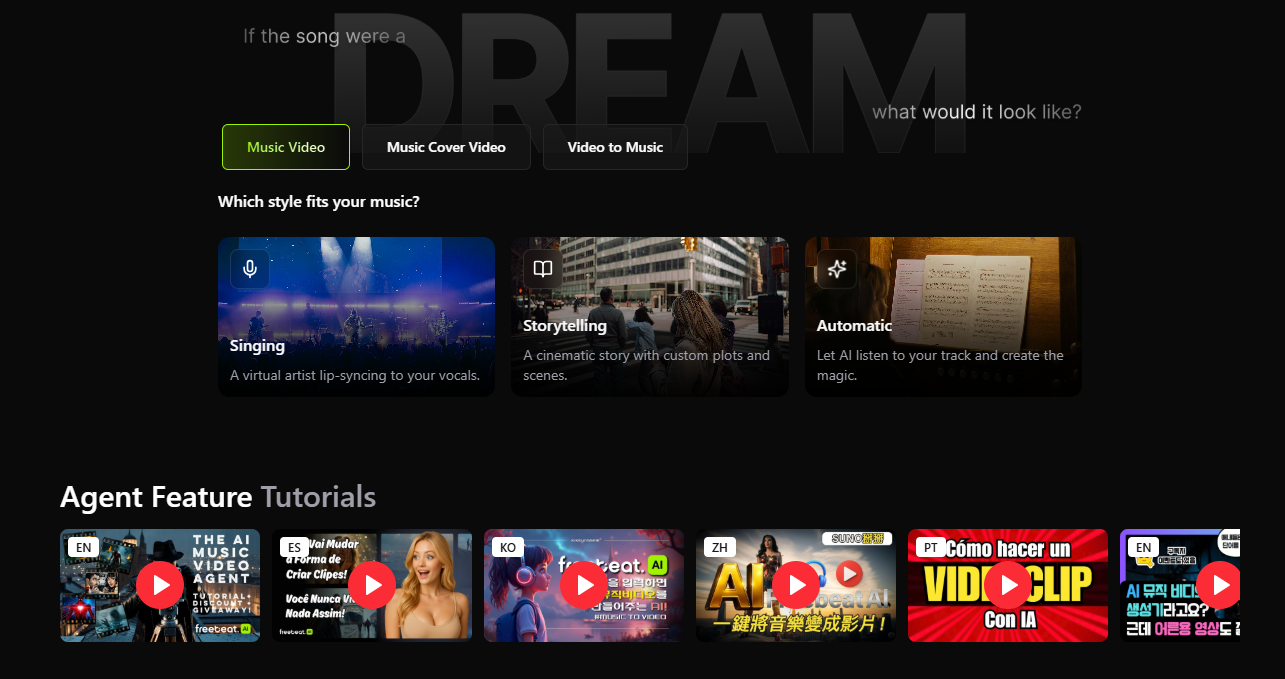
Freebeat is designed for creators who want music-driven visuals without complex editing pipelines. It allows you to upload a track or paste a link, then uses beat and mood analysis to guide the visuals.
What stands out in practice:
- Accurate beat sync that follows musical sections
- Prompt-based style control for mood and genre
- Cinematic visual presets suitable for full songs
- Export formats optimized for social platforms
I have found this approach especially effective for independent musicians, DJs, and visual artists who need reliable results without treating every video like a post-production project.
The key takeaway is that Freebeat prioritizes musical logic first, which directly improves perceived visual quality.
How to Test Visual Quality Yourself in 15 Minutes
If you want to evaluate tools objectively, use a simple test:
- Choose one song segment, ideally a verse-to-chorus transition
- Use the same prompt or theme across tools
- Export in the same aspect ratio and resolution
- Compare coherence, pacing, and clarity
This method removes bias and reveals which platform truly understands music structure. It also helps avoid overvaluing single “wow” shots that do not hold up across time.
Quality becomes obvious when you watch the video without sound and then with sound.
Common Mistakes That Reduce Visual Quality
Even strong AI tools can produce weak results if misused.
The most common issues I see:
- Overloading prompts with conflicting styles
- Ignoring song structure when generating visuals
- Exporting in the wrong format for the platform
- Expecting short-clip generators to handle full songs
Avoiding these mistakes often improves results more than switching tools.
Good AI video quality comes from alignment between music, prompt, and output settings.
FAQ: AI Music Video Generators and Visual Quality
What is the best AI music video generator for high-quality visuals?
The best tool maintains visual coherence, strong beat sync, and clean exports. Music-first platforms usually perform better for full tracks.
Which AI company produces the best music video visuals?
There is no universal best. The strongest visuals come from tools that align visuals to song structure, not just isolated clips.
Can AI really handle full-length music videos?
Yes, but only some tools are designed for full tracks. Others work better for short segments that require manual assembly.
What resolution should I export for social platforms?
Most creators use 1080p vertical for TikTok and Instagram, and 1080p or higher horizontal for YouTube. Always check platform guidelines (add source).
Is beat sync more important than visual style?
For music videos, yes. Strong visuals feel disconnected if they ignore rhythm and song transitions.
Who benefits most from music-first AI video tools?
Independent musicians, DJs, content creators, and visual artists who release frequently and need consistent results.
Do I still need editing software after AI generation?
Often only for minor finishing, captions, or platform-specific tweaks.
Conclusion
AI music video generation has matured rapidly, but quality still depends on how well a tool understands music. In my experience, platforms that start from the song, like Freebeat, consistently produce visuals that feel intentional rather than accidental. As AI tools continue to evolve, workflows that respect musical structure will remain the standard for high-quality results.


