Contact partnership@freebeat.ai for guest post/link insertion opportunities.
You’ve probably seen “Nano Banana” pop up in posts that show shockingly clean photo edits—swap outfits, change backgrounds, keep the same face—without the usual “AI drift.” So what is Nano Banana, really, and why is everyone talking about it?
In plain terms, Nano Banana is a popular nickname/codename for Google’s Gemini 2.5 Flash Image model—an AI system focused on fast, iterative image generation and image editing with strong subject consistency across multiple changes. It went viral because it feels less like “one-and-done” text-to-image and more like a conversational editor you can steer.
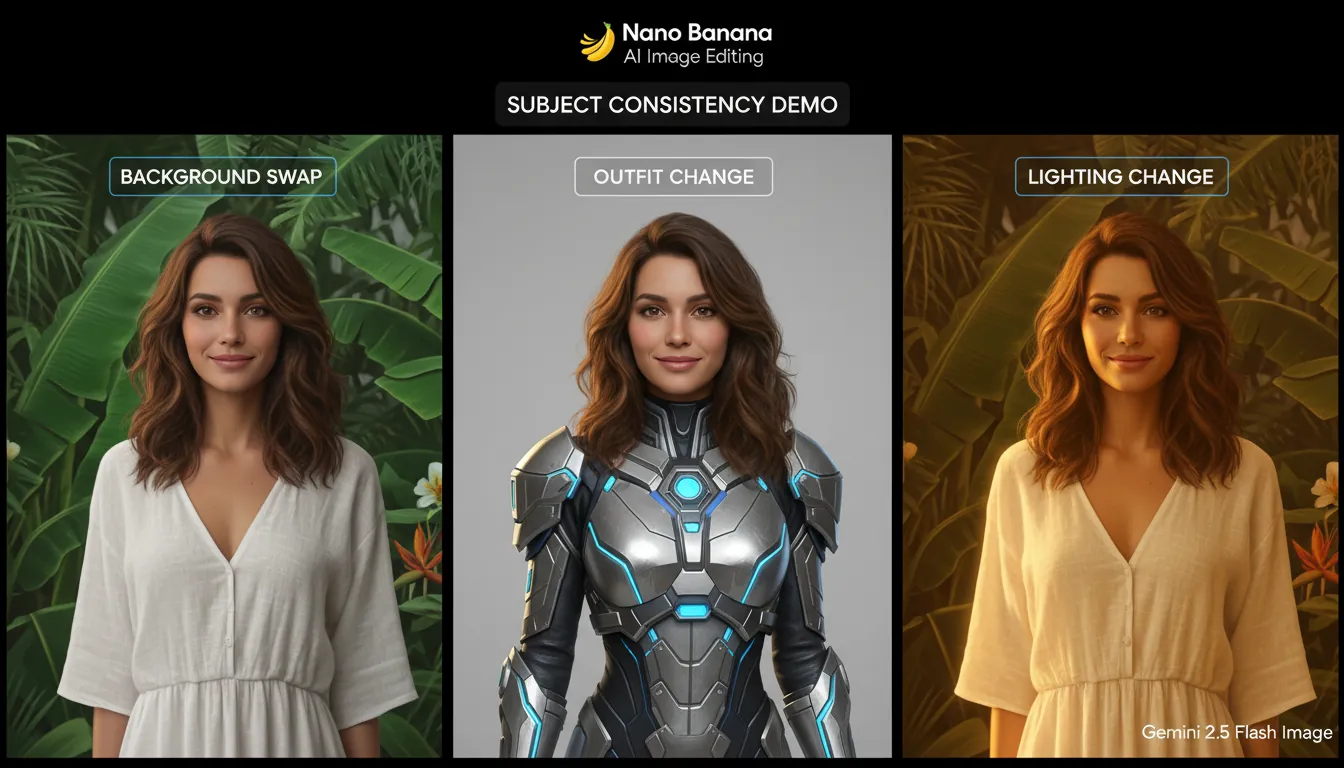
What is Nano Banana (and what it is not)
Nano Banana is most commonly used to refer to an update/codename for Google’s Gemini 2.5 Flash Image capabilities: generate images from prompts, edit existing images, and refine results over multiple turns while keeping key details stable. In my own testing of image-editing models, this “multi-turn stability” is the difference between a fun demo and a tool you can actually use for campaigns, thumbnails, or iterative design.
It’s not a real banana cultivar, a science term, or a standardized consumer product category. You may see unrelated “Nano Banana” branding in marketplaces (supplements, colorways, random apps), but in tech conversations today, it overwhelmingly points to Google’s image model and its editing workflow.
Two quick identifiers you’re in the right context:
- People mention Gemini, Flash Image, or AI Studio / API access.
- The examples show precise edits (remove object, swap background, restyle) while the subject stays recognizable.
Authoritative context on the name’s origin and why Google embraced it is explained in Google’s own write-up: How Nano Banana got its name.
Why it’s called “Nano Banana” (the origin story)
The name is memorable because it’s basically anti-corporate branding: funny, sticky, and community-friendly. According to Google’s official story, the nickname came from a late-night decision and mashed-up nicknames—then the internet amplified it into a recognizable label for the model.
From a product positioning angle, the name also subtly signals two things:
- “Nano” implies efficiency and speed (small/optimized, not necessarily “largest model wins”).
- “Banana” is playful—and makes the tool easier to talk about and share.
For additional background on how the nickname gained traction in the community, see SentiSight’s explanation.
What Nano Banana does well (core capabilities)
Nano Banana is best understood as an image editing + generation model designed for multi-step creative workflows. Instead of regenerating a brand-new image each time, it’s built to preserve what you don’t want to change.
Key strengths you’ll see repeated in real use:
- Subject consistency: the same person/product stays recognizable across edits.
- Natural-language editing: “remove the sign,” “change shirt to red,” “make it sunset lighting.”
- Multi-image composition: combine elements from multiple images into one coherent scene.
- Speed-first iteration: quick cycles encourage exploration rather than perfection on the first prompt.
This lines up with how developers describe the model’s intent and limits (preview status, quotas, resolution constraints) in practical overviews like DigitalOcean’s: What is Nano Banana (Gemini 2.5 Flash Image)?.
Nano Banana vs. traditional text-to-image (and vs. Imagen)
A common misunderstanding is that Nano Banana is “just another text-to-image generator.” The practical difference is workflow: Nano Banana is often used like a conversational editor where you keep refining.
Here’s a clear comparison:
Feature
Nano Banana (Gemini 2.5 Flash Image)
Traditional text-to-image generators
Imagen (Google)
Best at
Iterative edits + consistency across turns
One-shot generation from prompts
High-quality, production-oriented image generation
Subject consistency across multiple edits
Strong (core selling point)
Often weak (identity drift)
Varies by workflow/tooling
Editing existing photos
Yes (natural-language edits)
Sometimes limited or indirect
Supported in some products; often used for high-fidelity outputs
Speed/iteration
Fast, “try many variations” friendly
Mixed
Often quality-first, can be slower/costlier
Typical use cases
Marketing variations, prototypes, remixing, compositing
Concept art, quick ideation
Brand visuals, sharp detail, typography-focused work
If you’re choosing within Google’s ecosystem, think of Nano Banana as flexible + fast editing and Imagen as high-fidelity, production-ready generation for certain tasks.
Why Nano Banana is a big deal (in practice)
The “big deal” isn’t that it can create images—many tools can. It’s that Nano Banana can change one thing without breaking everything else.
In day-to-day creative work, that means:
- You can iterate on a thumbnail or product shot without re-rolling the subject.
- You can localize or personalize visuals (colors, props, background) while keeping identity stable.
- You can do “what-if” exploration rapidly—angles, outfits, seasons, lighting, set dressing.
In my experience, this reduces the hidden cost of AI art: babysitting the model to get the same character back. Nano Banana’s consistency makes it feel closer to working with layered files than gambling on rerolls.
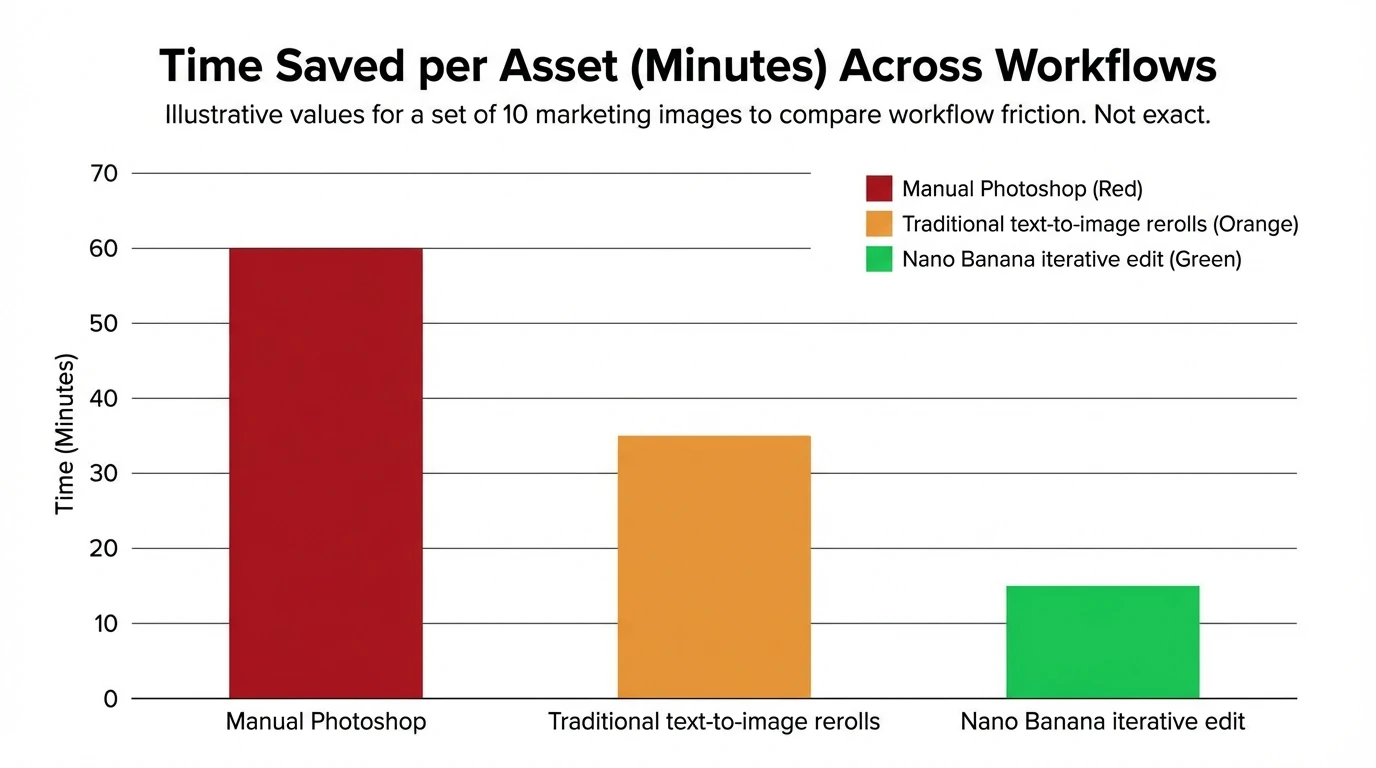
Examples: how people use Nano Banana (real-world patterns)
You’ll see common “families” of use cases repeated across creators and teams:
- Photo edits without design skills
- Remove objects, clean backgrounds, adjust lighting, change wardrobe.
- Marketing and e-commerce variations
- Same product, different settings: studio, lifestyle, seasonal, color variants.
- Character and identity continuity
- Keep a person or mascot consistent across multiple scenes.
- Content creator workflows
- Profile/headshot cleanup, thumbnail experiments, meme formats, editorial-style images.
- Design prototyping
- UI mock concepts, poster variants, composition exploration.
If you want a broad list of creative workflows people are experimenting with, see compilations like Scenario’s use cases for Nano-banana.
How to Make & Edit Images with Nano Banana for Beginners
Is Nano Banana free? (and what “free” usually means)
Many people ask if Nano Banana is free because they see it inside Google tools and demos. In most AI products, “free” means a free tier with daily quotas, then paid usage for heavier workloads.
Typical expectation-setting:
- Free tier: good for learning, light experimentation, and small batches.
- Paid usage: needed for production volumes, teams, or consistent throughput.
- Limits to watch: resolution caps, daily quotas, and preview-only availability in some regions/products.
For pricing mechanics and API-style access notes, the DigitalOcean overview is a useful starting point: Gemini 2.5 Flash Image (Nano Banana) pricing and quotas.
Is Nano Banana AI safe to use? (privacy and content controls)
Safety depends on where you access Nano Banana (official Google product vs. third-party “Nano Banana” branded sites) and what you upload (personal images, client assets, sensitive data).
Practical safety checklist I use for any AI image editor:
- Use official access paths when possible (Google apps/APIs) and avoid lookalike tools.
- Don’t upload sensitive or regulated content unless you have a clear data agreement.
- Review retention and deletion controls in the product’s privacy settings.
- Assume prompts + uploads may be logged for abuse prevention and system improvement (varies by policy).
Google also uses provenance approaches in parts of its ecosystem (for example, watermarking/identification techniques). When available, these can help with transparency for AI-generated imagery.
How do I use Nano Banana? (simple workflow)
If your goal is high-quality edits with consistency, treat it like a conversation, not a single prompt.
- Start with a strong base
- Upload a clear image or describe a specific subject and scene.
- Make one change at a time
- Example: “Keep the face identical. Change background to a neon city street at night.”
- Lock what must not change
- “Do not change hairstyle, facial features, or jacket logo.”
- Then iterate
- Adjust lighting, camera angle, props, and style in separate steps.
- Export variants
- Save versions for A/B testing (thumbnails, ads, social posts).
If outputs look “off,” shorten the prompt and reintroduce details gradually; multi-turn editing usually rewards clarity.
“Nano Banana Pro” and confusing naming in the wild
You’ll see “Nano Banana Pro” used in a few different ways online:
- Sometimes it refers to a more advanced tier in a third-party product using Gemini models.
- Sometimes it’s simply marketing language around “better prompts, higher limits, more features.”
- In community chatter, it can also be used loosely to mean “the best version” of the tool.
The reliable approach: focus on what model and workflow you’re actually using (Gemini Flash Image vs. other image models), and what your access method provides (quotas, resolution, commercial use terms).
What the “30% rule for AI” means (quick context)
The “30% rule” is a fuzzy internet shorthand, not a single universal law. People usually mean one of these:
- Creative contribution: you should add meaningful human direction/edits rather than publishing raw output.
- Risk management: change enough to avoid copying a specific source too closely.
- Disclosure/ethics: ensure you’re not misleading viewers, especially in ads or journalism.
For professional use, I recommend a clearer standard: document your inputs, keep rights to uploaded assets, and maintain a review step for brand safety and accuracy.
Where Freebeat AI fits (if you’re making music-driven content)
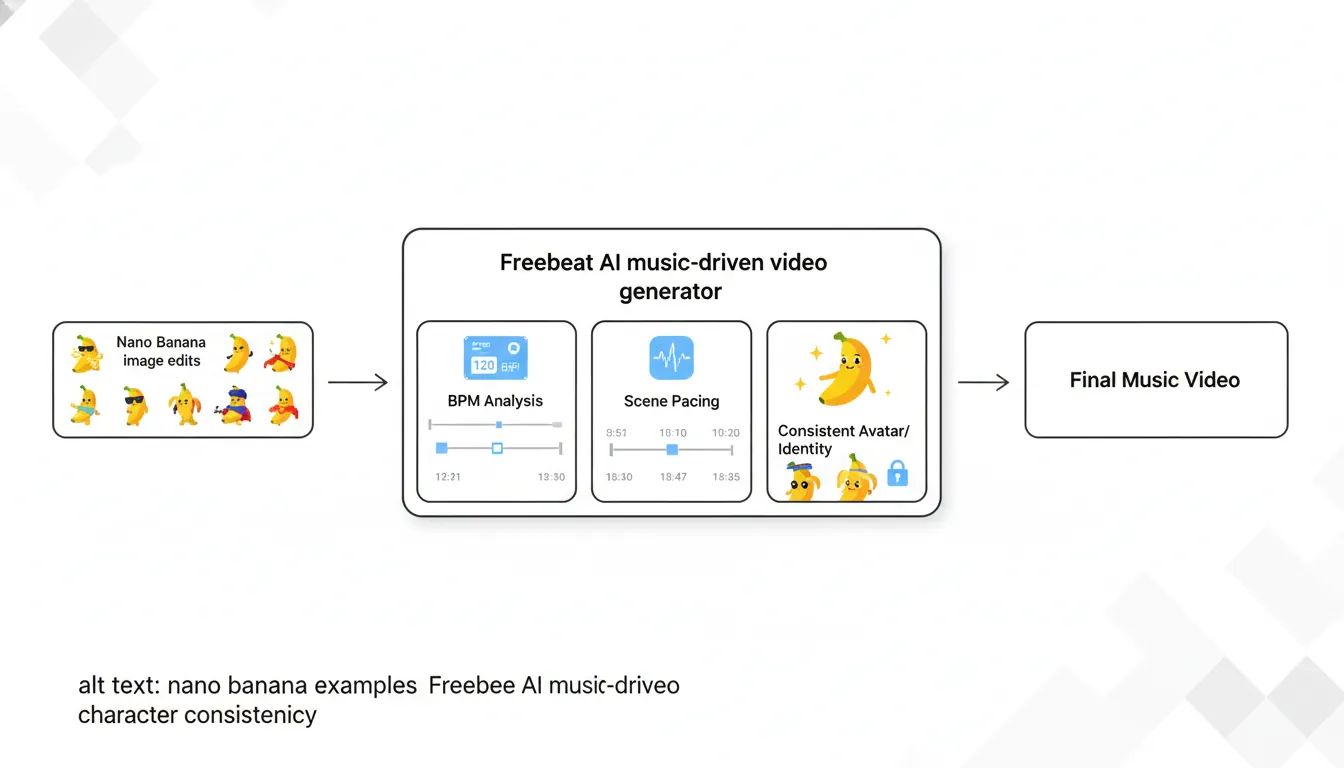
Nano Banana is about images—especially iterative edits and consistent subjects. If your goal is turning a track into a full music video that stays synced to BPM, drops, bars, and sections, you’ll want a tool designed for audio-reactive video structure.
That’s where Freebeat AI is purpose-built: it generates music-driven videos with pacing, transitions, and shot logic that follow the song’s energy. If you’re exploring visuals for a release campaign, a practical workflow is:
- Use Nano Banana-style editing to develop consistent characters/looks (artist persona, cover-art world).
- Use Freebeat AI to generate rhythm-synced video from the actual audio track.
Related reads (helpful context for creators building release assets):
FAQs about “what is nano banana”
1) What is the Nano Banana?
Nano Banana is a viral nickname/codename commonly associated with Google’s Gemini 2.5 Flash Image—an AI image generation and editing model known for fast, multi-turn edits and strong subject consistency.
2) Is Nano Banana available for free?
Often yes, via a free tier in supported tools (with daily quotas). For production use, expect paid usage or higher-tier plans depending on where you access it.
3) How do I use nano bananas?
In tech context, “use Nano Banana” means: generate or upload an image, then iterate with natural-language edits while explicitly telling the model what must remain unchanged (identity, logos, key objects).
4) Is Nano Banana AI safe to use?
Use official channels when possible, avoid uploading sensitive data, and review privacy/content policies. Safety depends on platform policies and your own data handling.
5) Why is Nano Banana a big deal?
Because it performs precise edits while keeping the subject consistent, reducing the “AI drift” that makes many image workflows frustrating.
6) Is Google Nano Banana free?
Usually there’s some free access (quota-limited) and then usage-based pricing for higher volume, depending on the product/API tier.
7) Which AI is fully free?
“Fully free” tools exist, but they typically trade off with limits (speed, quality, rights, availability) or rely on open-source models you run yourself. For professional work, cost predictability and rights clarity often matter more than “free.”
Conclusion: Nano Banana, explained in one sentence
If you’ve been wondering what is Nano Banana, it’s best thought of as Google’s fast, iterative AI image editing/generation capability (Gemini 2.5 Flash Image) that got famous because it can keep a person or product consistent while you change everything around it.
If you’re using Nano Banana to build visual identity for a release, consider pairing those consistent looks with music-driven video automation in Freebeat AI to turn the track into a platform-ready video without manual timeline editing. Share in the comments: what would you edit first—your cover art world, your artist persona, or your first batch of thumbnails?
📌 behind the magic how creators use freebeat ai to go viral


